<?xml version="1.0" encoding="utf-8"?>
<feed xmlns="http://www.w3.org/2005/Atom">
    <id>https://gladysassistant.com/blog/</id>
    <title>Gladys Assistant Blog</title>
    <updated>2026-10-25T00:00:00.000Z</updated>
    <generator>https://github.com/jpmonette/feed</generator>
    <link rel="alternate" href="https://gladysassistant.com/blog/"/>
    <subtitle>Gladys Assistant Blog</subtitle>
    <icon>https://gladysassistant.com/img/favicon/favicon.ico</icon>
    <rights>Copyright © 2026 Gladys Assistant.</rights>
    <entry>
        <title type="html"><![CDATA[Gladys Assistant 5.3: a real music player, and the AI and voice of your choice]]></title>
        <id>https://gladysassistant.com/blog/gladys-5-3-music-player-and-ai-providers/</id>
        <link href="https://gladysassistant.com/blog/gladys-5-3-music-player-and-ai-providers/"/>
        <updated>2026-10-25T00:00:00.000Z</updated>
        <summary type="html"><![CDATA[The music widget becomes a real player, with the artwork, the progress, the queue and a search, and a new scene action starts a playlist. The assistant can now run on the AI of your choice, a local model included, and speak with the voice of your choice. Also in this release: an integration catalog built for a thousand integrations, updates from the catalog card and a batch of fixes.]]></summary>
        <content type="html"><![CDATA[<p>Hey everyone!</p>
<p>New version of Gladys today, 5.3 🎉</p>
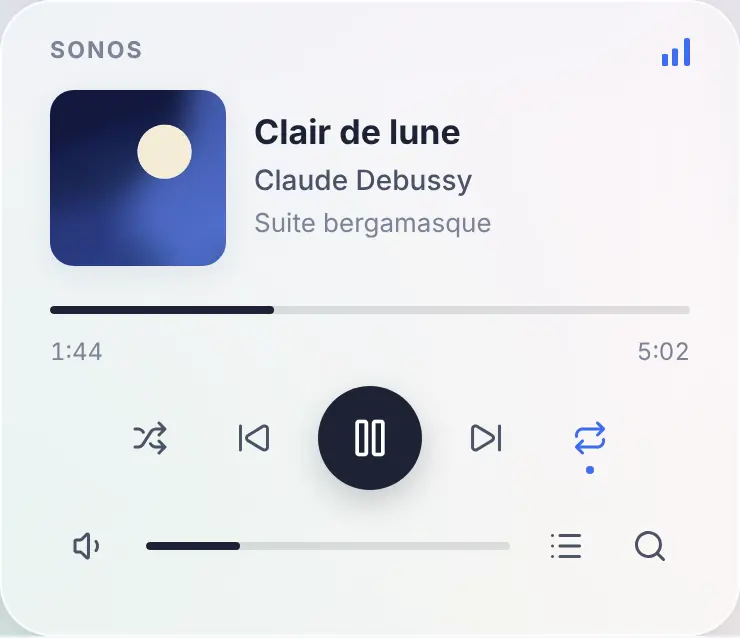
<p>Three things in this one. The music widget becomes <strong>a real player</strong>: the artwork, the title, the progress, the queue, and a search to start an album or a playlist. The assistant can now run on <strong>the AI of your choice</strong>, a model running at home included, instead of Gladys Plus. And the <strong>voice</strong> too: scene announcements can be spoken by a local text-to-speech engine.</p>
<p><img decoding="async" loading="lazy" alt="The new music widget: the artwork, the track, the progress and the controls" src="https://gladysassistant.com/assets/images/01-music-player-en-bc5f238e40ad72726dd43419bc6f94c9.webp" width="740" height="638" class="img_ev3q"></p>
<!-- -->
<h2 class="anchor anchorTargetStickyNavbar_Vzrq" id="a-real-music-player-on-the-dashboard">A real music player on the dashboard<a href="https://gladysassistant.com/blog/gladys-5-3-music-player-and-ai-providers/#a-real-music-player-on-the-dashboard" class="hash-link" aria-label="Direct link to A real music player on the dashboard" title="Direct link to A real music player on the dashboard" translate="no">​</a></h2>
<p>Until now, the music widget of Gladys was a remote control: the name of the speaker, play, pause, next, and a volume slider. Nothing told you what was playing.</p>
<p>In 5.3, it becomes the player you know from Spotify or Sonos apps: the <strong>artwork</strong> of the album, the <strong>title</strong>, the <strong>artist</strong> and the <strong>album</strong>, a <strong>progress bar</strong> you can drag to seek, shuffle, repeat (all or one), and the volume. A live radio shows a "Live" badge instead of the progress bar.</p>
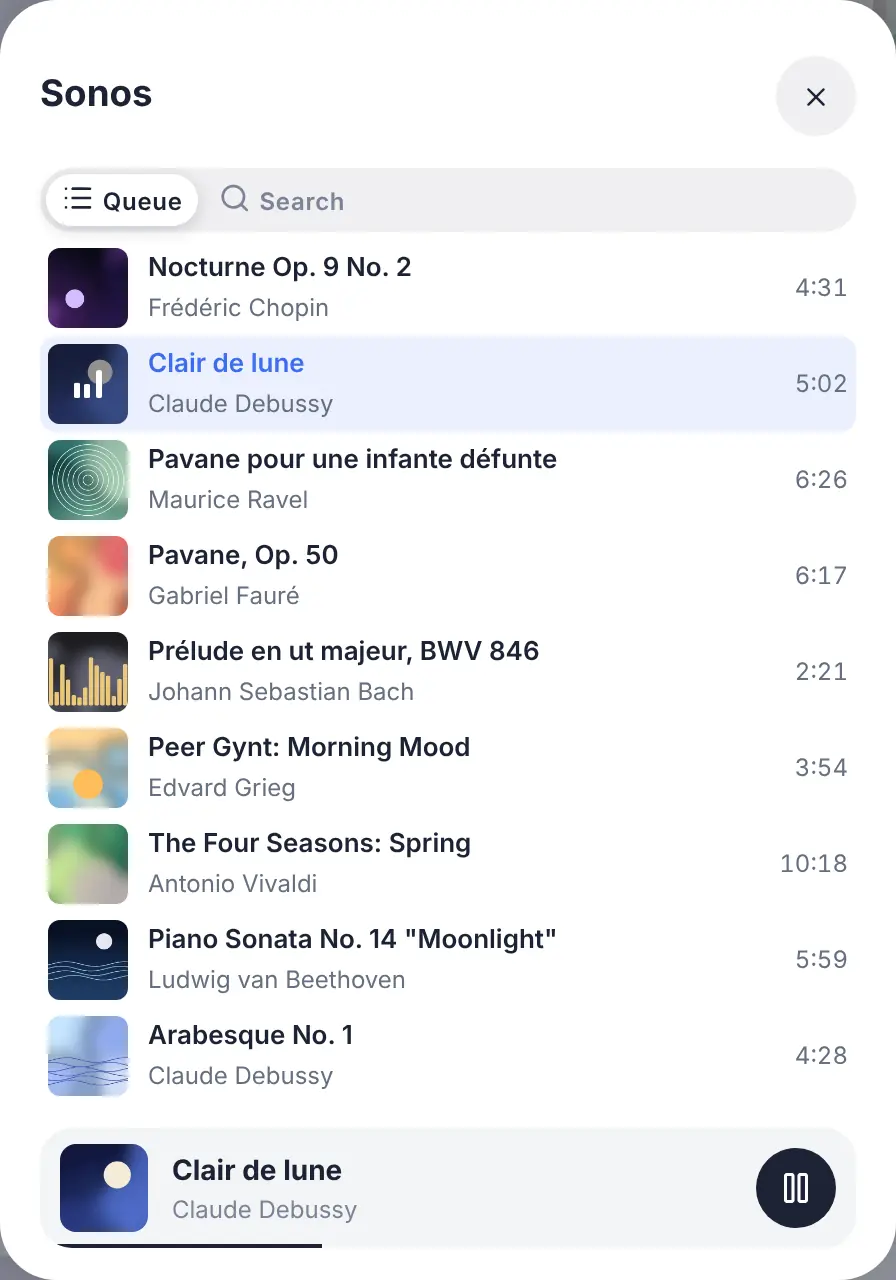
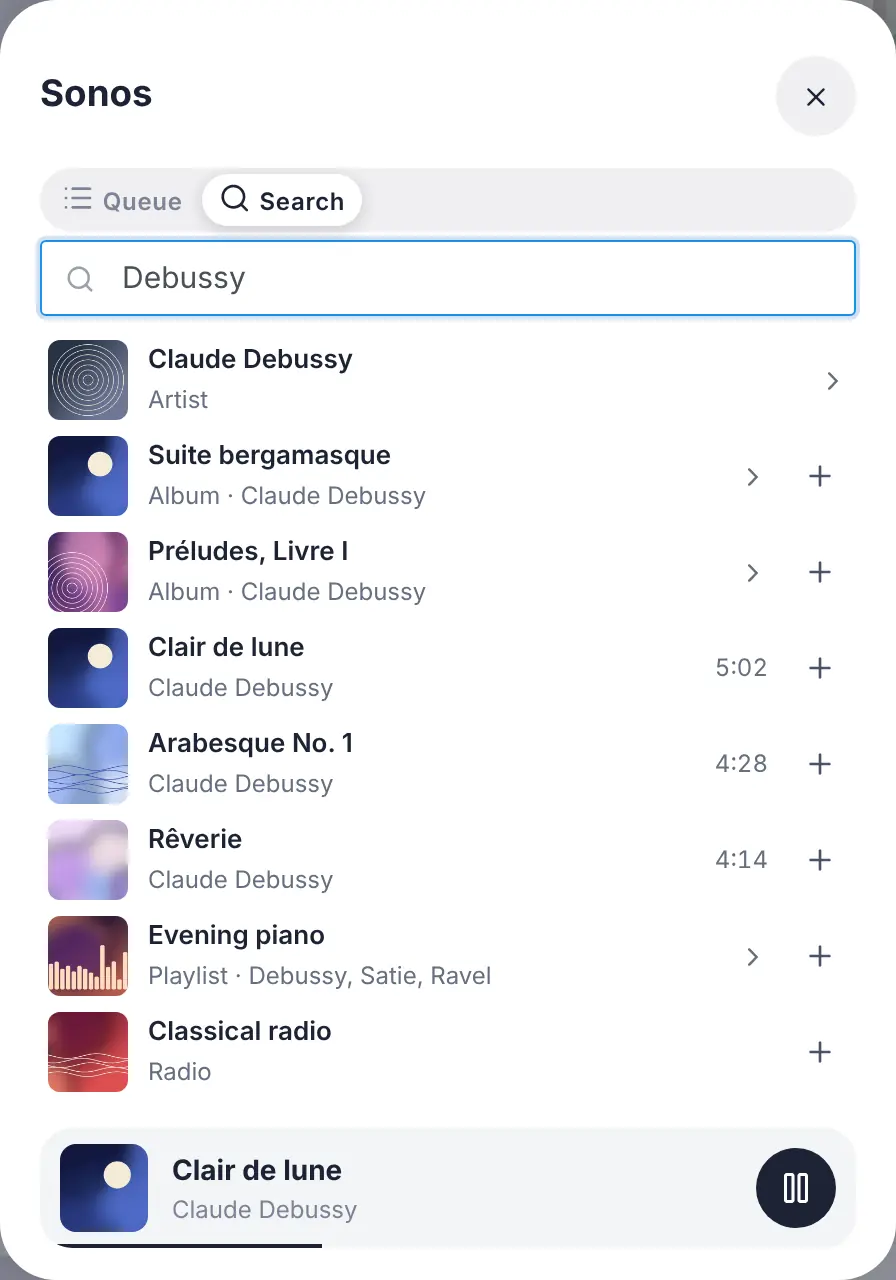
<p>Two buttons at the end of the volume row open the rest, in a panel that never changes the size of the card:</p>
<ul>
<li class=""><strong>the queue</strong>, with the current track highlighted: a tap jumps to any track;</li>
</ul>
<p><img decoding="async" loading="lazy" alt="The queue of the player, with the current track highlighted" src="https://gladysassistant.com/assets/images/02-music-queue-en-7b21492a8a701e5c898269837e251a4a.webp" width="896" height="1280" class="img_ev3q"></p>
<ul>
<li class=""><strong>the search and the library</strong>: type an artist, an album, a playlist or a radio, tap to play it, or add it to the queue with the "+" button. An album or a playlist can be opened, or played whole.</li>
</ul>
<p><img decoding="async" loading="lazy" alt="Searching the catalog of the player from the dashboard" src="https://gladysassistant.com/assets/images/03-music-search-en-65f0ec34d09e0ef40023a6778594a2f9.webp" width="896" height="1280" class="img_ev3q"></p>
<p>A detail that matters: the progress bar is not refreshed every second by the server. The player only reports its position when something happens (a pause, a seek, a new track), and the dashboard computes the rest. A music player costs your database nothing: none of its states is kept in history.</p>
<h3 class="anchor anchorTargetStickyNavbar_Vzrq" id="start-a-playlist-from-a-scene">Start a playlist from a scene<a href="https://gladysassistant.com/blog/gladys-5-3-music-player-and-ai-providers/#start-a-playlist-from-a-scene" class="hash-link" aria-label="Direct link to Start a playlist from a scene" title="Direct link to Start a playlist from a scene" translate="no">​</a></h3>
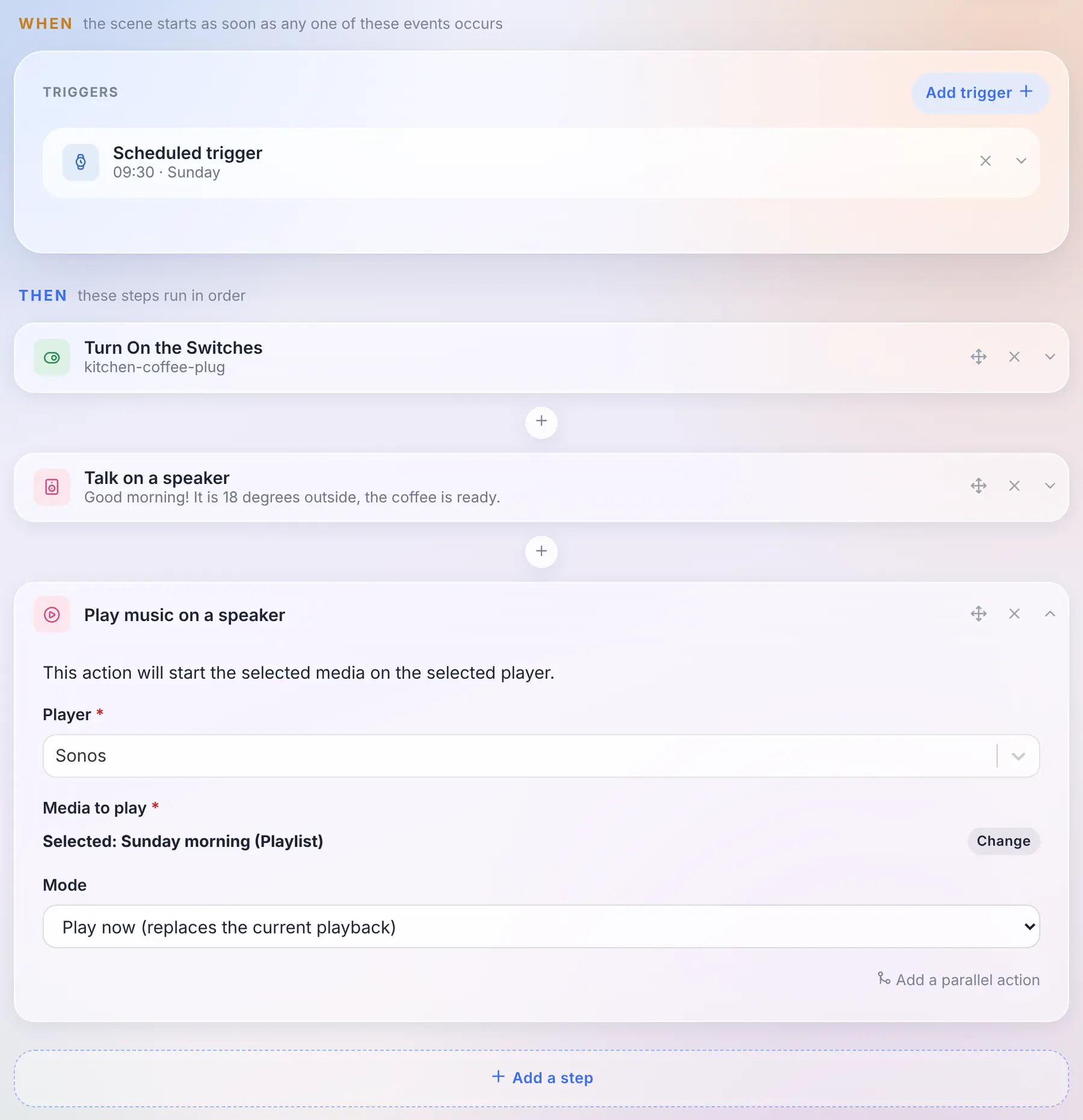
<p>A new <strong>"Play music on a speaker"</strong> action lets a scene start a track, an album, a playlist or a radio. You pick it with the same search as on the dashboard, and choose whether it replaces what is playing or joins the queue (right after the current track, or at the end).</p>
<p><img decoding="async" loading="lazy" alt="A scene that turns the coffee machine on, says good morning on the speaker, then starts a playlist" src="https://gladysassistant.com/assets/images/04-scene-play-media-en-7b69b42d6d154205f868b2fea697e61c.webp" width="1800" height="1861" class="img_ev3q"></p>
<p>And because the track is now a state of the device like any other, "when the track changes on the kitchen speaker" is just the usual device trigger, on the title.</p>
<h3 class="anchor anchorTargetStickyNavbar_Vzrq" id="which-players">Which players?<a href="https://gladysassistant.com/blog/gladys-5-3-music-player-and-ai-providers/#which-players" class="hash-link" aria-label="Direct link to Which players?" title="Direct link to Which players?" translate="no">​</a></h3>
<p>This new player is fed by <strong>external integrations</strong>: an integration publishes what is playing and serves the artworks, Gladys displays them and never loads an image from the internet in your browser. The store already has integrations for Sonos, Spotify, Jellyfin, Plex, Volumio, MPD, Lyrion or Yamaha MusicCast, which now have everything they need to light up this player: their authors just have to publish the new states.</p>
<p>The built-in Sonos, Google Cast and AirPlay integrations don't change: their widget keeps the same controls, in the new style. And the built-in Sonos integration already has its "Migrate" button towards the community one: your rooms, widgets and scenes follow the device.</p>
<h2 class="anchor anchorTargetStickyNavbar_Vzrq" id="choose-the-ai-of-your-assistant">Choose the AI of your assistant<a href="https://gladysassistant.com/blog/gladys-5-3-music-player-and-ai-providers/#choose-the-ai-of-your-assistant" class="hash-link" aria-label="Direct link to Choose the AI of your assistant" title="Direct link to Choose the AI of your assistant" translate="no">​</a></h2>
<p>For a few months now, the assistant of Gladys talks with you, controls your home, creates scenes and analyzes your cameras. Behind it, there was always the same AI: the one of Gladys Plus.</p>
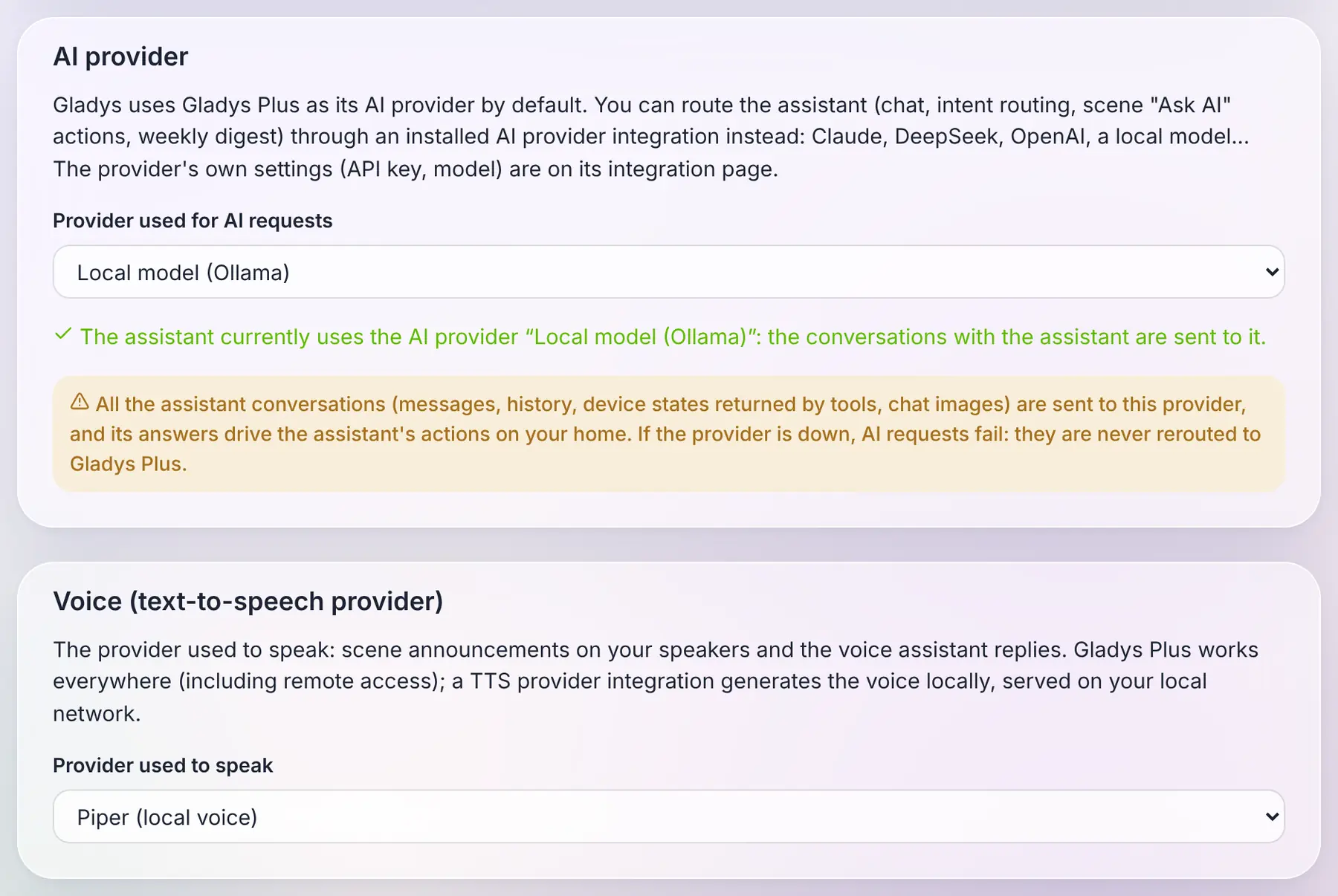
<p>In 5.3, it becomes <strong>a choice</strong>. An external integration of the new <strong>"AI provider"</strong> type can answer the assistant in place of Gladys Plus: Claude, Mistral, OpenAI, DeepSeek, or <strong>a model running on your own machine</strong> through Ollama. You choose it on the Artificial Intelligence page of the integrations, and the whole assistant follows: the chat, the "Ask AI" action of scenes, and the weekly home report.</p>
<p><img decoding="async" loading="lazy" alt="The choice of the AI provider and of the voice, on the Artificial Intelligence page (example integrations)" src="https://gladysassistant.com/assets/images/05-ai-tts-provider-en-f744d0e8e6ea55aaa387b048ed2e94b2.webp" width="1800" height="1206" class="img_ev3q"></p>
<p>To be clear about what ships today: 5.3 brings the AI and text-to-speech provider types, and the providers themselves will arrive in the catalog as the community publishes them. The screenshot above uses example integrations. And the Ollama integration already in the store is something else: it lets a scene ask a question to a local model, it is not an AI provider for the assistant.</p>
<p>What I find interesting about the way it works: <strong>the whole assistant still runs in your Gladys</strong>. The tools, the context of your home, the conversation history, the actions on your devices: all of this stays local. The only thing that goes to the provider is a standard request, the one every AI on the market understands, and its answer comes back to Gladys, which checks it before acting. An AI integration is therefore a thin adapter, which can plug in any provider.</p>
<p>Three rules I cared about:</p>
<ul>
<li class=""><strong>Gladys Plus stays the default.</strong> Nothing changes for you if you don't touch anything.</li>
<li class=""><strong>No silent fallback.</strong> If you chose a local model because you want your conversations to stay at home, and that model is down, Gladys tells you so. It never sends your messages to Gladys Plus behind your back.</li>
<li class=""><strong>The assistant without Gladys Plus.</strong> With your own provider, the chat, the scenes and the weekly report work without a Gladys Plus subscription.</li>
</ul>
<p>One honest warning: an AI provider sees every conversation and its answers drive actions in your home. That's the highest level of trust you can give an integration, and Gladys says so plainly when you select one.</p>
<h2 class="anchor anchorTargetStickyNavbar_Vzrq" id="and-the-voice-too">And the voice too<a href="https://gladysassistant.com/blog/gladys-5-3-music-player-and-ai-providers/#and-the-voice-too" class="hash-link" aria-label="Direct link to And the voice too" title="Direct link to And the voice too" translate="no">​</a></h2>
<p>Same idea for text-to-speech. Until now, when a scene announced "the washing machine is done" on a speaker, the voice came from Gladys Plus.</p>
<p>An integration of the new <strong>"Text-to-speech"</strong> type can now generate that voice, locally with an engine like Piper, or with the cloud service of your choice. You choose it on the same page, and <strong>scene announcements</strong> on your speakers go through it. The audio is generated on your network and stays in memory for a few minutes, the time for the speaker to fetch it.</p>
<p>One limitation, for now: with a local voice, the replies of the voice assistant in the browser are text only. The microphone of a browser requires HTTPS, and a browser refuses to play, inside an HTTPS page, a sound served over HTTP on your local network. Gladys never switches to Gladys Plus behind your back: if you want the assistant to speak in the browser, keep Gladys Plus as the voice.</p>
<h2 class="anchor anchorTargetStickyNavbar_Vzrq" id="a-catalog-built-for-a-thousand-integrations">A catalog built for a thousand integrations<a href="https://gladysassistant.com/blog/gladys-5-3-music-player-and-ai-providers/#a-catalog-built-for-a-thousand-integrations" class="hash-link" aria-label="Direct link to A catalog built for a thousand integrations" title="Direct link to A catalog built for a thousand integrations" translate="no">​</a></h2>
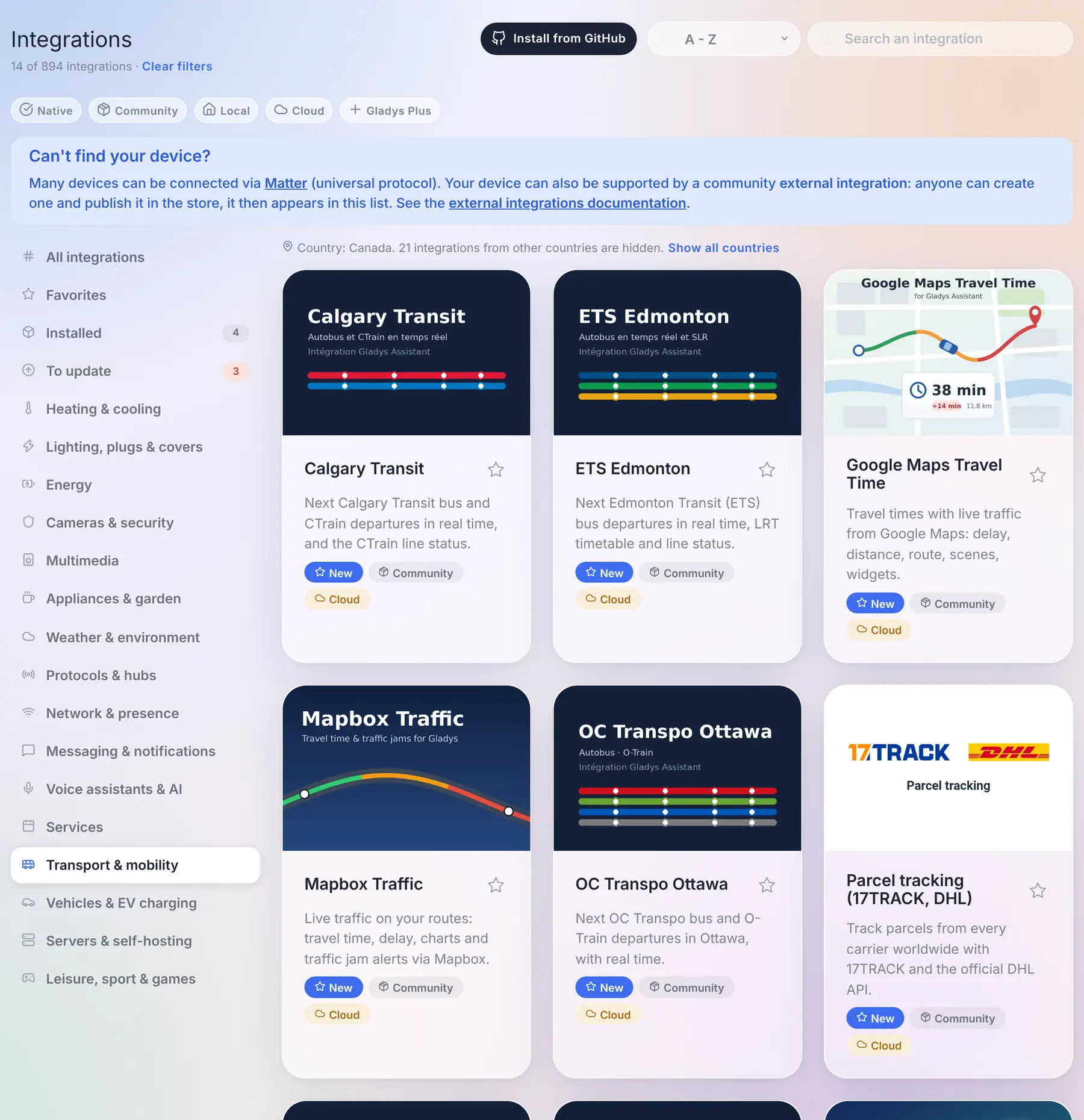
<p>When version 5 launched at the end of August, the store had about seventy community integrations. Today it has <strong>856</strong>, plus the native ones. The integrations page wasn't designed for that: it downloaded the complete store (25 MB) every 30 minutes, and finding something meant scrolling through everything.</p>
<p><img decoding="async" loading="lazy" alt="The catalog: the new categories, and the integrations of other countries hidden" src="https://gladysassistant.com/assets/images/07-catalog-en-6ac8694bb4bbc99353fd35737e88f198.webp" width="1800" height="1860" class="img_ev3q"></p>
<p>So here is what changes:</p>
<ul>
<li class=""><strong>A catalog that loads fast.</strong> Gladys now downloads a light index of 1.5 MB, and fetches the complete file of an integration, a few dozen kilobytes at most, only when you open it, install it or update it. While it loads, the page says so, instead of showing the native integrations as if they were the whole catalog. Cards are shown page by page, with a "Show more integrations" button.</li>
<li class=""><strong>The search is the first filter.</strong> It reads more than the card: every language of the description, the keywords declared by the author, the author themselves, and the countries. Results are ranked (the names that start with what you typed first), and a search always looks through the whole catalog, whatever the category you are in.</li>
<li class=""><strong>The country filter nobody has to set.</strong> Transit networks, electricity suppliers, waste collection, cinemas: a lot of integrations only make sense in one country. Gladys deduces your country from the timezone it is already configured with, and hides the integrations of other countries from the categories. One line says how many are hidden, with a "Show all countries" link, and the search still finds them.</li>
<li class=""><strong>Four new categories</strong>: <em>Transport &amp; mobility</em>, <em>Vehicles &amp; EV charging</em>, <em>Servers &amp; self-hosting</em> and <em>Leisure, sport &amp; games</em>. "Services" had become a 160-integration catch-all.</li>
<li class=""><strong>Small things that count</strong>: an "Installed" badge on the cards, a "Last updated" sort, a count that always compares to the whole catalog ("21 of 894 integrations") with a single "Clear filters" link, and when you come back from an integration page, you're back exactly where you were in the list.</li>
</ul>
<h3 class="anchor anchorTargetStickyNavbar_Vzrq" id="update-your-integrations-from-the-catalog">Update your integrations from the catalog<a href="https://gladysassistant.com/blog/gladys-5-3-music-player-and-ai-providers/#update-your-integrations-from-the-catalog" class="hash-link" aria-label="Direct link to Update your integrations from the catalog" title="Direct link to Update your integrations from the catalog" translate="no">​</a></h3>
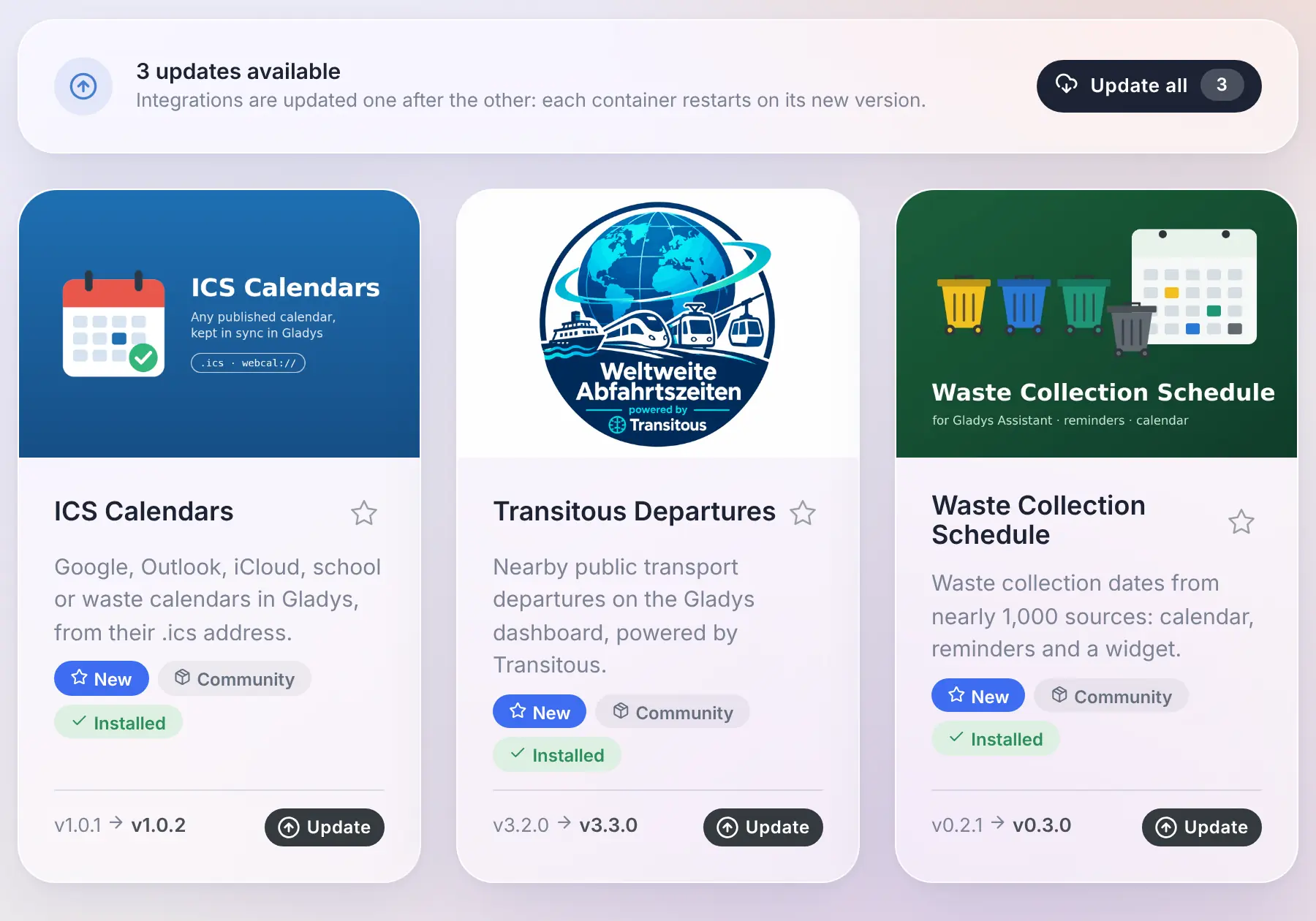
<p>When a community integration has a new version, its card now shows the installed version, the new one, and an <strong>Update</strong> button. No need to open the integration anymore.</p>
<p>And when several are waiting, the <strong>To update</strong> view opens on an <strong>Update all</strong> button. The integrations are updated one after the other, not all at once, which spares a Raspberry Pi or a NAS, and the panel follows the progress. If one fails, it lists it with a link to its page, and the others carry on.</p>
<p><img decoding="async" loading="lazy" alt="The &amp;quot;To update&amp;quot; view: the &amp;quot;Update all&amp;quot; button, and the update button of each card" src="https://gladysassistant.com/assets/images/08-update-all-en-7ebf8a2cb1d98349b72c06445d2f4496.webp" width="1800" height="1260" class="img_ev3q"></p>
<p>Thanks to <a href="https://github.com/cicoub13" target="_blank" rel="noopener noreferrer" class="">@cicoub13</a> for both!</p>
<h2 class="anchor anchorTargetStickyNavbar_Vzrq" id="for-integration-developers">For integration developers<a href="https://gladysassistant.com/blog/gladys-5-3-music-player-and-ai-providers/#for-integration-developers" class="hash-link" aria-label="Direct link to For integration developers" title="Direct link to For integration developers" translate="no">​</a></h2>
<ul>
<li class=""><strong>Music players</strong>: a player gains the "now playing" features (<code>title</code>, <code>artist</code>, <code>album</code>, <code>artwork</code>, <code>duration</code>, <code>position</code>, <code>shuffle</code>, <code>repeat</code>, <code>mute</code>, and a writable <code>playback_state</code>), and the new <code>music</code> manifest field declares what the integration can do on demand: <code>browse</code>, <code>search</code>, <code>queue</code> and <code>append</code>. Artworks are served by the integration behind a key, never as a URL. The contract is in <a href="https://github.com/GladysAssistant/Gladys/blob/master/docs/specs/external-integrations/capabilities/music.md" target="_blank" rel="noopener noreferrer" class="">the music spec</a>.</li>
<li class=""><strong>AI providers</strong>: the new <code>ai</code> type receives OpenAI-compatible chat completion requests and answers with an OpenAI-compatible completion. <a href="https://github.com/GladysAssistant/Gladys/blob/master/docs/specs/external-integrations/capabilities/ai-type.md" target="_blank" rel="noopener noreferrer" class="">The AI provider spec</a> also explains how to reach a model running on the host, and why its context window must be configured.</li>
<li class=""><strong>Text-to-speech providers</strong>: the new <code>tts</code> type receives a text and a language, and answers with the audio. <a href="https://github.com/GladysAssistant/Gladys/blob/master/docs/specs/external-integrations/capabilities/tts-type.md" target="_blank" rel="noopener noreferrer" class="">The TTS provider spec</a>.</li>
<li class=""><strong>Catalog</strong>: two new optional manifest fields, <code>keywords</code> (search-only terms: brands, models, cities served) and <code>countries</code> (ISO codes of the countries where the integration is usable, absent means worldwide), and the four new categories <code>transport</code>, <code>vehicles</code>, <code>servers</code> and <code>leisure</code>.</li>
<li class=""><strong>Polling</strong>: a discovered device that publishes a <code>poll_frequency</code> is now polled by Gladys without having to set <code>should_poll</code> as well.</li>
</ul>
<p>The <a href="https://github.com/GladysAssistant/integration-sdk-js" target="_blank" rel="noopener noreferrer" class="">SDK v0.16.0</a> supports all of it: <code>onAiChat</code> for AI providers, <code>onTtsSynthesize</code> for text-to-speech, and <code>publishNowPlaying</code>, <code>artworkKey</code> and the <code>onMusic*</code> handlers for music players.</p>
<h2 class="anchor anchorTargetStickyNavbar_Vzrq" id="fixes">Fixes<a href="https://gladysassistant.com/blog/gladys-5-3-music-player-and-ai-providers/#fixes" class="hash-link" aria-label="Direct link to Fixes" title="Direct link to Fixes" translate="no">​</a></h2>
<p>5.2.1 went out the day after 5.2. Here is what it and this release fix:</p>
<ul>
<li class=""><strong>Users</strong>: you can no longer change your own role, and the last administrator of an instance can't lose the role. Until now, an administrator who was the only one could give themselves another role, and nobody could reach the users settings anymore to give it back. An instance already in that situation gets its oldest account back as administrator.</li>
<li class=""><strong>Devices</strong>: saving a device no longer rolls back the current value of its features to the one the page had when it was opened. Thanks <a href="https://github.com/Terdious" target="_blank" rel="noopener noreferrer" class="">@Terdious</a>!</li>
<li class=""><strong>Devices</strong>: creating a device while Gladys is writing something else to its database no longer fails with a "database is locked" error.</li>
<li class=""><strong>Login</strong>: an email typed with capitals or spaces is accepted, at login and when resetting the password.</li>
<li class=""><strong>Batteries</strong>: disabling the low battery warning in the settings really disables it, and the battery and backup failure messages reach every administrator, even when sending to one of them fails. Thanks <a href="https://github.com/cicoub13" target="_blank" rel="noopener noreferrer" class="">@cicoub13</a>!</li>
<li class=""><strong>Energy</strong>: the EDF Tarif Bleu templates, which carry more than ten years of price history, can be selected again: the history outside the validity of your contract is dropped, without changing the costs.</li>
<li class=""><strong>Enedis</strong>: meters can be renamed, and a new meter is named after its PDL instead of "Enedis", which tells two meters apart.</li>
<li class=""><strong>Zigbee2MQTT</strong>: the serial port of the USB dongle is always the one bound inside the container, whatever its path on the host, which could prevent Zigbee2MQTT from starting.</li>
<li class=""><strong>Zigbee2MQTT</strong>: the four buttons of the Philips Hue Tap switch are recognized.</li>
<li class=""><strong>Dashboard</strong>: selecting text or dragging a slider in a panel or a modal, then releasing the mouse outside of it, no longer closes it.</li>
<li class=""><strong>Devices</strong>: the device lists no longer carry the image of each camera (up to 150 kB each): they load faster, and saving a camera no longer fails because the request is too large.</li>
<li class=""><strong>Energy</strong>: a new contract can reuse the name of an existing one, like a renewed Tempo contract. Thanks <a href="https://github.com/cicoub13" target="_blank" rel="noopener noreferrer" class="">@cicoub13</a>!</li>
<li class=""><strong>Settings</strong>: a user who is not an administrator now reaches the settings from the menu, and only sees the tabs they can use. Thanks <a href="https://github.com/cicoub13" target="_blank" rel="noopener noreferrer" class="">@cicoub13</a>!</li>
<li class=""><strong>Scenes</strong>: the summary of a shutter action shows the device and the chosen value, and the editor highlights the selected button. Thanks <a href="https://github.com/cicoub13" target="_blank" rel="noopener noreferrer" class="">@cicoub13</a>!</li>
<li class=""><strong>Widgets</strong>: the buttons of integration widgets keep their icon colors in the Horizon theme. Thanks to Stefan Bauer!</li>
<li class=""><strong>HomeKit</strong>: the presets of a radiator stay accurate in the Home app, and a request that fails gets an answer instead of leaving the Home app waiting. Thanks <a href="https://github.com/Dreamthy" target="_blank" rel="noopener noreferrer" class="">@Dreamthy</a>!</li>
<li class=""><strong>Under the hood</strong>: the interface is now built with Vite 8. Thanks <a href="https://github.com/bertrandda" target="_blank" rel="noopener noreferrer" class="">@bertrandda</a>!</li>
</ul>
<p>That makes 32 pull requests since version 5.2.</p>
<h2 class="anchor anchorTargetStickyNavbar_Vzrq" id="thanks-to-the-contributors">Thanks to the contributors<a href="https://gladysassistant.com/blog/gladys-5-3-music-player-and-ai-providers/#thanks-to-the-contributors" class="hash-link" aria-label="Direct link to Thanks to the contributors" title="Direct link to Thanks to the contributors" translate="no">​</a></h2>
<p>Thanks to <a href="https://github.com/cicoub13" target="_blank" rel="noopener noreferrer" class="">@cicoub13</a> for the update buttons of the catalog, "Update all" included, the battery and backup messages, the settings of non-admin users, the shutter actions in scenes and the energy contracts sharing a name, to <a href="https://github.com/Terdious" target="_blank" rel="noopener noreferrer" class="">@Terdious</a> for the device save fix, to <a href="https://github.com/Dreamthy" target="_blank" rel="noopener noreferrer" class="">@Dreamthy</a> for the HomeKit radiators, to Stefan Bauer for the widget icons in the Horizon theme, to <a href="https://github.com/bertrandda" target="_blank" rel="noopener noreferrer" class="">@bertrandda</a> for the upgrade to Vite 8, and to <a href="https://github.com/William-De71" target="_blank" rel="noopener noreferrer" class="">@William-De71</a> for keeping the tests green when the clocks change. And thanks to everyone who asked for these features and reported bugs on the forum!</p>
<p>See you on <a href="https://community.gladysassistant.com/" target="_blank" rel="noopener noreferrer" class="">the forum</a> if you want to talk about this release :)</p>
<h2 class="anchor anchorTargetStickyNavbar_Vzrq" id="how-to-update">How to update?<a href="https://gladysassistant.com/blog/gladys-5-3-music-player-and-ai-providers/#how-to-update" class="hash-link" aria-label="Direct link to How to update?" title="Direct link to How to update?" translate="no">​</a></h2>
<p>As always, Gladys updates automatically within 24 hours if you use Watchtower, otherwise you can do it in one click from the settings.</p>
<p>The <a href="https://github.com/GladysAssistant/Gladys/releases/tag/v5.3.0" target="_blank" rel="noopener noreferrer" class="">full CHANGELOG of 5.3.0</a> is on GitHub.</p><div><div style="border-top:1px solid white;margin-top:50px;margin-bottom:50px"></div><div class="row"><div class="col col--8"><h2>Subscribe to the Gladys Assistant newsletter</h2>A few emails per month about new releases and project news. Sent by Pierre-Gilles Leymarie, founder of the project. Unsubscribe anytime 🙂</div><div class="col col--4 newsletterSectionInputCol_wyow"><form><div class="form-group"><input type="email" style="width:100%;line-height:1.5;border-radius:5px;padding:8px" placeholder="Email" value=""></div><div class="form-group"><input type="text" style="width:100%;line-height:1.5;border-radius:5px;padding:8px;margin-top:10px" placeholder="First name" value=""></div><button style="margin-top:10px" class="button button--primary button--block">Subscribe to the newsletter</button></form></div></div></div>]]></content>
        <author>
            <name>Pierre-Gilles Leymarie</name>
            <uri>https://github.com/Pierre-Gilles</uri>
        </author>
    </entry>
    <entry>
        <title type="html"><![CDATA[Gladys Assistant 5.2: a real thermostat, and energy contracts for every country]]></title>
        <id>https://gladysassistant.com/blog/gladys-5-2-thermostat-and-energy-contracts/</id>
        <link href="https://gladysassistant.com/blog/gladys-5-2-thermostat-and-energy-contracts/"/>
        <updated>2026-10-12T00:00:00.000Z</updated>
        <summary type="html"><![CDATA[Gladys can now be your thermostat, or programme the one you already have, with weekly schedules and a brand new widget. Energy tracking opens up to every electricity contract in the world. Also in this release: the channel of system messages, 34 math functions in scenes and the devices that fill your database.]]></summary>
        <content type="html"><![CDATA[<p>Hey everyone!</p>
<p>New version of Gladys today, 5.2 🎉</p>
<p>Two big pieces in this one, and both are about your home rather than about the interface. Gladys can now <strong>be your thermostat</strong>, or programme the one you already have, with weekly schedules. And <strong>energy tracking opens up to every electricity contract</strong>: not just the three French ones Gladys knew until now, but time-of-use rates, seasons, tiers, spot prices, from almost any country.</p>
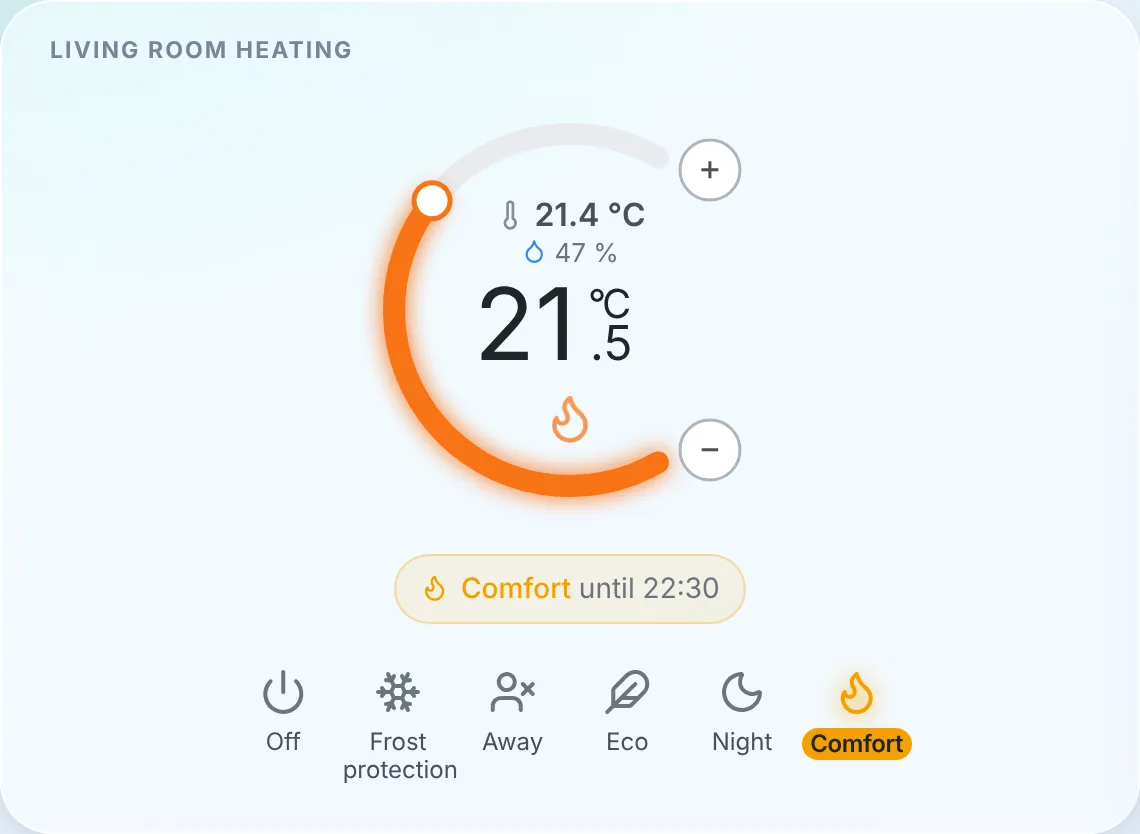
<p><img decoding="async" loading="lazy" alt="The new thermostat widget: the room temperature, the setpoint, the current slot of the schedule and the presets" src="https://gladysassistant.com/assets/images/01-thermostat-widget-en-2005bf0f5b16ec5310201f3288eb08ed.webp" width="1140" height="834" class="img_ev3q"></p>
<!-- -->
<h2 class="anchor anchorTargetStickyNavbar_Vzrq" id="gladys-becomes-a-thermostat">Gladys becomes a thermostat<a href="https://gladysassistant.com/blog/gladys-5-2-thermostat-and-energy-contracts/#gladys-becomes-a-thermostat" class="hash-link" aria-label="Direct link to Gladys becomes a thermostat" title="Direct link to Gladys becomes a thermostat" translate="no">​</a></h2>
<p>It was one of the oldest requests on the forum, and probably the most common setup in France: an electric heater driven by a relay or a smart plug, a temperature sensor somewhere in the room, and no branded thermostat anywhere. Until now, the answer in Gladys was a scene per temperature threshold. No schedule, no hysteresis, and a heater that flickered on and off around 21 °C.</p>
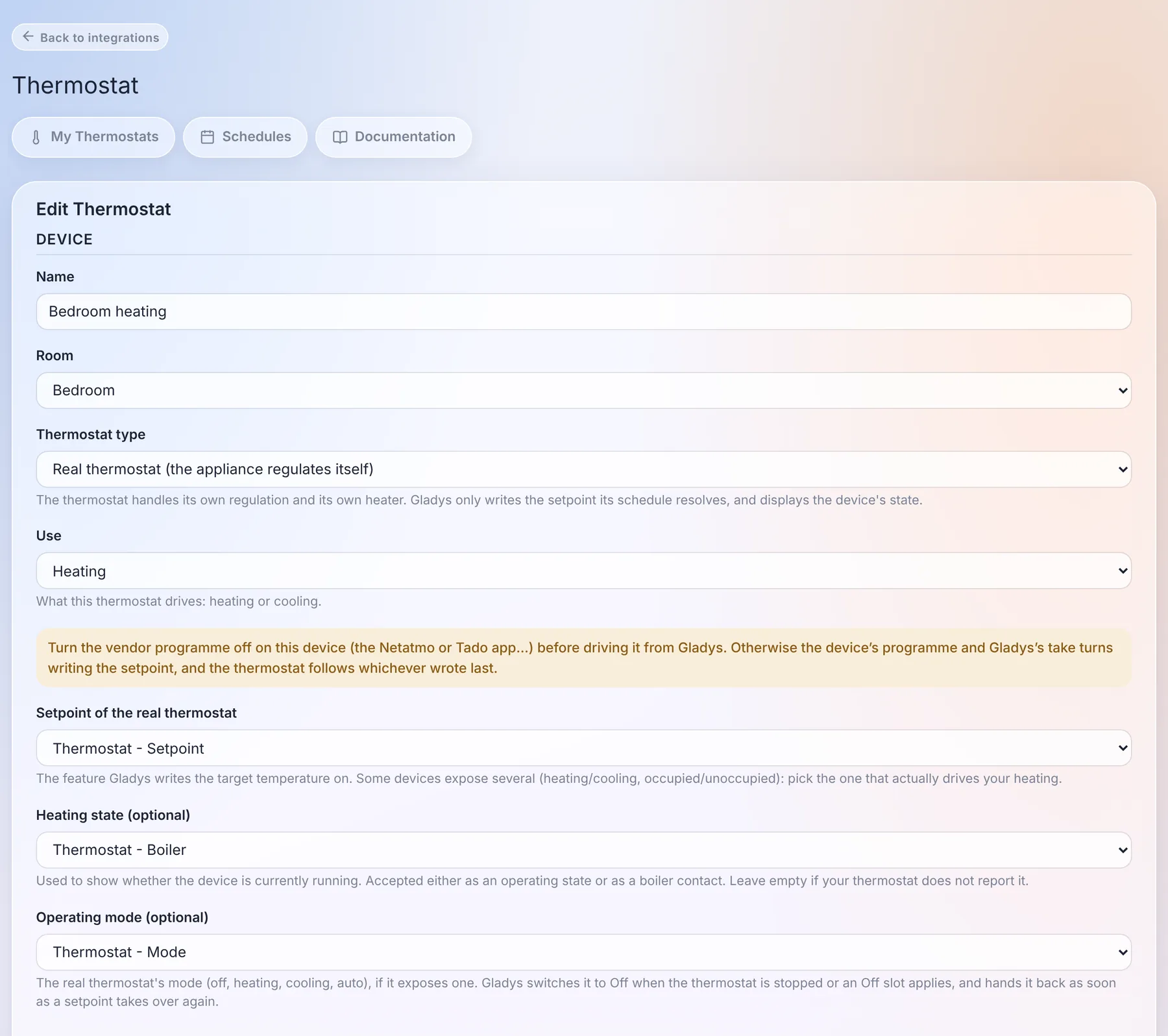
<p>There is now a native <strong>Thermostat</strong> integration, and it handles two cases.</p>
<p><strong>Gladys is the thermostat.</strong> You pick a temperature sensor and a switch (a relay, a plug, a boiler contact), and Gladys regulates: it reads the temperature every minute and turns the heater on and off to reach the setpoint. You choose between a hysteresis (heat below 20.5 °C, stop above 21.5 °C) and TPI regulation, which heats for a share of a fixed cycle proportional to the gap. The latter is gentler on heaters with a lot of inertia. A window sensor cuts the heating the second the window opens.</p>
<p><strong>Gladys programmes your existing thermostat.</strong> A Netatmo, a Zigbee radiator valve, a Matter or MQTT thermostat already regulates itself very well. What it lacked was a schedule living in Gladys, next to the rest of the house, rather than in the vendor app. Gladys now writes its setpoint according to the schedule, switches its mode to Off when needed, and shows whether it's heating.</p>
<p><img decoding="async" loading="lazy" alt="The form of a real thermostat: Gladys drives the setpoint, the heating state and the mode of the device" src="https://gladysassistant.com/assets/images/03-thermostat-external-en-a5b20504b4349dd7df7e497ec608facb.webp" width="1800" height="1596" class="img_ev3q"></p>
<p>A detail I'm quite happy with: if someone turns the dial of the real thermostat, or changes the temperature from the vendor app, Gladys sees it and treats it as a manual change. It doesn't overwrite it a minute later, which is the classic bug of thermostats driven by two masters.</p>
<h3 class="anchor anchorTargetStickyNavbar_Vzrq" id="weekly-schedules-per-house">Weekly schedules, per house<a href="https://gladysassistant.com/blog/gladys-5-2-thermostat-and-energy-contracts/#weekly-schedules-per-house" class="hash-link" aria-label="Direct link to Weekly schedules, per house" title="Direct link to Weekly schedules, per house" translate="no">​</a></h3>
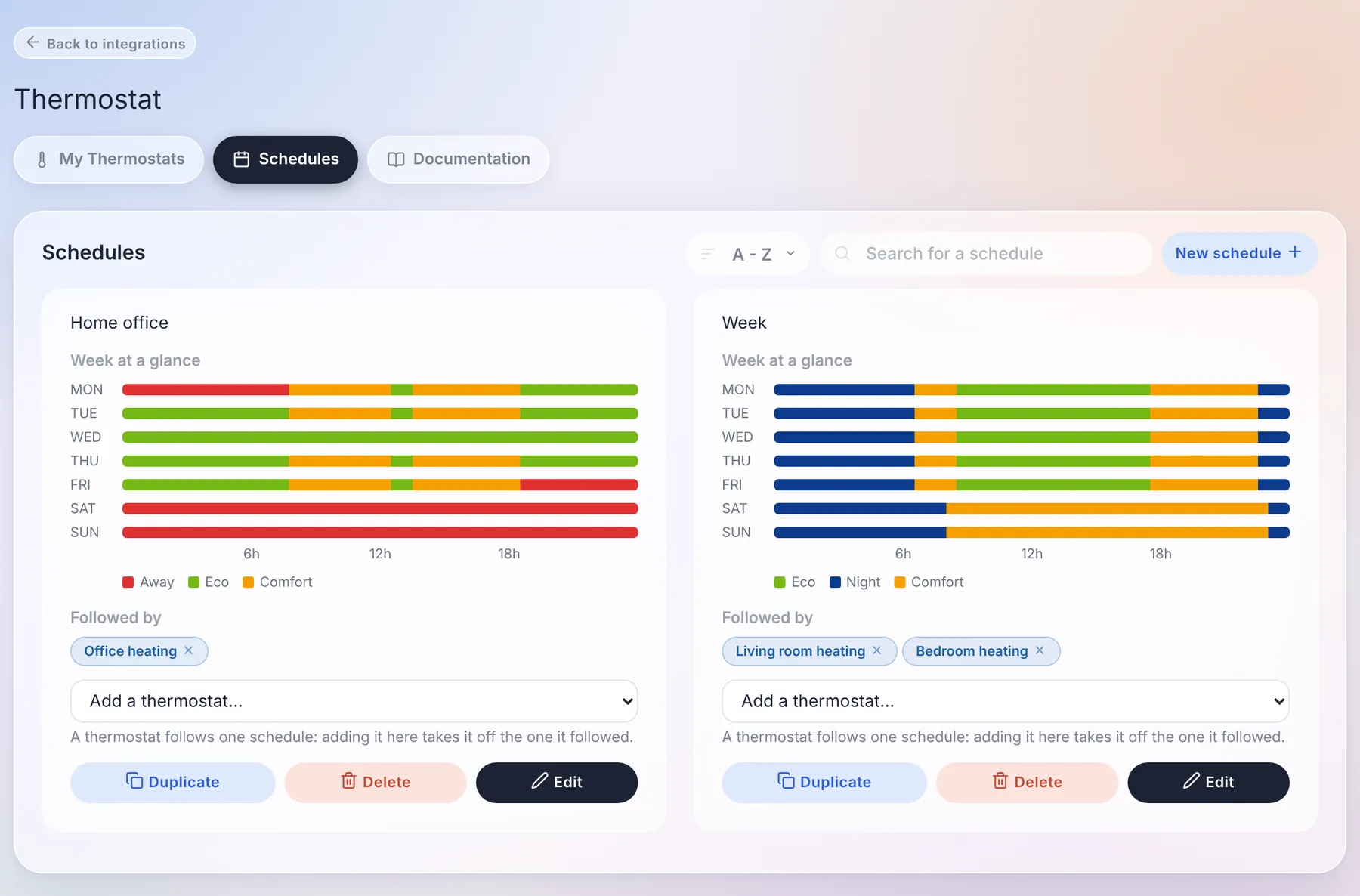
<p>The schedules belong to a house. With two houses, each has its own "Week", and a thermostat can only follow a schedule of its own house.</p>
<p><img decoding="async" loading="lazy" alt="The schedules of the house: a view of the week, and the thermostats following each of them" src="https://gladysassistant.com/assets/images/02-thermostat-schedules-en-431cad67253ed2f66d29e74b5fc1c3bd.webp" width="1800" height="1186" class="img_ev3q"></p>
<p>Under the hood, a schedule is a list of <strong>transition points</strong>, the way Netatmo and Tado do it: "from Monday 06:30, Comfort, until the next point". It sounds like a detail, but it removes a whole family of bugs:</p>
<ul>
<li class="">a night from 22:30 to 06:30 is a single slot, not two halves glued together at midnight;</li>
<li class="">there are no gaps and no overlaps: adding a slot shortens the ones it covers, deleting a slot extends the previous one;</li>
<li class="">a day without its own slot keeps the last preset of the day before. An office schedule with no weekend slot keeps its Friday evening preset all weekend, and the week view shows exactly that.</li>
</ul>
<p>"Copy to..." copies a day onto the others: you write Monday, you copy it to the whole week, done.</p>
<h3 class="anchor anchorTargetStickyNavbar_Vzrq" id="the-widget-and-everything-else">The widget, and everything else<a href="https://gladysassistant.com/blog/gladys-5-2-thermostat-and-energy-contracts/#the-widget-and-everything-else" class="hash-link" aria-label="Direct link to The widget, and everything else" title="Direct link to The widget, and everything else" translate="no">​</a></h3>
<p>The new dashboard widget shows the room temperature and humidity, the setpoint in large, and an orange glow when the heater is running. The banner tells you what the thermostat is doing ("Comfort until 22:30"), and the bar at the bottom gives you the presets: Off, Frost protection, Away, Eco, Night, Comfort.</p>
<p>Picking a preset or turning the dial is a manual change, which by default lasts <strong>until the next slot of the schedule</strong>, as on Tado or Netatmo. You can also set a fixed duration instead. And without a schedule, a manual change stays, like on a classic thermostat.</p>
<p>The part that matters the most to me is not visible on screen: the preset, the mode and the setpoint are <strong>standard device features</strong>. A scene can therefore set the house to "Away" when everyone leaves, and the AI, MQTT, Gladys Plus and the voice assistants see a thermostat like any other, with its preset and its heating state.</p>
<p>Huge thanks to <a href="https://github.com/William-De71" target="_blank" rel="noopener noreferrer" class="">@William-De71</a>, who wrote the bulk of this integration: 84 commits, and a lot of patience through the review!</p>
<p>The <a class="" href="https://gladysassistant.com/docs/integrations/thermostat/">thermostat documentation is here</a>.</p>
<h2 class="anchor anchorTargetStickyNavbar_Vzrq" id="energy-contracts-for-every-country">Energy contracts, for every country<a href="https://gladysassistant.com/blog/gladys-5-2-thermostat-and-energy-contracts/#energy-contracts-for-every-country" class="hash-link" aria-label="Direct link to Energy contracts, for every country" title="Direct link to Energy contracts, for every country" translate="no">​</a></h2>
<p>Energy tracking in Gladys knew three contracts: base, peak / off-peak and EDF Tempo. Anything else meant a pull request on Gladys and a new release. A weekend off-peak rate, a summer / winter tariff in the United States, Hydro-Québec tiers, an hourly spot price in Norway: impossible.</p>
<p>In 5.2, a contract is no longer a list of prices but a <strong>set of rules</strong>, interpreted by a pricing engine that knows no supplier by name. A rule can depend on the time, the day of the week, the season, a date range, a tariff calendar (Tempo colour, public holidays, critical peak days), consumption tiers per day, per month or per billing period, or the peak power. On top of that come fixed fees, taxes as a percentage, demand charges per kW and spot prices with a multiplier and a margin.</p>
<p>The engine is tested against real contracts from <strong>12 countries</strong>: France, Belgium, the United Kingdom, Germany, Finland, Norway, the United States, Canada, Australia, Japan, South Korea and India.</p>
<h3 class="anchor anchorTargetStickyNavbar_Vzrq" id="a-wizard-and-a-preview-on-your-own-consumption">A wizard, and a preview on your own consumption<a href="https://gladysassistant.com/blog/gladys-5-2-thermostat-and-energy-contracts/#a-wizard-and-a-preview-on-your-own-consumption" class="hash-link" aria-label="Direct link to A wizard, and a preview on your own consumption" title="Direct link to A wizard, and a preview on your own consumption" translate="no">​</a></h3>
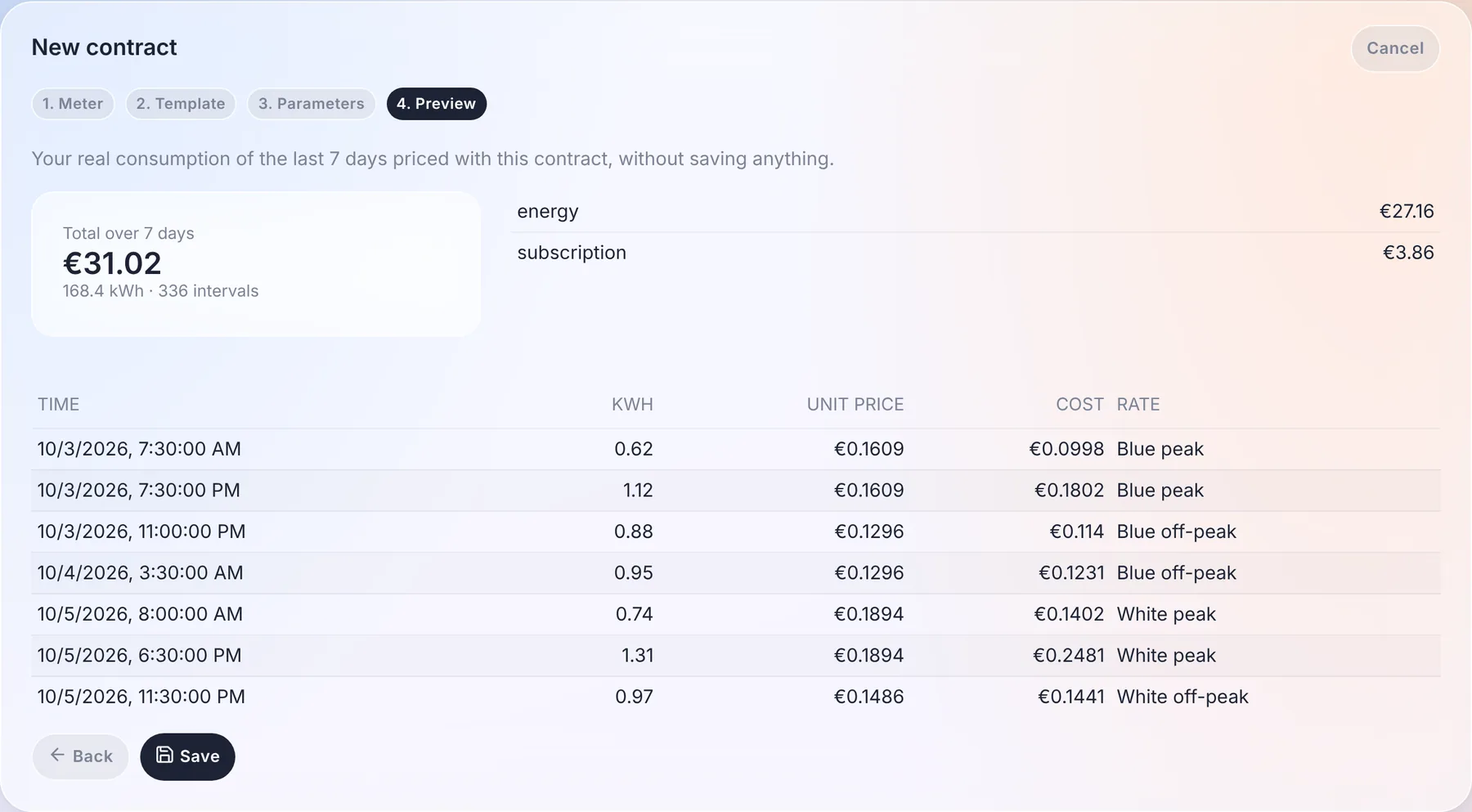
<p>Creating a contract happens in four steps: the meter, the contract template (filtered by country, with a search), its parameters, and a <strong>preview</strong>.</p>
<p><img decoding="async" loading="lazy" alt="The preview: the cost of the last 7 days with this contract, and the price applied to each 30-minute interval" src="https://gladysassistant.com/assets/images/04-energy-contract-preview-en-f62a312227d17d2b5134e5b609206832.webp" width="1800" height="993" class="img_ev3q"></p>
<p>The preview prices your real consumption of the last 7 days with the contract, without saving anything: the total, the detail per component, and a sample of intervals with the price applied to each of them. If it doesn't match your bill, you know before you save.</p>
<p>Your existing prices are <strong>converted automatically</strong> into contracts on the first start, without touching the cost history. Gladys checks the conversion itself by comparing the old and new calculation over the last 7 days, and flags a contract that differs.</p>
<p>And you no longer have to maintain the energy hierarchy by hand. Gladys now links the energy features of your devices itself: a plug's index, its consumption and its cost, attached to your main meter. The only choice left is which meter a device is on, and only when you have several: the meter of a second home is finally priced by its own contract. Installations whose hierarchy was broken by the old "Fix" button are repaired on the first start.</p>
<h3 class="anchor anchorTargetStickyNavbar_Vzrq" id="the-price-on-the-dashboard-and-in-your-scenes">The price on the dashboard, and in your scenes<a href="https://gladysassistant.com/blog/gladys-5-2-thermostat-and-energy-contracts/#the-price-on-the-dashboard-and-in-your-scenes" class="hash-link" aria-label="Direct link to The price on the dashboard, and in your scenes" title="Direct link to The price on the dashboard, and in your scenes" translate="no">​</a></h3>
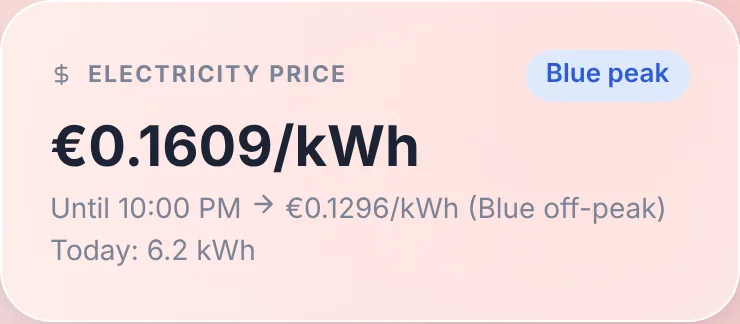
<p>A new <strong>Electricity price</strong> widget shows the current price, the current tier, until when it applies and the next price, as well as today's consumption.</p>
<p><img decoding="async" loading="lazy" alt="The electricity price widget: the current price, until when it applies, and the next one" src="https://gladysassistant.com/assets/images/05-energy-price-widget-en-97b14c1cb4a4e4bfa1ae7ed82fa92708.webp" width="740" height="324" class="img_ev3q"></p>
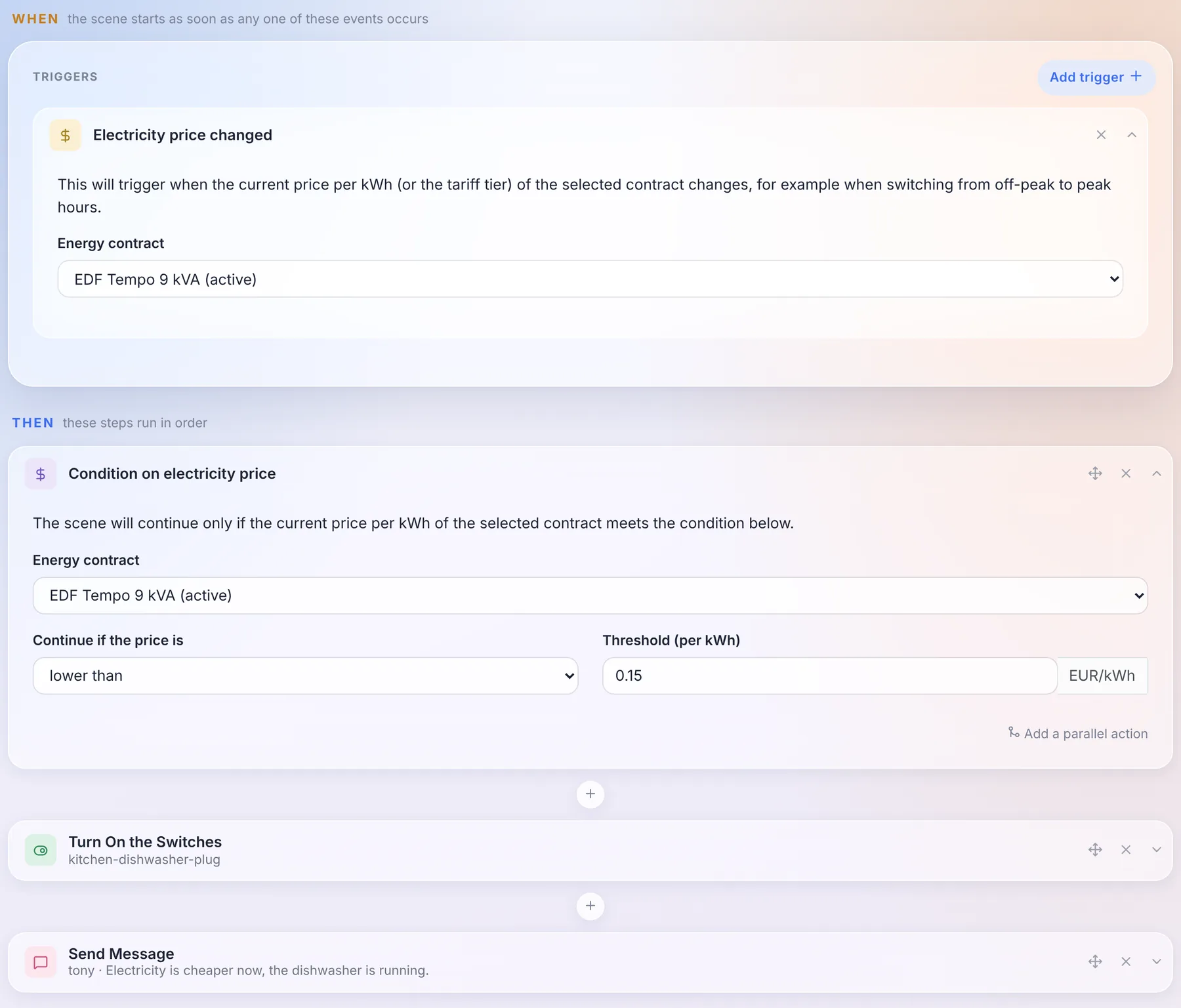
<p>And because the price is now known by Gladys at every moment, scenes can use it: an <strong>"Electricity price changed"</strong> trigger, and a <strong>"Condition on electricity price"</strong> action. Starting the dishwasher when electricity gets cheaper takes three blocks:</p>
<p><img decoding="async" loading="lazy" alt="A scene that starts the dishwasher as soon as the price drops below €0.15/kWh" src="https://gladysassistant.com/assets/images/06-energy-scene-en-04fafb8654eacb2186b972374aa1b1ce.webp" width="1800" height="1537" class="img_ev3q"></p>
<h3 class="anchor anchorTargetStickyNavbar_Vzrq" id="a-contract-can-come-from-anywhere">A contract can come from anywhere<a href="https://gladysassistant.com/blog/gladys-5-2-thermostat-and-energy-contracts/#a-contract-can-come-from-anywhere" class="hash-link" aria-label="Direct link to A contract can come from anywhere" title="Direct link to A contract can come from anywhere" translate="no">​</a></h3>
<p>The templates come from three places: the <a href="https://github.com/GladysAssistant/energy-contracts" target="_blank" rel="noopener noreferrer" class="">community catalogue</a>, downloaded by Gladys without needing an update, the internal Gladys services (EDF Tempo), and <strong>external integrations</strong>. An integration can now declare contract templates, publish tariff calendars (day colours, half-hourly or quarter-hourly spot prices, public holidays) and, for the contracts that rules can't express, compute the cost itself.</p>
<p>Concretely: an Octopus Agile, Tibber or Nord Pool integration can be published by anyone, without touching Gladys. And if your contract is missing, you can also write it yourself in JSON in the wizard, then export it as a template to share it.</p>
<p>The <a class="" href="https://gladysassistant.com/docs/integrations/energy-monitoring/">energy monitoring documentation</a> is up to date.</p>
<h2 class="anchor anchorTargetStickyNavbar_Vzrq" id="choose-where-system-messages-go">Choose where system messages go<a href="https://gladysassistant.com/blog/gladys-5-2-thermostat-and-energy-contracts/#choose-where-system-messages-go" class="hash-link" aria-label="Direct link to Choose where system messages go" title="Direct link to Choose where system messages go" translate="no">​</a></h2>
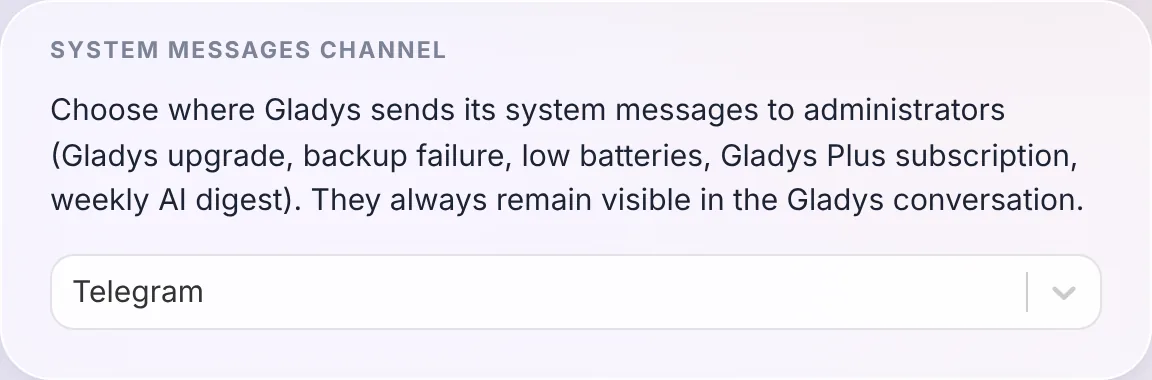
<p>Gladys sends messages to administrators on its own: an update, a failed backup, low batteries, the Gladys Plus subscription, the weekly AI digest. Until now, they went to every messaging channel you had configured.</p>
<p><img decoding="async" loading="lazy" alt="The new system messages channel setting" src="https://gladysassistant.com/assets/images/07-system-messages-en-bfd6741d8fb6327fd9ace1347ea79e32.webp" width="1152" height="380" class="img_ev3q"></p>
<p>You now choose the channel in <code>Settings / System</code>: all of them, Telegram only, or the Gladys conversation only. They always stay visible in the Gladys conversation anyway.</p>
<p>Thanks to <a href="https://github.com/cicoub13" target="_blank" rel="noopener noreferrer" class="">@cicoub13</a> for this one!</p>
<h2 class="anchor anchorTargetStickyNavbar_Vzrq" id="34-math-functions-in-scene-formulas">34 math functions in scene formulas<a href="https://gladysassistant.com/blog/gladys-5-2-thermostat-and-energy-contracts/#34-math-functions-in-scene-formulas" class="hash-link" aria-label="Direct link to 34 math functions in scene formulas" title="Direct link to 34 math functions in scene formulas" translate="no">​</a></h2>
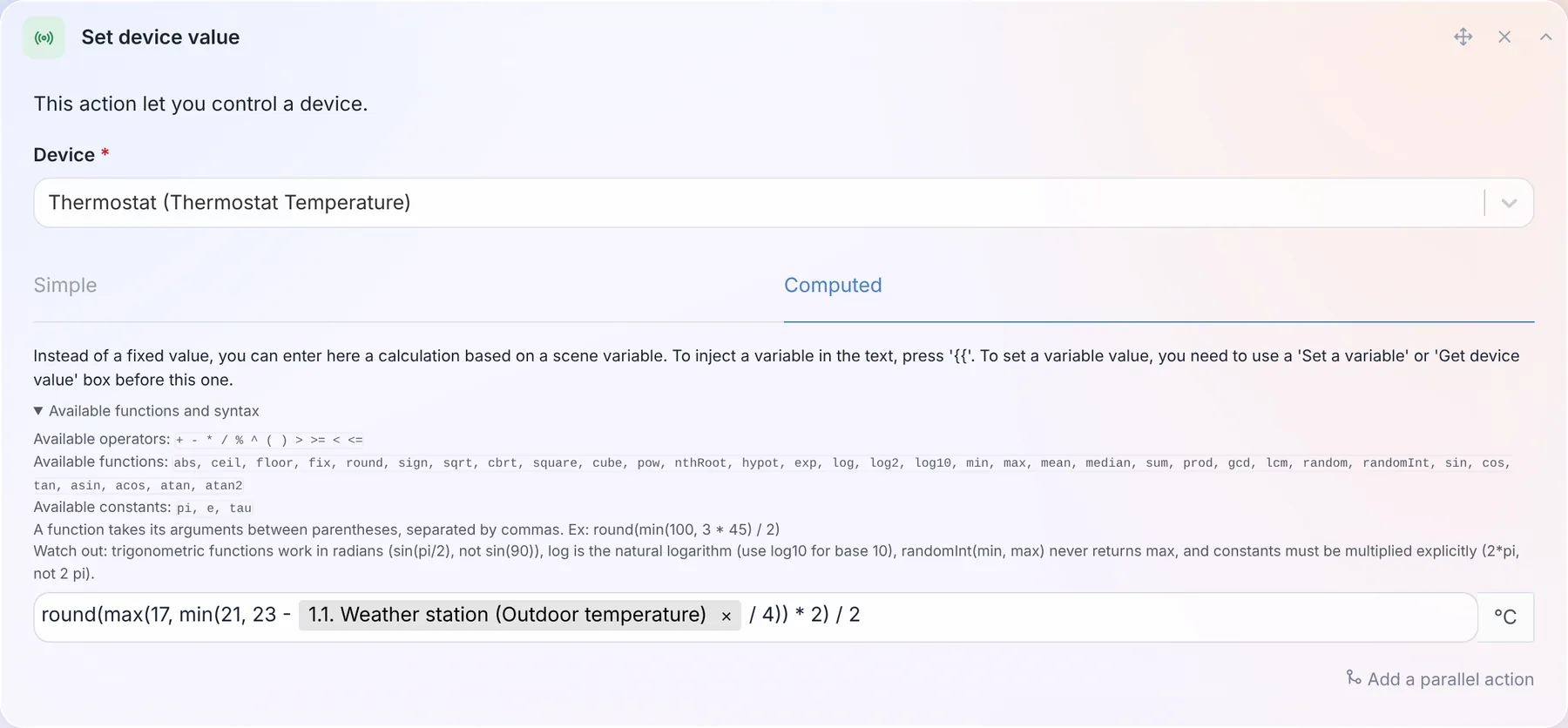
<p>The calculated values of scenes (wait, set a device value, set a variable, conditions, speaker volume) only knew <code>+ - * / % ^</code> and five functions. There are now 34 of them, plus 3 constants: <code>min</code>, <code>max</code>, <code>mean</code>, <code>median</code>, <code>sum</code>, <code>sqrt</code>, <code>pow</code>, <code>log10</code>, <code>exp</code>, the trigonometric functions, <code>pi</code>... And a "Available functions and syntax" link opens the full list right under the field.</p>
<p><img decoding="async" loading="lazy" alt="The formula field of a scene, with the list of available functions" src="https://gladysassistant.com/assets/images/08-formula-functions-en-f98394d5cafed565e30a9e4520b515b7.webp" width="1800" height="836" class="img_ev3q"></p>
<p>So a setpoint that follows the outdoor temperature while staying between 17 and 21 °C, rounded to the half degree, fits in one line, like in the screenshot above: <code>round(max(17, min(21, 23 - outside / 4)) * 2) / 2</code>, where <code>outside</code> is the temperature read in the previous step of the scene.</p>
<p>Another change: a formula that can't be computed now <strong>stops the scene</strong>, instead of letting it continue with the previous value.</p>
<p><a class="" href="https://gladysassistant.com/docs/scenes/math-functions/">The full list is in the documentation</a>.</p>
<h2 class="anchor anchorTargetStickyNavbar_Vzrq" id="find-the-devices-that-fill-your-database">Find the devices that fill your database<a href="https://gladysassistant.com/blog/gladys-5-2-thermostat-and-energy-contracts/#find-the-devices-that-fill-your-database" class="hash-link" aria-label="Direct link to Find the devices that fill your database" title="Direct link to Find the devices that fill your database" translate="no">​</a></h2>
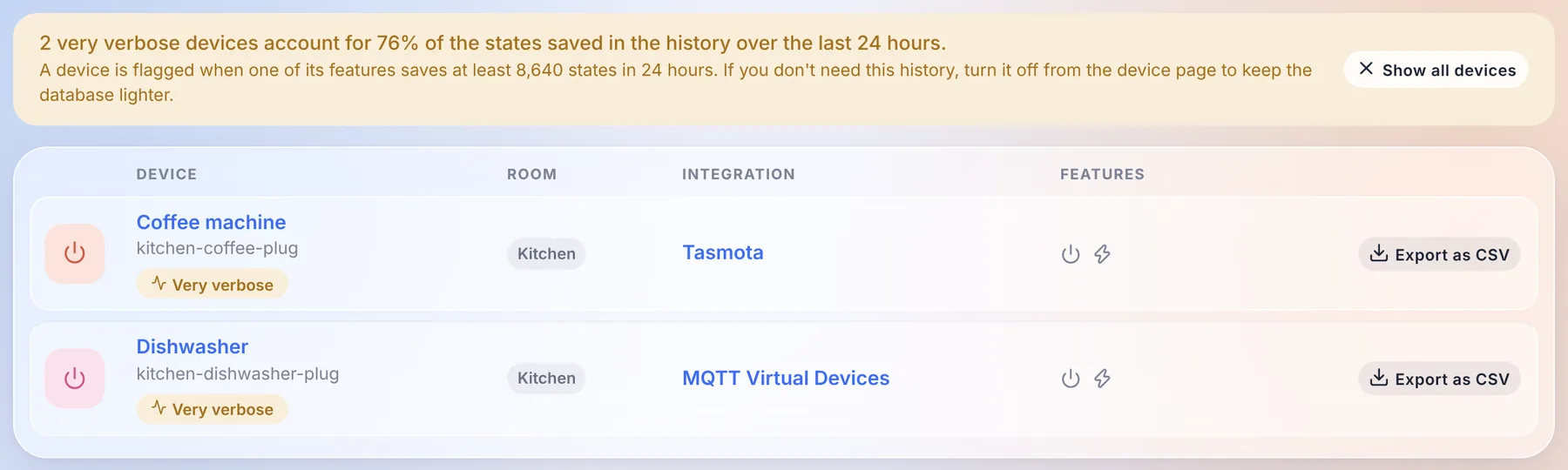
<p>Some devices send a value every few seconds. A smart plug reporting its power ten times a minute, kept forever in the history, ends up weighing more than the rest of the house combined.</p>
<p><img decoding="async" loading="lazy" alt="The devices page flags the very verbose devices, with their share of the history" src="https://gladysassistant.com/assets/images/09-verbose-devices-en-2baf852f010da1f55432433129f400c2.webp" width="1800" height="540" class="img_ev3q"></p>
<p>The devices page now flags them: a banner tells you which share of the history they represent over the last 24 hours, a filter shows only them, and each device page displays the size of the history of each feature. If you don't need that history, disable it from the device page, and your database will thank you.</p>
<h2 class="anchor anchorTargetStickyNavbar_Vzrq" id="for-integration-developers">For integration developers<a href="https://gladysassistant.com/blog/gladys-5-2-thermostat-and-energy-contracts/#for-integration-developers" class="hash-link" aria-label="Direct link to For integration developers" title="Direct link to For integration developers" translate="no">​</a></h2>
<ul>
<li class=""><strong>Calendars</strong>: a new <code>calendar</code> integration type lets an integration sync calendars and their events into Gladys: a CalDAV or Nextcloud server, iCloud, a public ICS feed (school timetable, waste collection, sports fixtures)... They show up in the calendar view and work with the calendar scene triggers, exactly like the calendars of the CalDAV integration, and each user links their own account from the integration page. Google Calendar and Outlook, which need a per-user OAuth login, will come in a second step.</li>
<li class=""><strong>Energy contracts</strong>: the new <code>energy_contracts</code> capability, described above.</li>
<li class=""><strong>Late readings</strong>: an integration whose supplier only serves yesterday's readings (Hydro-Québec) can publish a dated consumption, priced at the right half-hour, critical peaks included.</li>
<li class=""><strong>Widgets</strong>: a widget button can now open a short form (4 fields maximum) before sending its action, for example the price of a pellet delivery typed from the wall tablet.</li>
<li class=""><strong>Houses</strong>: a field can offer the list of the houses of Gladys with <code>source: "houses"</code>, in the configuration, the widgets and the scenes.</li>
</ul>
<p>Everything is in <a class="" href="https://gladysassistant.com/docs/dev/external-integrations/">the developer guide</a>.</p>
<h2 class="anchor anchorTargetStickyNavbar_Vzrq" id="fixes-and-everything-51x-already-brought">Fixes, and everything 5.1.x already brought<a href="https://gladysassistant.com/blog/gladys-5-2-thermostat-and-energy-contracts/#fixes-and-everything-51x-already-brought" class="hash-link" aria-label="Direct link to Fixes, and everything 5.1.x already brought" title="Direct link to Fixes, and everything 5.1.x already brought" translate="no">​</a></h2>
<p>Four patch releases went out since 5.1 (5.1.1 to 5.1.4). Here is what they and this release fix:</p>
<ul>
<li class=""><strong>Updates</strong>: when Gladys can't download its new image, the update now shows the real Docker error (internet connection, disk space, timeout) instead of a generic message.</li>
<li class=""><strong>CalDAV</strong>: events with parameters on their properties and <code>GMT+hhmm</code> timezones are synced correctly, and an event that can't be formatted no longer blocks the others.</li>
<li class=""><strong>Zigbee2MQTT</strong>: the bundled container is upgraded to 2.14.2.</li>
<li class=""><strong>Broadlink</strong>: the toggle of smart plugs stays in sync with the real state of the plug.</li>
<li class=""><strong>Vacuum cleaners</strong>: the cleaning mode and run mode controls only offer the options the device supports.</li>
<li class=""><strong>Camera widget</strong>: only the text states of the image feature are displayed, and a dashboard whose camera widget had its PTZ controls toggled can be saved again.</li>
<li class=""><strong>Integrations</strong>: secret fields of actions can be typed in, default values of action fields are applied, number fields accept decimals, widget buttons keep their colours in dark mode, and widget tiles are laid out in a balanced grid that keeps its icon colours in the glass theme.</li>
<li class=""><strong>AI</strong>: the assistant could fail on any scene-related question through Gladys Plus (an error 502): its requests are accepted again, and much lighter.</li>
<li class=""><strong>Tablet mode</strong>: opening Gladys through Gladys Plus or with an API key no longer fails on the tablet mode.</li>
<li class=""><strong>Login</strong>: after a local login, Gladys takes you back to the page you were trying to open.</li>
<li class=""><strong>Database</strong>: the daily purge keeps the 1,000 most recent messages per user and the 2,000 most recent background jobs, so these tables no longer grow forever.</li>
<li class=""><strong>Security</strong>: the location and presence routes of a user are now restricted to that user and to administrators, and several dependencies are upgraded to clear npm advisories.</li>
<li class=""><strong>Gladys Plus</strong>: the nightly backup no longer gets Gladys killed for lack of memory on a machine with a large history. If your Gladys Plus account has no two-factor recovery codes, a banner on the dashboard now asks you to generate them, so you can't be locked out by losing your phone. The version check is only sent by the official release images, and the pricing page shows the offline email alert introduced in 5.1.</li>
</ul>
<p>That makes 47 pull requests since version 5.1, 28 of them in this release.</p>
<h2 class="anchor anchorTargetStickyNavbar_Vzrq" id="thanks-to-the-contributors">Thanks to the contributors<a href="https://gladysassistant.com/blog/gladys-5-2-thermostat-and-energy-contracts/#thanks-to-the-contributors" class="hash-link" aria-label="Direct link to Thanks to the contributors" title="Direct link to Thanks to the contributors" translate="no">​</a></h2>
<p>Thanks to <a href="https://github.com/William-De71" target="_blank" rel="noopener noreferrer" class="">@William-De71</a> for the thermostat, to <a href="https://github.com/cicoub13" target="_blank" rel="noopener noreferrer" class="">@cicoub13</a> for the system messages channel and the camera widget, PTZ and tablet mode fixes, and to <a href="https://github.com/bertrandda" target="_blank" rel="noopener noreferrer" class="">@bertrandda</a> for the CalDAV fix. And thanks to everyone who reported bugs on the forum!</p>
<p>See you on <a href="https://community.gladysassistant.com/" target="_blank" rel="noopener noreferrer" class="">the forum</a> if you want to talk about this release :)</p>
<h2 class="anchor anchorTargetStickyNavbar_Vzrq" id="how-to-update">How to update?<a href="https://gladysassistant.com/blog/gladys-5-2-thermostat-and-energy-contracts/#how-to-update" class="hash-link" aria-label="Direct link to How to update?" title="Direct link to How to update?" translate="no">​</a></h2>
<p>As always, Gladys updates automatically within 24 hours if you use Watchtower, otherwise you can do it in one click from the settings.</p>
<p>Remember to set up Telegram to get an alert on your phone when Gladys updates, and since this release, you can choose exactly where these messages go!</p>
<p>The <a href="https://github.com/GladysAssistant/Gladys/releases/tag/v5.2.0" target="_blank" rel="noopener noreferrer" class="">full CHANGELOG of 5.2.0</a> is on GitHub.</p><div><div style="border-top:1px solid white;margin-top:50px;margin-bottom:50px"></div><div class="row"><div class="col col--8"><h2>Subscribe to the Gladys Assistant newsletter</h2>A few emails per month about new releases and project news. Sent by Pierre-Gilles Leymarie, founder of the project. Unsubscribe anytime 🙂</div><div class="col col--4 newsletterSectionInputCol_wyow"><form><div class="form-group"><input type="email" style="width:100%;line-height:1.5;border-radius:5px;padding:8px" placeholder="Email" value=""></div><div class="form-group"><input type="text" style="width:100%;line-height:1.5;border-radius:5px;padding:8px;margin-top:10px" placeholder="First name" value=""></div><button style="margin-top:10px" class="button button--primary button--block">Subscribe to the newsletter</button></form></div></div></div>]]></content>
        <author>
            <name>Pierre-Gilles Leymarie</name>
            <uri>https://github.com/Pierre-Gilles</uri>
        </author>
    </entry>
    <entry>
        <title type="html"><![CDATA[Gladys Assistant 5.1: integrations can add their own widgets and scenes]]></title>
        <id>https://gladysassistant.com/blog/gladys-5-1-integration-widgets-and-scenes/</id>
        <link href="https://gladysassistant.com/blog/gladys-5-1-integration-widgets-and-scenes/"/>
        <updated>2026-09-21T00:00:00.000Z</updated>
        <summary type="html"><![CDATA[A community integration can now put its own widgets on your dashboard, and add its own triggers and actions to your scenes. Also in this release: a Spanish translation, an email alert when your Gladys goes down, grid carbon tracking and smoke detector diagnostics.]]></summary>
        <content type="html"><![CDATA[<p>Hey everyone!</p>
<p>New version of Gladys today, 5.1 🎉</p>
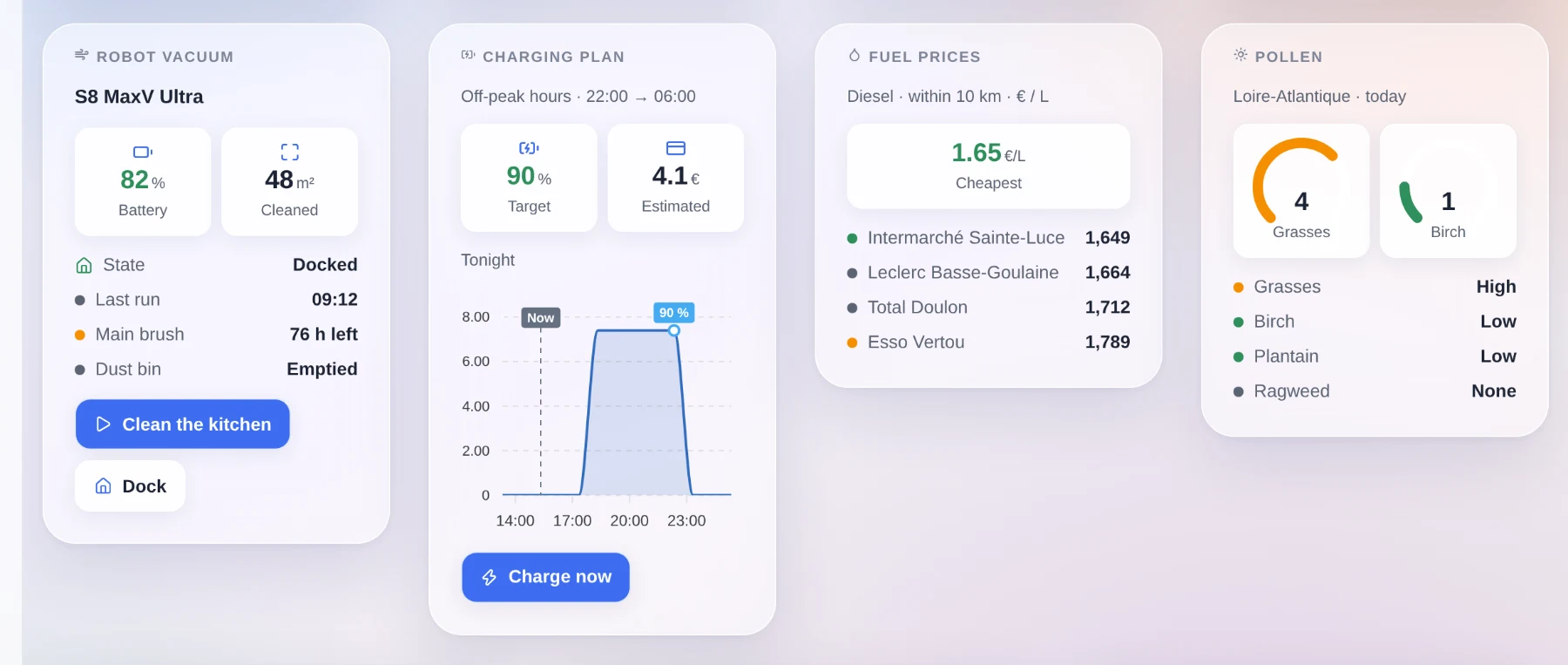
<p>Version 5 was a big interface redesign. This one is mostly for integrations. Until now, a community integration could do exactly one thing: publish devices. It can now put its own widgets on your dashboard, and add its own triggers and actions to your scenes.</p>
<p><img decoding="async" loading="lazy" alt="Four widgets published by community integrations, on a Gladys dashboard" src="https://gladysassistant.com/assets/images/01-integration-widgets-en-d72bc1b775c8aaaa2a102633b772c1ad.webp" width="1800" height="763" class="img_ev3q"></p>
<!-- -->
<h2 class="anchor anchorTargetStickyNavbar_Vzrq" id="dashboard-widgets-published-by-integrations">Dashboard widgets published by integrations<a href="https://gladysassistant.com/blog/gladys-5-1-integration-widgets-and-scenes/#dashboard-widgets-published-by-integrations" class="hash-link" aria-label="Direct link to Dashboard widgets published by integrations" title="Direct link to Dashboard widgets published by integrations" translate="no">​</a></h2>
<p>Quick reminder: since 4.84, anyone can package an integration into a small Docker image, publish it on GitHub, and it shows up in the catalog of every Gladys instance. We are at 81 today, written almost entirely by the community.</p>
<p>The problem is that a lot of useful things are not devices. A solar production forecast, a vacuum's cleaning map, the cheapest diesel around you, today's pollen risk, the plan your car will follow tonight: none of that fits into "a temperature and a switch", and all of it is exactly what you want on a dashboard.</p>
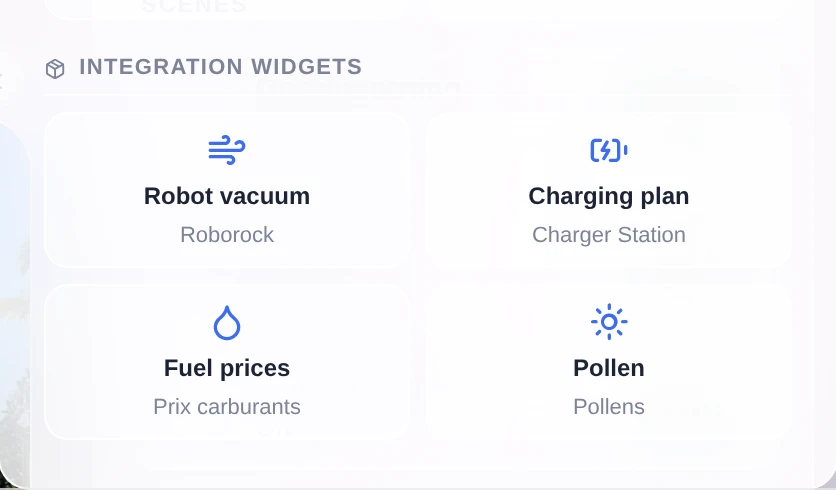
<p>So an integration can now declare its own widgets, and they land in the dashboard editor next to the built-in ones:</p>
<p><img decoding="async" loading="lazy" alt="The &amp;quot;Integration widgets&amp;quot; section of the widget picker" src="https://gladysassistant.com/assets/images/02-widget-picker-en-b085c9a94cef49cf4c15513ce9025511.webp" width="836" height="490" class="img_ev3q"></p>
<p>They show up in the widget picker of the dashboard editor, in their own section, with the name of the integration that provides them. You add one like any other widget. And if it has settings (which vacuum, which region, which period), you fill them in right there, in a form described by the integration and generated by Gladys.</p>
<h3 class="anchor anchorTargetStickyNavbar_Vzrq" id="the-integration-says-what-to-show-gladys-decides-how">The integration says what to show, Gladys decides how<a href="https://gladysassistant.com/blog/gladys-5-1-integration-widgets-and-scenes/#the-integration-says-what-to-show-gladys-decides-how" class="hash-link" aria-label="Direct link to The integration says what to show, Gladys decides how" title="Direct link to The integration says what to show, Gladys decides how" translate="no">​</a></h3>
<p>This is the important part of the feature, and it was a deliberate choice rather than something we ended up with.</p>
<p>No third-party integration injects HTML into your Gladys. No iframe, no script, no CSS, no custom colors or sizes. The integration sends a description of its content in a small vocabulary: a title, value tiles, a gauge, a list of states, a chart, an image grid, buttons. Gladys does the rendering.</p>
<p>So every widget, even one written by someone you have never heard of, automatically gets the Horizon theme, dark mode, the mobile layout, your language and your timezone. And it keeps working when the interface changes. It is the iOS and Android widget model.</p>
<p>There is also a content budget, to avoid overloaded cards: 8 components maximum, a single main component (a chart or a list or an image, not two), 6 value tiles maximum, 4 buttons maximum, bounded lists and short texts. And Gladys decides the display order: header, tiles, main component, states, buttons. Two widgets showing a value, a curve and two buttons therefore come out looking the same.</p>
<p>A few technical details:</p>
<ul>
<li class="">The content is computed on the fly, not frozen in the manifest. A vacuum that is cleaning can return a different layout than a vacuum on its dock.</li>
<li class="">Nothing is treated as trustworthy. Every payload is checked and bounded before it reaches the interface: known components only, size-limited texts and lists, finite numbers, valid dates, https links, and images served by your Gladys rather than fetched from a third party by your browser.</li>
<li class="">A button can act: call the integration, or write a value on one of its device features. The result is shown in the card.</li>
<li class="">A widget can plot a curve from your Gladys history, or from data Gladys does not have (a forecast, a charging plan, tomorrow's prices) by sending the points directly, with annotations and a "now" marker.</li>
<li class="">An integration with no devices at all, like a fuel price index or a cinema release feed, finally has a place thanks to the new <code>provider</code> type.</li>
</ul>
<p>One note about the screenshots above: they are examples of what the vocabulary can do. The mechanism ships today, the integrations that use it still have to be written.</p>
<h2 class="anchor anchorTargetStickyNavbar_Vzrq" id="scene-triggers-and-actions-published-by-integrations">Scene triggers and actions published by integrations<a href="https://gladysassistant.com/blog/gladys-5-1-integration-widgets-and-scenes/#scene-triggers-and-actions-published-by-integrations" class="hash-link" aria-label="Direct link to Scene triggers and actions published by integrations" title="Direct link to Scene triggers and actions published by integrations" translate="no">​</a></h2>
<p>It is exactly the same problem on the scenes side. Until now, every trigger and every action in the scene editor was hardcoded in Gladys. An external integration had no way to add one, and the two generic surfaces it did have were not enough:</p>
<ul>
<li class="">A device feature is a state. A temperature, a switch, a presence: that works very well with the "state change" trigger. But a licence plate recognized in the driveway, a doorbell with a snapshot, an NFC tag scanned or a voice command understood are one-off events with data attached. Turning them into a feature loses the data, gets mixed up when two events come in a row, and pollutes your history.</li>
<li class="">Writing a value is not running an operation. "Take a snapshot and give me the image", "clean these three rooms", "announce this on that speaker": there are parameters and a result.</li>
</ul>
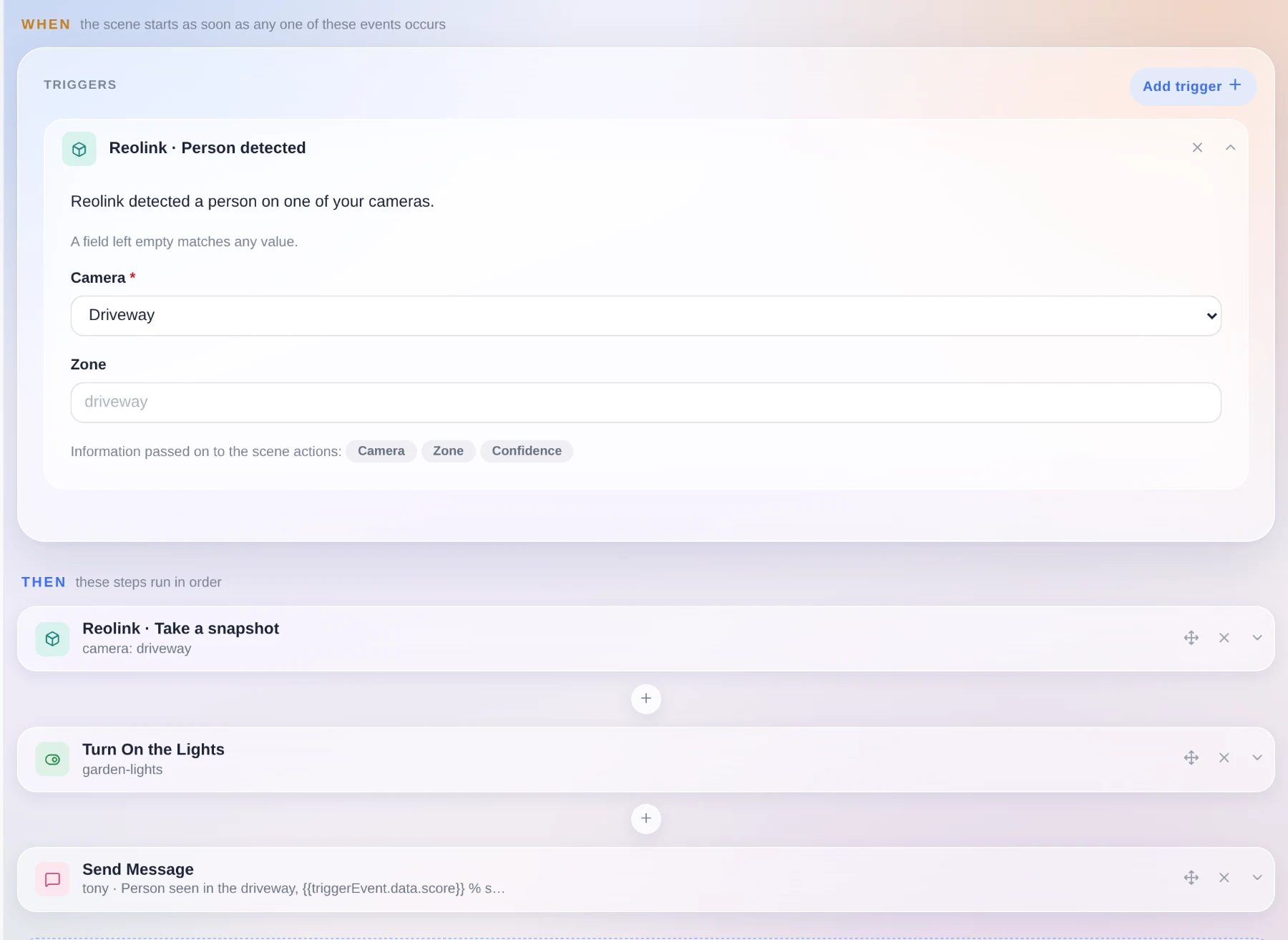
<p>So an integration can now declare its triggers and its actions in its manifest, and they show up in the scene editor like everything else.</p>
<p><img decoding="async" loading="lazy" alt="A scene triggered by an integration, with an integration action in its steps" src="https://gladysassistant.com/assets/images/03-scene-integration-en-e318737ed9d531e4e09d403f7bf0d3fd.webp" width="1800" height="1313" class="img_ev3q"></p>
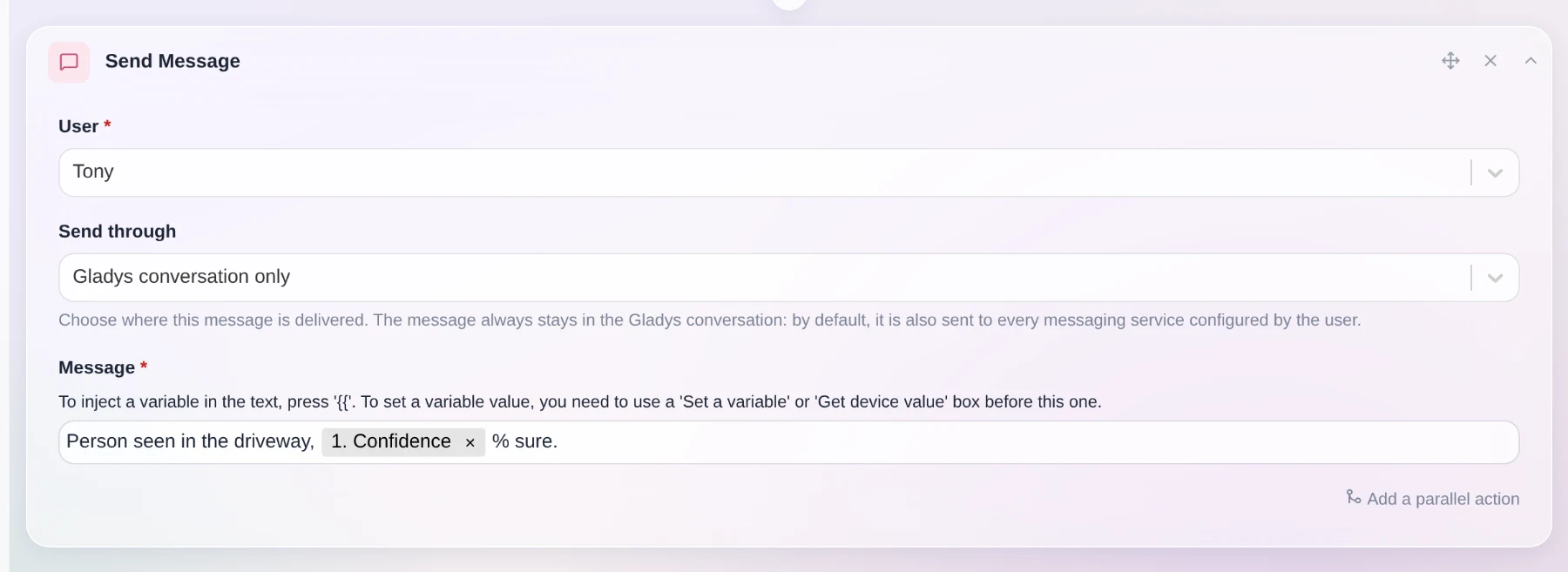
<p>The card is generated by Gladys from the declaration. The fields become a form, a field left empty matches any value, and the data carried by the event becomes scene variables you can reuse in the following steps. The confidence score in the screenshot comes straight from the trigger.</p>
<p>On the design side, it is Gladys that does the matching: the integration sends a typed event with its data, and Gladys compares it against the triggers you configured. The integration never learns which scenes exist, so there is nothing to leak and nothing to resynchronize when it reconnects, and your configuration stays in Gladys. An action is sent once, and a timeout fails that action only.</p>
<p>One nice side effect: a scene can now mix an event from one integration, an action from another, and the usual Gladys steps in between.</p>
<h2 class="anchor anchorTargetStickyNavbar_Vzrq" id="gladys-conversation-only">"Gladys conversation only"<a href="https://gladysassistant.com/blog/gladys-5-1-integration-widgets-and-scenes/#gladys-conversation-only" class="hash-link" aria-label="Direct link to &quot;Gladys conversation only&quot;" title="Direct link to &quot;Gladys conversation only&quot;" translate="no">​</a></h2>
<p>A lot of you asked for this one. When a scene sends you a message, it goes by default to every messaging service you configured (Telegram, SMS...).</p>
<p><img decoding="async" loading="lazy" alt="The delivery selector of the message action, set to &amp;quot;Gladys conversation only&amp;quot;" src="https://gladysassistant.com/assets/images/04-conversation-only-en-5d0c01c7e33ed74db70a0874e65f94d7.webp" width="1800" height="657" class="img_ev3q"></p>
<p>You can now choose. With "Gladys conversation only", the message stays in Gladys and nowhere else. That is handy if you install Telegram later and do not want your old scenes to start notifying your phone. The option works even if you have no messaging channel configured at all, and it also exists on the "Ask the AI" action.</p>
<p>Still in scenes: scenes created by the AI are now tagged "AI", which makes them easy to find again. And filtering by tag now matches the tag exactly, instead of keeping anything that contains the word.</p>
<h2 class="anchor anchorTargetStickyNavbar_Vzrq" id="gladys-speaks-spanish">Gladys speaks Spanish<a href="https://gladysassistant.com/blog/gladys-5-1-integration-widgets-and-scenes/#gladys-speaks-spanish" class="hash-link" aria-label="Direct link to Gladys speaks Spanish" title="Direct link to Gladys speaks Spanish" translate="no">​</a></h2>
<p><img decoding="async" loading="lazy" alt="The Gladys interface in Spanish" src="https://gladysassistant.com/assets/images/05-spanish-fc01d11e5225f35ab9d2e55bac190169.webp" width="1800" height="1125" class="img_ev3q"></p>
<p>Gladys is now translated into Spanish, the fourth language after English, French and German. The whole interface went through: dashboard, devices, scene editor, settings, integration pages, and even the icon search keywords.</p>
<p>Big thanks to Nestor Alonso Torres for this contribution. If you want Gladys in your language, the translation files are plain JSON in the repository, go for it.</p>
<h2 class="anchor anchorTargetStickyNavbar_Vzrq" id="get-warned-when-your-gladys-goes-down">Get warned when your Gladys goes down<a href="https://gladysassistant.com/blog/gladys-5-1-integration-widgets-and-scenes/#get-warned-when-your-gladys-goes-down" class="hash-link" aria-label="Direct link to Get warned when your Gladys goes down" title="Direct link to Get warned when your Gladys goes down" translate="no">​</a></h2>
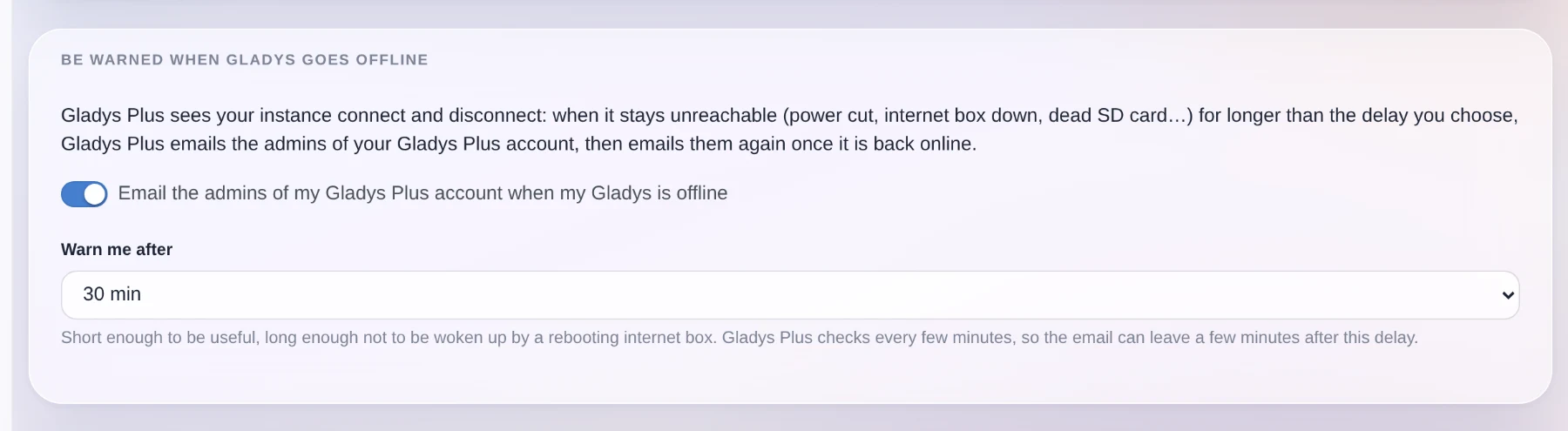
<p><img decoding="async" loading="lazy" alt="The new Gladys Plus setting: be emailed when your instance goes offline" src="https://gladysassistant.com/assets/images/06-offline-alert-en-3850beff776e348b34c64089643990d1.webp" width="1800" height="495" class="img_ev3q"></p>
<p>Gladys Plus sees your instance connect and disconnect. It can now email you when it has been unreachable for longer than a delay you choose, from 10 minutes to a day, then email you again when it comes back.</p>
<p>Power cut, internet box down, dead SD card, a Docker update that went wrong: you find out the same day, instead of discovering it in the evening when you get home.</p>
<p>The setting belongs to your Gladys Plus account, so you change it from Gladys Plus, and Gladys gives you a direct link to the right page.</p>
<h2 class="anchor anchorTargetStickyNavbar_Vzrq" id="a-new-device-category-grid-carbon">A new device category: grid carbon<a href="https://gladysassistant.com/blog/gladys-5-1-integration-widgets-and-scenes/#a-new-device-category-grid-carbon" class="hash-link" aria-label="Direct link to A new device category: grid carbon" title="Direct link to A new device category: grid carbon" translate="no">​</a></h2>
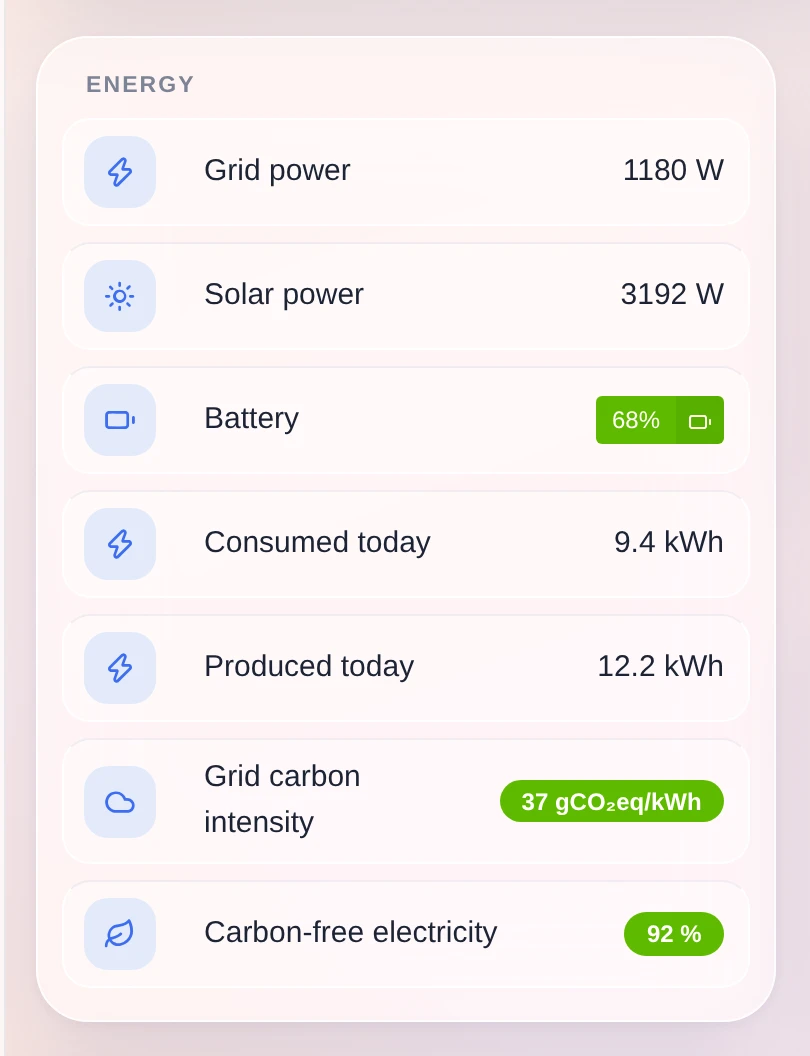
<p><img decoding="async" loading="lazy" alt="The grid carbon intensity of the electricity grid, on an energy dashboard" src="https://gladysassistant.com/assets/images/08-grid-carbon-en-f21c8d8b60574fec51504f2d0c43b017.webp" width="810" height="1056" class="img_ev3q"></p>
<p>Gladys gains a "grid carbon sensor" category, with three values: the carbon intensity of your electricity grid in gCO₂eq/kWh, the share of carbon-free electricity and the share of renewables. Each one has its unit, its history and its charts.</p>
<p>More importantly, a scene can read them. "Start the washing machine when the grid is clean" becomes possible, and the integrations that publish those numbers for your country finally have somewhere to put them.</p>
<h2 class="anchor anchorTargetStickyNavbar_Vzrq" id="smoke-detectors-report-more-information">Smoke detectors report more information<a href="https://gladysassistant.com/blog/gladys-5-1-integration-widgets-and-scenes/#smoke-detectors-report-more-information" class="hash-link" aria-label="Direct link to Smoke detectors report more information" title="Direct link to Smoke detectors report more information" translate="no">​</a></h2>
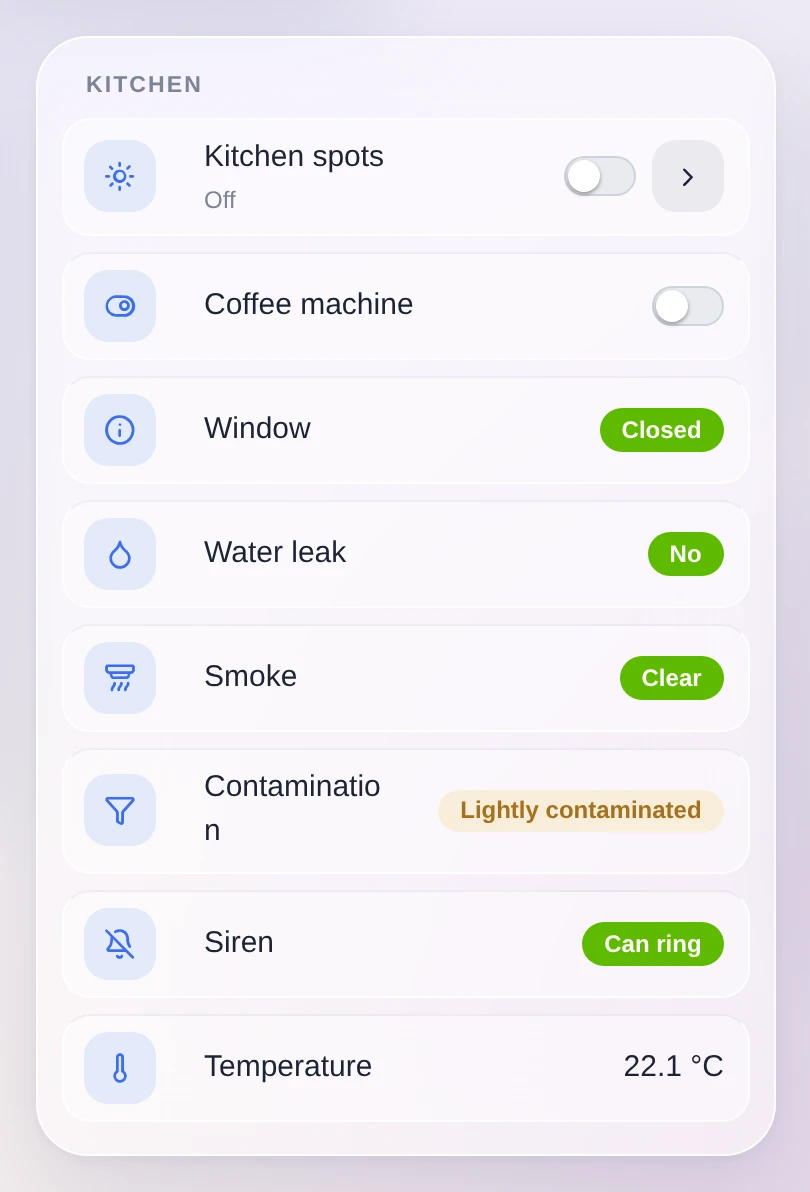
<p><img decoding="async" loading="lazy" alt="A kitchen widget showing the diagnostics of a smoke detector" src="https://gladysassistant.com/assets/images/07-smoke-detector-en-f35246342eabc1135e899bac782c8b90.webp" width="810" height="1192" class="img_ev3q"></p>
<p>Zigbee smoke detectors send a lot more than the alarm itself, and Gladys can now read it: how contaminated the sensing chamber is (a contaminated detector no longer detects anything, so it tells you when to clean or replace it), whether the detector has muted itself, and a command to hush the alarm for as long as the device allows.</p>
<p>That last one deliberately stays out of the switch category. Silencing a fire alarm must not be possible through a "turn everything off" in a scene or a voice assistant.</p>
<h2 class="anchor anchorTargetStickyNavbar_Vzrq" id="devices-protocols-system">Devices, protocols, system<a href="https://gladysassistant.com/blog/gladys-5-1-integration-widgets-and-scenes/#devices-protocols-system" class="hash-link" aria-label="Direct link to Devices, protocols, system" title="Direct link to Devices, protocols, system" translate="no">​</a></h2>
<ul>
<li class=""><strong>Matter</strong>: matter.js is upgraded to 0.17.9, which fixes the <code>Node ID X is already commissioned</code> errors that blocked some pairings.</li>
<li class=""><strong>HomeKit</strong>: air conditioners are exposed as a HeaterCooler. Asking Siri to turn one on now keeps the mode it was in.</li>
<li class=""><strong>Zigbee2MQTT</strong>: the ZLinky_TIC three-phase labels are handled (<code>SINSTS1</code>, <code>SMAXSN*</code>, <code>IINST1</code>, <code>IMAX1</code>), <code>probe_temperature</code> gets its own temperature type instead of overwriting the main one, and the container now runs in your instance's timezone. Its logs and schedules are no longer off by a couple of hours.</li>
<li class=""><strong>Dashboard</strong>: the slider and the number input respect the step declared by the device feature. A setpoint that moves by 0.5 no longer jumps by 1.</li>
<li class=""><strong>Sonos</strong>: the built-in integration now has a "deprecated" badge and a migrate button to the community integration, which does more. The migration modal warns about what changes for play notifications.</li>
<li class=""><strong>Calendar</strong>: fixed a regression where loading the dayjs timezone plugin broke the calendar.</li>
<li class=""><strong>Gladys Plus</strong>: the payment lock some accounts were stuck in because of the Lite plan 402 bug is now cleared automatically. And every release is published to Gladys Plus straight from the release workflow.</li>
<li class=""><strong>Security</strong>: fixed a password reset flaw where an attacker-chosen origin could poison the link sent by email.</li>
</ul>
<p>On the documentation side, the API routes that were missing from the generated apidoc are published, and the external integrations specification is split into one file per topic.</p>
<h2 class="anchor anchorTargetStickyNavbar_Vzrq" id="and-everything-50x-already-fixed">And everything 5.0.x already fixed<a href="https://gladysassistant.com/blog/gladys-5-1-integration-widgets-and-scenes/#and-everything-50x-already-fixed" class="hash-link" aria-label="Direct link to And everything 5.0.x already fixed" title="Direct link to And everything 5.0.x already fixed" translate="no">​</a></h2>
<p>Between 5.0 and today, four patch releases went out (5.0.1 to 5.0.4) with around fifty fixes, almost all of them from your feedback on the new interface: portrait tablets, long device names, the mobile dock, weather icons, the ConBee III, scene variable renumbering, dropdown menus falling off the bottom of the screen, dashboard scroll lag.</p>
<p>That makes almost 70 pull requests since version 5.0, 23 of them in this release.</p>
<h2 class="anchor anchorTargetStickyNavbar_Vzrq" id="thanks-to-the-contributors">Thanks to the contributors<a href="https://gladysassistant.com/blog/gladys-5-1-integration-widgets-and-scenes/#thanks-to-the-contributors" class="hash-link" aria-label="Direct link to Thanks to the contributors" title="Direct link to Thanks to the contributors" translate="no">​</a></h2>
<p>Thanks to <a href="https://github.com/cicoub13" target="_blank" rel="noopener noreferrer" class="">@cicoub13</a>, <a href="https://github.com/William-De71" target="_blank" rel="noopener noreferrer" class="">@William-De71</a>, <a href="https://github.com/vincentBesseau" target="_blank" rel="noopener noreferrer" class="">@vincentBesseau</a> and Nestor Alonso Torres for the code in this release, and to everyone publishing external integrations. The catalog is at 81 and it keeps growing.</p>
<p>If you want to write your own, <a class="" href="https://gladysassistant.com/docs/dev/external-integrations/">the developer guide is here</a>. It now covers widgets and scene declarations, with the manifest fields, the content vocabulary, the limits and the SDK methods.</p>
<p>See you on <a href="https://community.gladysassistant.com/" target="_blank" rel="noopener noreferrer" class="">the forum</a> if you want to talk about this release :)</p>
<h2 class="anchor anchorTargetStickyNavbar_Vzrq" id="how-to-update">How to update?<a href="https://gladysassistant.com/blog/gladys-5-1-integration-widgets-and-scenes/#how-to-update" class="hash-link" aria-label="Direct link to How to update?" title="Direct link to How to update?" translate="no">​</a></h2>
<p>As always, Gladys updates automatically within 24 hours if you use Watchtower, otherwise you can do it in one click from the settings.</p>
<p>Remember to set up Telegram to get an alert on your phone when Gladys updates!</p>
<p>The <a href="https://github.com/GladysAssistant/Gladys/releases/tag/v5.1.0" target="_blank" rel="noopener noreferrer" class="">full CHANGELOG of 5.1.0</a> is on GitHub.</p><div><div style="border-top:1px solid white;margin-top:50px;margin-bottom:50px"></div><div class="row"><div class="col col--8"><h2>Subscribe to the Gladys Assistant newsletter</h2>A few emails per month about new releases and project news. Sent by Pierre-Gilles Leymarie, founder of the project. Unsubscribe anytime 🙂</div><div class="col col--4 newsletterSectionInputCol_wyow"><form><div class="form-group"><input type="email" style="width:100%;line-height:1.5;border-radius:5px;padding:8px" placeholder="Email" value=""></div><div class="form-group"><input type="text" style="width:100%;line-height:1.5;border-radius:5px;padding:8px;margin-top:10px" placeholder="First name" value=""></div><button style="margin-top:10px" class="button button--primary button--block">Subscribe to the newsletter</button></form></div></div></div>]]></content>
        <author>
            <name>Pierre-Gilles Leymarie</name>
            <uri>https://github.com/Pierre-Gilles</uri>
        </author>
    </entry>
    <entry>
        <title type="html"><![CDATA[Gladys Assistant 5 is here 🎉]]></title>
        <id>https://gladysassistant.com/blog/gladys-assistant-5/</id>
        <link href="https://gladysassistant.com/blog/gladys-assistant-5/"/>
        <updated>2026-08-27T00:00:00.000Z</updated>
        <summary type="html"><![CDATA[Almost six years after v4, Gladys Assistant gets a brand new interface. Horizon: a glass design built for the phone in your pocket, a dashboard you can actually lay out, a rewritten scene editor, and 67 community integrations.]]></summary>
        <content type="html"><![CDATA[<p>Hey everyone!</p>
<p><strong>Gladys Assistant 5 is out.</strong> 🎉</p>
<p>This is the first major version of Gladys in almost six years, and it is the one I have wanted to ship for a very long time: a complete redesign of the interface, from the dashboard to the last settings page.</p>
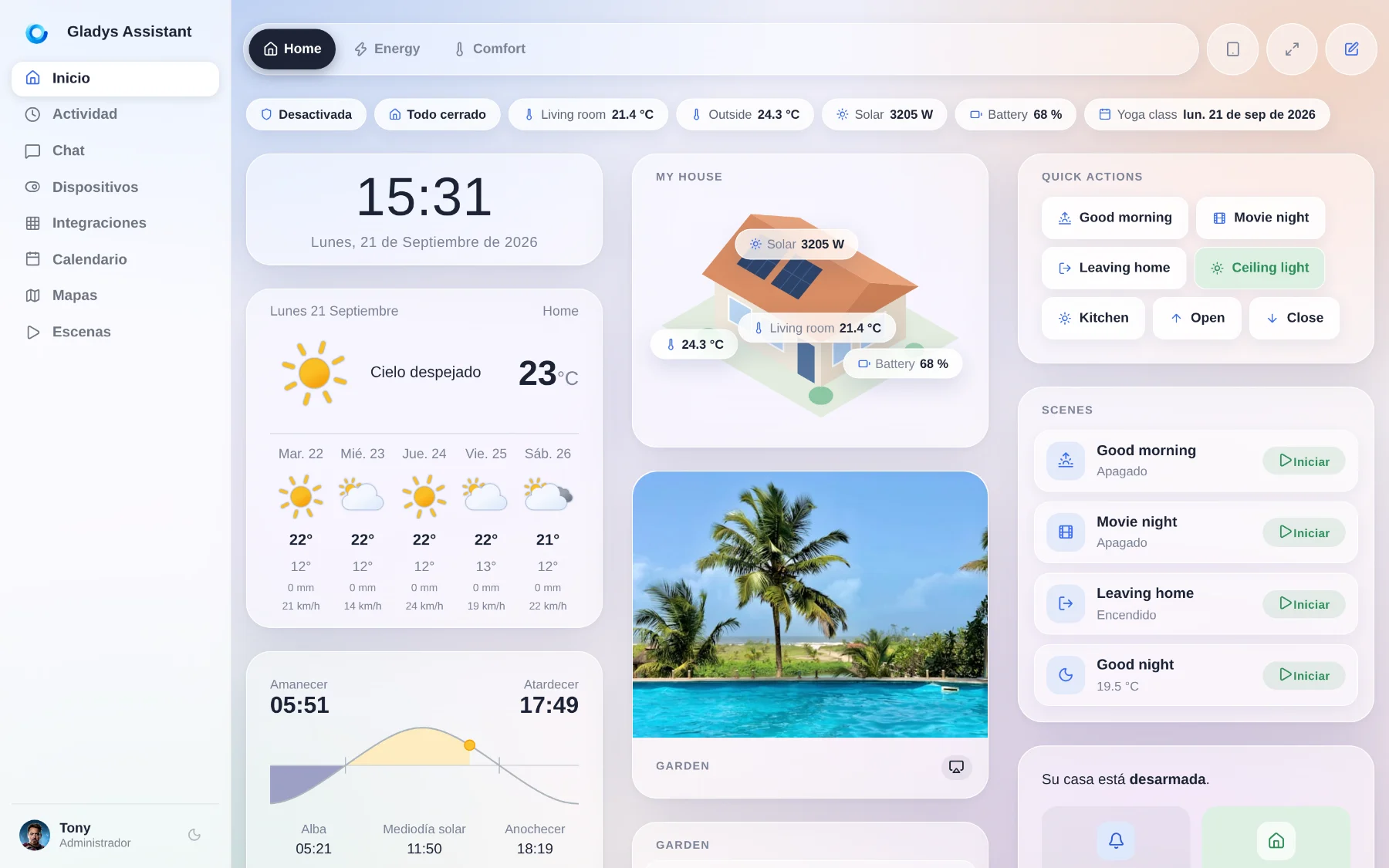
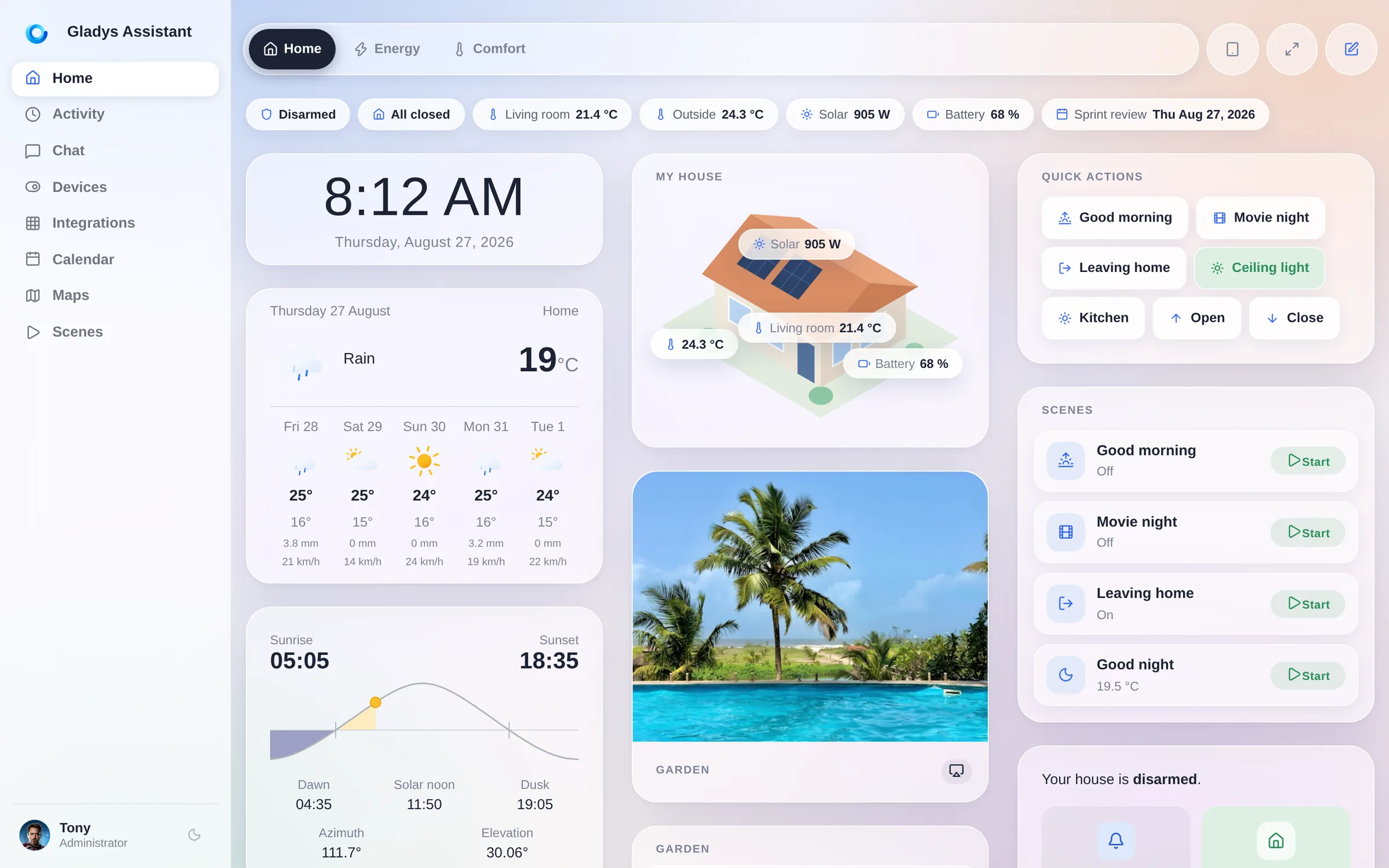
<p><img decoding="async" loading="lazy" alt="The Gladys Assistant 5 dashboard, in the new Horizon design" src="https://gladysassistant.com/assets/images/01-horizon-dashboard-en-abb44ada1746ee3905fb49369584dfca.webp" width="2400" height="1500" class="img_ev3q"></p>
<!-- -->
<h2 class="anchor anchorTargetStickyNavbar_Vzrq" id="a-short-history">A short history<a href="https://gladysassistant.com/blog/gladys-assistant-5/#a-short-history" class="hash-link" aria-label="Direct link to A short history" title="Direct link to A short history" translate="no">​</a></h2>
<p>Gladys has been in the open <strong>since 2013</strong>. It started as a personal project on a Raspberry Pi, in a bedroom, with a very simple idea: your home should be run by a machine <strong>you own</strong>, in <strong>your house</strong>, that keeps working when the internet goes down and when a startup gets acquired.</p>
<p>Thirteen years later, that idea has not moved, and it has aged well.</p>
<ul>
<li class=""><strong>2013</strong>: first lines of code, Gladys v1, on a Raspberry Pi.</li>
<li class=""><strong>2015</strong>: Gladys v2, and a community forms around it.</li>
<li class=""><strong>2016</strong>: Gladys v3.</li>
<li class=""><strong>3 November 2020</strong>: <strong>Gladys 4</strong>, a full rewrite, Docker-based, with the interface most of you use today.</li>
<li class=""><strong>27 August 2026</strong>: <strong>Gladys Assistant 5</strong>.</li>
</ul>
<p>Between v4 and today, we shipped <strong>86 feature updates</strong>, each one a real batch of new things, plus the bug-fix releases in between. The engine got very good: Zigbee, Z-Wave, Matter, MQTT, cameras, energy, scenes, an AI assistant, a plugin system. But the interface stayed the one designed in 2020, for a laptop screen, at a time when I did not really expect people to mount tablets on their walls and drive their house from their phone in bed.</p>
<p>You did exactly that. So version 5 is for the screen you actually use.</p>
<h2 class="anchor anchorTargetStickyNavbar_Vzrq" id="️-horizon-the-new-design">☀️ Horizon, the new design<a href="https://gladysassistant.com/blog/gladys-assistant-5/#%EF%B8%8F-horizon-the-new-design" class="hash-link" aria-label="Direct link to ☀️ Horizon, the new design" title="Direct link to ☀️ Horizon, the new design" translate="no">​</a></h2>
<p>The new design is called <strong>Horizon</strong>. It is a soft, luminous glass theme: frosted surfaces floating over a living gradient, generous radii, real depth, and a type scale that finally lets the numbers breathe.</p>
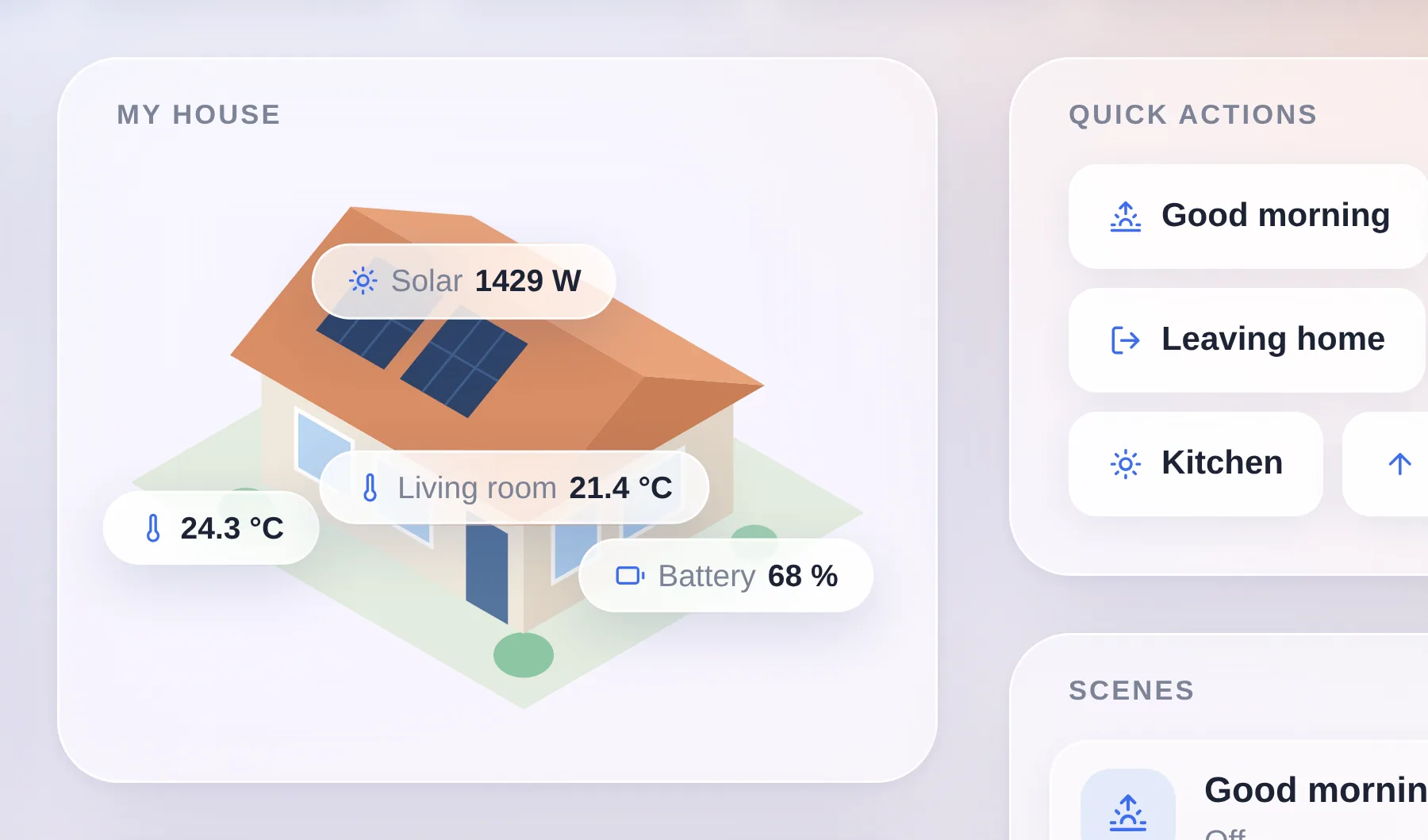
<p><img decoding="async" loading="lazy" alt="Close-up on the top of the Home dashboard: the clock, the weather and the house view widget" src="https://gladysassistant.com/assets/images/02-horizon-closeup-en-1c42a6ca68e7ac475aec5d32d21e390c.webp" width="1800" height="1059" class="img_ev3q"></p>
<p>That is a zoom on the top of a dashboard, at real size. Every widget is a frosted panel with a wide radius, floating over a gradient that runs behind the entire page instead of being repainted card by card. In the middle sits the <strong>house view</strong>, the signature widget of this release: your home as an illustration, with live values pinned exactly where they belong.</p>
<p>It is not a re-skin of two screens. <strong>Every page of Gladys moved onto it</strong>: the dashboard, Devices, Integrations and each of their sub-pages, Discussion, Activity, Calendar, Plans, Scenes, Settings, the profile, even the login screen.</p>
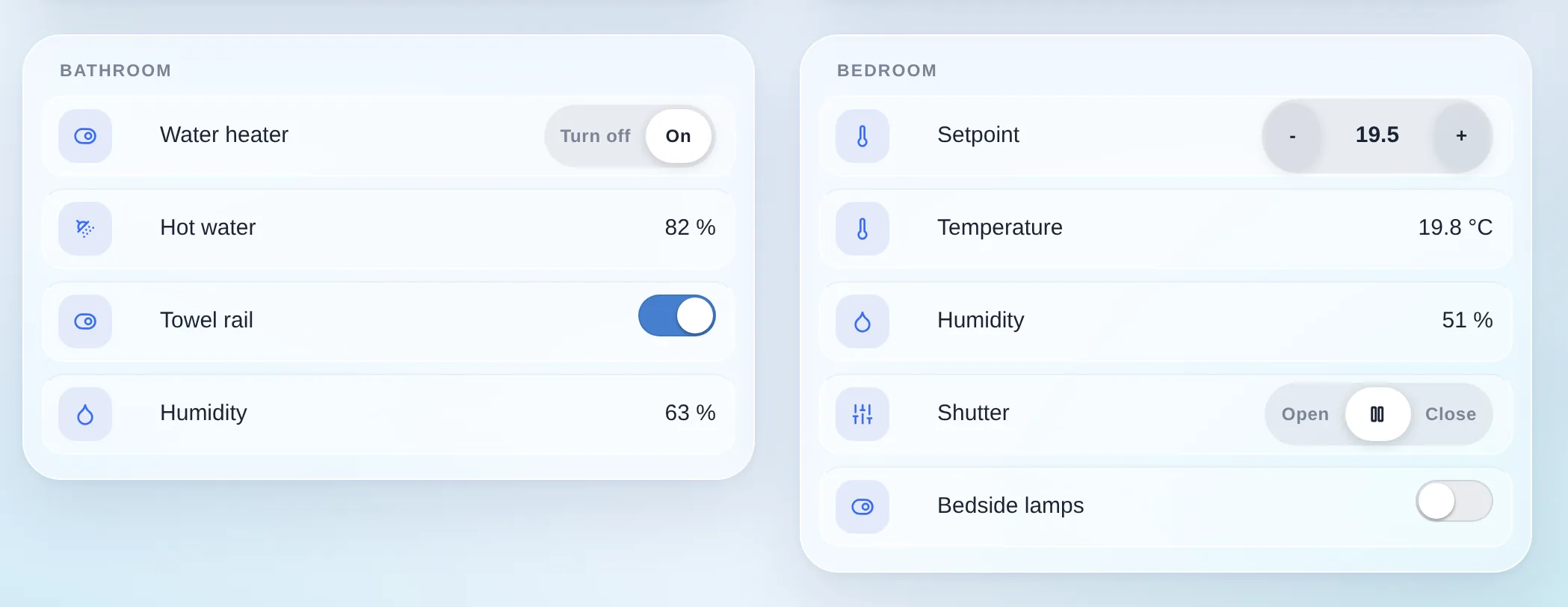
<p><img decoding="async" loading="lazy" alt="Close-up on the device controls: segmented controls, a setpoint capsule and toggles" src="https://gladysassistant.com/assets/images/03-horizon-controls-en-b9e640666a63dec6ab2107a76a08f0e0.webp" width="2098" height="812" class="img_ev3q"></p>
<p>And the controls were redrawn one by one. The old Bootstrap button groups became <strong>iOS-style segmented controls</strong>: a soft track, a single white active segment. Setpoints became <strong>capsules</strong> with a minus and a plus. Every device row became its own nested glass tile. None of this changes what Gladys does. All of it changes how it feels to use twenty times a day.</p>
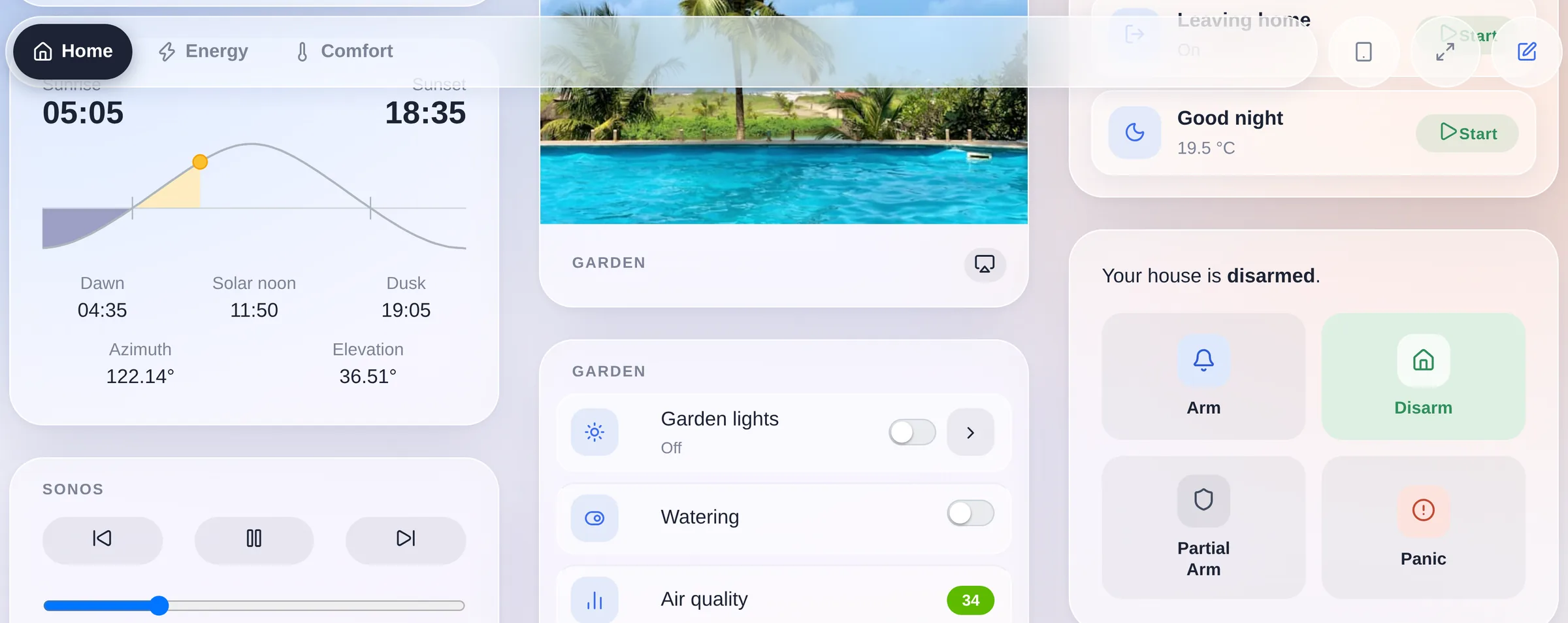
<p>My favourite detail is one you only really see in motion. The dashboard switcher does not sit in a bar at the top of the page: it is a <strong>floating capsule</strong> that stays pinned while the dashboard scrolls underneath it, and its backdrop frosts whatever passes through. A photo, a chart, a card title: everything blurs as it goes under, and comes back sharp on the other side.</p>
<p><img decoding="async" loading="lazy" alt="The dashboard scrolling under the floating switcher, which frosts the content passing beneath it" src="https://gladysassistant.com/assets/images/04-liquid-glass-en-84c260640a4eefeacddc44c552c65e6f.webp" width="2400" height="953" class="img_ev3q"></p>
<p>The capsule is also transparent to the pointer everywhere except on its own pills, so the widgets sliding under it stay clickable. It is a small thing. It is also the moment where the interface stops feeling like a web page.</p>
<h2 class="anchor anchorTargetStickyNavbar_Vzrq" id="-built-for-the-phone-in-your-pocket">📱 Built for the phone in your pocket<a href="https://gladysassistant.com/blog/gladys-assistant-5/#-built-for-the-phone-in-your-pocket" class="hash-link" aria-label="Direct link to 📱 Built for the phone in your pocket" title="Direct link to 📱 Built for the phone in your pocket" translate="no">​</a></h2>
<p>This is the part I care most about, and the part that is hardest to show in a screenshot, so let me be specific.</p>
<p><img decoding="async" loading="lazy" alt="Gladys Assistant 5 on a phone: the home screen, the controls of a room, and the light panel" src="https://gladysassistant.com/assets/images/05-mobile-en-07e1dda59e44445866f47d49de374937.webp" width="2400" height="1500" class="img_ev3q"></p>
<p>Those three screens are one gesture apart. You open Gladys and you see your house. You scroll once and you are on the controls of a room: a light, a shutter, the air conditioning and its setpoint, all at finger size. You tap the light and you get a full-screen panel with a brightness slider you drag with your thumb and a colour wheel. That is the whole point of this release.</p>
<p><strong>The dashboard switcher moved to the bottom.</strong> On a phone, the reachable edge is the bottom one, not the top. So below the desktop breakpoint the tab bar detaches from the header and becomes a floating dock within thumb reach. It respects <code>safe-area-inset-bottom</code>, so it clears the home indicator on an iPhone, and it tracks the <strong>visual viewport</strong>: iOS Safari animates its own bottom toolbar while you scroll, and without that correction the dock would keep hiding underneath it. Now it does not.</p>
<p><strong>Only the active tab keeps its name.</strong> The others shrink to icon dots. On a 390 pixel screen that is the difference between seeing two dashboards and seeing five.</p>
<p><strong>You can swipe between dashboards, and it feels native.</strong> Not a page reload: the neighbouring dashboard <strong>slides in under your finger as a skeleton</strong>, at the exact layout the real one will have, and swaps to live data when it lands. The gesture locks to an axis after 12 pixels of travel, commits at 15% of the screen width or on a flick, and rubber-bands when there is no dashboard on that side. Widgets that own their own horizontal gesture (a map, a slider, a scrollable device table) keep it: the pager detects those by geometry, not by a hardcoded list, so a new scrollable widget is covered by construction.</p>
<p><strong>Touch targets grow only for fingers.</strong> Every control in a widget reaches the ~44 pixel Apple HIG floor, but under <code>@media (pointer: coarse)</code> only, so a laptop with a touchscreen keeps the compact mouse sizing instead of turning into a kiosk. Same idea for tapping a device row: on touch, the whole row is the target; with a mouse, it is not, because a stray click on a device name must never be a live write to your lights.</p>
<p><strong>Segmented controls are the exception to the 44 pixel rule</strong>, on purpose: inside a segmented track the <em>whole track</em> is the touch zone, so its segments stay at the iOS segmented height instead of stacking into a tower of fat buttons.</p>
<p><strong>Popups escape their card.</strong> Date pickers, period selectors and dropdown menus render at the top of the document rather than inside the widget that opened them, so on a small screen they are never cut off by the card they belong to.</p>
<p><strong>The settings menu scrolls sideways</strong> with overflow arrows instead of wrapping into six lines, and columns that no longer fit <strong>wrap</strong> instead of being crushed.</p>
<p>Twenty small decisions. Together they are the difference between an interface that <em>works</em> on a phone and one that was <em>made</em> for it.</p>
<h2 class="anchor anchorTargetStickyNavbar_Vzrq" id="-light-or-dark-your-call">🌙 Light or dark, your call<a href="https://gladysassistant.com/blog/gladys-assistant-5/#-light-or-dark-your-call" class="hash-link" aria-label="Direct link to 🌙 Light or dark, your call" title="Direct link to 🌙 Light or dark, your call" translate="no">​</a></h2>
<p>Horizon ships in both. The dark theme is not an inverted filter, it is authored: the same glass, the same depth, warmer at the edges.</p>
<p><img decoding="async" loading="lazy" alt="The Gladys Assistant 5 dashboard in dark mode" src="https://gladysassistant.com/assets/images/06-dark-mode-en-a52f0b68d80b614c65f32eeaa173b518.webp" width="2400" height="1500" class="img_ev3q"></p>
<h2 class="anchor anchorTargetStickyNavbar_Vzrq" id="-a-dashboard-you-can-actually-lay-out">🧱 A dashboard you can actually lay out<a href="https://gladysassistant.com/blog/gladys-assistant-5/#-a-dashboard-you-can-actually-lay-out" class="hash-link" aria-label="Direct link to 🧱 A dashboard you can actually lay out" title="Direct link to 🧱 A dashboard you can actually lay out" translate="no">​</a></h2>
<p>The old dashboard was N equal columns, full stop. If you wanted a big house view on the left and a stack of small tiles on the right, you could not have it.</p>
<p>Now a dashboard is made of <strong>sections</strong>, and each section has its own columns:</p>
<ul>
<li class=""><strong>Weighted column widths.</strong> A column is <em>normal</em> or <em>wide</em>. A <code>wide | normal</code> section puts a large panel on the left and a tile stack on the right. Two clicks, two values, no pixel fiddling.</li>
<li class=""><strong>A chips bar.</strong> Compact status pills at the top of a dashboard: alarm state, "all closed", a temperature, solar production, the next calendar event. They reflow on a phone instead of overflowing.</li>
<li class=""><strong>Quick actions and scenes with live state.</strong> A scene button now tells you what the scene did: <code>Leave home · On</code>.</li>
<li class=""><strong>A house view widget</strong>: an illustration of your home with live values pinned on it.</li>
<li class=""><strong>The editor previews the real thing.</strong> The edit canvas and the viewer now share one column layout, with the same percentage shares, so what you arrange is what you get.</li>
<li class=""><strong>A searchable widget picker</strong> with an icon and a name per type, instead of a raw dropdown.</li>
</ul>
<p>Dashboards also now <strong>require an icon</strong> when you create one, and existing dashboards whose name started with an emoji get that emoji promoted to their icon automatically.</p>
<h2 class="anchor anchorTargetStickyNavbar_Vzrq" id="-the-scene-editor-rewritten">🎬 The scene editor, rewritten<a href="https://gladysassistant.com/blog/gladys-assistant-5/#-the-scene-editor-rewritten" class="hash-link" aria-label="Direct link to 🎬 The scene editor, rewritten" title="Direct link to 🎬 The scene editor, rewritten" translate="no">​</a></h2>
<p>Scenes were the most powerful and the most intimidating part of Gladys. The editor is now a <strong>vertical flow</strong>: a <strong>WHEN</strong> block for the triggers, a <strong>THEN</strong> block for the steps, each step collapsible, each action picked from a <strong>categorized picker</strong> instead of a flat list.</p>
<p><img decoding="async" loading="lazy" alt="The rewritten scene editor, with its WHEN and THEN blocks" src="https://gladysassistant.com/assets/images/07-scene-editor-en-c5000e735eec3d94d25c1fbee3cec415.webp" width="2400" height="1500" class="img_ev3q"></p>
<p>Also new in scenes:</p>
<ul>
<li class=""><strong>See and stop running scenes</strong>, at last.</li>
<li class="">A <strong>"Get the current date and time"</strong> action.</li>
<li class="">An <strong>"any state change"</strong> mode on the device state trigger.</li>
<li class="">The message channel selector only lists the messaging services you actually configured.</li>
<li class="">You can delete the first action block of a scene.</li>
<li class="">Calendar events come back as a readable list in scene variables.</li>
</ul>
<h2 class="anchor anchorTargetStickyNavbar_Vzrq" id="-67-community-integrations-and-counting">🧩 67 community integrations, and counting<a href="https://gladysassistant.com/blog/gladys-assistant-5/#-67-community-integrations-and-counting" class="hash-link" aria-label="Direct link to 🧩 67 community integrations, and counting" title="Direct link to 🧩 67 community integrations, and counting" translate="no">​</a></h2>
<p>Two versions ago we opened <strong>external integrations</strong>: anyone can package a device compatibility as a small Docker image, publish it, and it appears in the catalog of every Gladys instance on the planet.</p>
<p>The catalog went from 20 to <strong>67 integrations in a little over two weeks</strong>. Airzone, Apple TV, Daikin, De Dietrich, charging stations, CallMeBot, Docker, solar inverters: almost all of it written by the community, not by me.</p>
<p><img decoding="async" loading="lazy" alt="The integration catalog, filtered on the community integrations" src="https://gladysassistant.com/assets/images/08-integration-store-en-6e5acae97ac83b9971bf15c35b47591c.webp" width="2400" height="1500" class="img_ev3q"></p>
<p>This release polishes that whole loop: an <strong>Installed</strong> view showing what actually runs on your instance, version numbers <strong>linked to their changelog</strong>, the new version shown in the "update available" banner, <strong>per-feature history retention</strong> on external devices, and <strong>automatic energy tracking</strong> for the features that report power.</p>
<p>If your device is not supported yet, <a class="" href="https://gladysassistant.com/docs/dev/external-integrations/">you can build the integration yourself in an afternoon</a>.</p>
<h2 class="anchor anchorTargetStickyNavbar_Vzrq" id="-the-assistant-gets-a-microphone">🤖 The assistant gets a microphone<a href="https://gladysassistant.com/blog/gladys-assistant-5/#-the-assistant-gets-a-microphone" class="hash-link" aria-label="Direct link to 🤖 The assistant gets a microphone" title="Direct link to 🤖 The assistant gets a microphone" translate="no">​</a></h2>
<p>The Discussion page moved onto Horizon like everything else: the conversation sits on the same glass, and the tools the assistant used to answer you are laid out as chips you can unfold.</p>
<p><img decoding="async" loading="lazy" alt="The Gladys AI assistant on the Horizon Discussion page" src="https://gladysassistant.com/assets/images/09-ai-chat-en-267eb4db787e800a7fefd37f834930b5.webp" width="2400" height="1500" class="img_ev3q"></p>
<p>The new thing is right next to the send button: a <strong>microphone</strong>. Tap it and dictate your message instead of typing it. On a phone that is the difference between using the assistant and not bothering.</p>
<p><img decoding="async" loading="lazy" alt="The message composer, with the new microphone button next to send" src="data:image/webp;base64,UklGRuYhAABXRUJQVlA4INohAAAwQAGdASpACSgBPmEwlEikIqIiIJLYuIAMCWlu+/BXRgJ8RzD9HPzazJ9npY3wld9/9Y+utdbzz+TSaZl++B84eIm6eF0aV9q+cf7v+PnhJ/rPEn8X+g/zXkgf5XiZ9A/nvM7+T/ar9d/afRH/deDfyO/vvUO9Z/6H8z/Qt2uuw/63/n+oL7T/bf+1/f/Hl/wfRH7BewB/OP7H/x/XP/Z+Dt6V7Af9C/2nqv/23/r/zPoM/Rv8//7/9D8Bn699dP0Wgjtl6cU0WSgi0JtVGzw42faKMvbRjyEZe2jFdOXF5noCMvbRiunLsPYAt2LgMd3F5noCMvbRiunLi8z0BGXtoxXTlxeZ6AjL20Yrpy4ug9CljlsB3QBeY2rgCiutHfVl8gCP/QEZe2jFdOXF5tp6AjL219GK6cuLzPQEZe2j1IC3YvM9ARl7aOzGXtoxXTlxeZ6Al0DFcNUbFqzoIKyC2TW9e5nGOqb+25Mp4WyBqbkzZBaiO6YnSbumJ0m7oxOrj96Fjehi1xNQdsm7pidJs+ZJC9tyFsm7awQ1idJuuQnSbumJ0m7pidJu6YnSbumOeLd8taOhiXzyC6P3gexH6tzPZWyOTAl3oQS8z6AW7F5noCMvbRiunLieQgAjL20Yrpy4vM9ARl7aMsFdOXF5noKkgIzV5sKAW7F5ocloyMZg4Aq2rkpNAXUQ2ZUX0Q0BOk3dSyzRN9TLvQxbZJljWN8jHrOhDU2XtZzKSTd0xOk3dSy/JIvcGLbeJluAi02X5P9+K8Eom96Mes6C0OqjyTy/korvRj1nPIqbL8lFd6J/NfssFmg8pvOgy8nU7G7xXwAEr0JYU6PsOdEqt+I/RHQxiu30kxDR4r5p1dct91hxS5oPngIRCO9ARmIL0BGXx46X8wRl7aMV05cXmegIy9tGK6cvKLcz0BGXtoxXW5bsXmegIy9tGKgwCeapmZi2B/OvkDOT9BLUucu1mtjpa8utIhA0SyHxjKtwt5Wxes1T6OEk2YHzCVu4fqTXU8QCpqElrkwGAunzwdBpy2S7X+yM6KjPBYPW5xP6pwRLBvRguSvtJ5vn8Ay1vAd/4UNQn3+DlV7sG1DOysOsWprisom1pxG0L6DaXxeH/78K+J6YrLeNzc2X4TWr1nXvHhRYrpy4vM9ARl9QC9ARl7aQfFdOXF5noCMvbRiunLi8z0BGXtoxXTlxeZ6AjL20YqIlCDzTcMBeDft38oJdCygQwUqo/eFk828DiT+43wYbzXB2+gvkzpPGOMSz9UfGBxACQN6UEQCqBat6wIhm0moF76YyLt8aEaY0BwR1u/Od4RsFA2WdGcpR3+Z65NUD20ZRm8NAzVTiZ1GMB5xoTj10ES6JrW/8bf0CFiC+gFkLsBwj0spcDUe7bCldRJWLDVZ6qA9ZJw1hIBjZG6ejQ748H4XPQ5Veu6cuNwUoBbsUlwje2jFdOXIku7F5noCMvbR2Yy9tGK6cuLzPQEZe2jFdOXF5noCMva6tMqngDaNz834GjmxGFm5hGnpLVvVuayRnZM0tK7Kiv5KK70Ib0MV5QRA9Jl8OZ3/+XkR3O8czd0xOk3XLysb0MYODFsm7qVr59+pkkBpdUgtk3dMUXox6zoQ0sa9DFso+/cpWamy/JQphwqbecfV8Oes5XrhBQxdBXPZkGmlow1NnLmQXeEFsm7pfFWQWyBOmOeN6GMHox6yz/ZTDNTZfknBJOUnz4HpMvhz1mHbEFH3MUMUT/GV5H0mvr/WH8JrbJ81UCE1/+c///+7/9ZitjnnahDU2X5KK7CY9OSK70Y9Z0Iamk/JRQGd3rOhAAiGFQmCP5EWCjxyCHxGpSgFuxeZ6AuMv/oCNl3Tlx3Kl5cXk0xarc2FALzG2ELXtPN9L6tzPQF0GjhBfrgReeOloxXTlxeZ3EOTEZcXmegIqMv+DcR2sNVEQxR+Px/rLYVjL6sbjpnl8Lq1sq+GhclqY6uxNur6hYSlAozW4oDb5Ua9bG29zNbHflnmefMEe1FtNHIhayX2d05bqZ3TlxeZ6AjL1hszaMV05cXmniK3YvM9ARl7aMV06DLzPQEZe2jFSR3XSbuiSFN5y39io7jE9N1xwz0frbPj5oqNVDRuwo++hGo3sw/fkTZqojileTDhCv9UKCYICq5V6wL54JIftN9G1Qv5gaq/i8U3IXuOG8Ct2+IbRrFVuUeySnrHL1uB+P1o/G72sZ4DnjsdkHA8UhyCQGMnM65BZfnQkGZiFuBJ6Dtz3GiCECpPUE9NrBXQpc4SJhb4i7b0g0clBTnb2lyiMV2QuLzPQEZe2iuTL20Yrpy7Hy0L20Yrpy4vM9ARlzm8KcuLzPQEZdAF5CMvbPe5SgFmVWH6VqyZQfa6dTdA8m0c9Y3OaZvWC/5ArPBephCDeJ5caLsgl3ehekBOJJrqRua8WB4Zp/oXVVWELudXNcnEIacaX8IvLi8yx0oBbsXmtMciMV05cXmegIzEF5x+LzPQEZe38wRwdpICMvbRiunLqbPHAoJyJ5x3YvM6d9a5w5Poy/0YuWYIpEHB8Hr9yNrwP6ttObhAfURjJrsectVFBaaGVl7aMV05cZGM03M84/F5noCMvbRXS2jFdOXF5noCMva146bAFuxea5KZ6ZjF5noCMvbPXci9tyBMFuxeDiqdzlodfqmLR3+0YmesuAIhzhVL/ayJV0twIfR10gnoEms/56wxbJu6YnSbvxTvQxFfGdHTE5vO9Vjehi2Td0v+RZOUkHqaV5+kMAppRfwpNm+53TE6Td0xHM3dMTpN2mlQ13hBbJu6YlnW5Qsb0LuLdnITpN3R0BeP3oWN6GKPdi2R932qNvzEXv9c/5E2pnZNxrkZcDG1bgrlPnrOXzk9oO9oeX8lD1uRdBgv9ATaTd0xOkup7t2LpE4LcmDAWnoBxutpOTDZIVboppbM+ozoQ1Nl9QICrSgZDOFxrIuNZFtWyHJo42wddL9N/qeUete2umdjN92QaSIRJubLBz3NeqaVBlDkS+2JfbEvtiXOOh3lAG2Jfa6kVaVUNLwGl4DSqhpeA0GjHFFg8T1vAaXgNLwGlxPPLqoHbsDavoBu4qTtsS+2JIGGOCJ7j8ym2JMCCUNBoxxRX95tiXZ1gym2JOKm6OBu6SoOA0u852U+S+2JfbEvtdQkDdzxH55dVBwCJ7l1UHAaXgM/PtAr2IUtBoxxRYMociX2QkP1a6qDgNLwGl4DQaMcUVaEalxiNXSqwEWIUtLwGl4DS8Bpd5zspudGS6WAb7NIjErkGJeEDS56RcyXr8xd3u2oimmI3I7piOo75sEars+yYlJLr1fo0zbOmhvpUI5Nq0kuwiG9DN/teoHne2QWyTAy4CX4qZkysNQKKiG3qA/cBNxtb56rGAlQk0cR013pvEXdLAE5DfWoweFooHpM2QI8mwAD+/iDYFjvXXMT1QCNh5xFl83CcTyUMIjh1nsQiPewXtHZixZoIVGa2wnZfXEMA8nXOj8MSuifxb+1otrJiygqQ3mZODEe08QgbG0BO8IYAU5/oCQQN/25PSGESdCaQ80dDnpT3qrHAdx5rYtMh1SZQACEcWLm7L919+SpJ85MCWl39PRV2veVGZmquNtgIUAAAz8R0Cj5aUSlSZG1n5ixmMSquBYTDQsEi4ABdOTLZIt7W/smfVymjmp1XWbTnWovnFwTtuhIa/no2YAy6rIy3SE60n7dfqnYS3JvFSyMm7n7n4BGQmtUEitIO+G6OeR7SORB/pkEpWi/ypJNIFAEmUANq4AAAC5hjbsJXPdfSGqHMbWXN05I35dUFFBFAAMdj0OYgMx6vDDm1i89kslzDu7tZwJbNWFlEW/+yL/lLWTE4L0xa5S2iOBLS9nyeVkVFA74p59E72Tuh6gHO7KTuuBCaoBrnuxEKoWCQd7Y9b58jWOsIkQq+sCFOTMyu0EqnWK9BT7XlHP58vBAG/EhuGF/3+Mue4zKvFGPsHbZ88JY8eT3wr5XRh1qGjQoiJMjKKZLGd3gEf7d24ow1DnDnDnDnDncdzUJA2aGbr6TSIgh2tO0d3600XtYAwosPYhCSZDg4coQmhJYFY3ac4zPmTL+S3yIfzJdbWWchhsstoGwUtGOcUQ2mv82iB0+IYRVWWAVypmp5jirW7O2wF1q+ulAa5wo0unf836S1GHyo7BtkCQ2n3UcczXVRWbwUYDT6KWTAELBX3xNbZRWqPzaoqsybBuDacKIIomYidp/KElErYUdSySK7MWVVvVcf23YtobW6Khd6ClJ2cWO7rmhKmm482M0r/hhXW/pjZ9J/WZ8H8bbxtZCKXVIDgJa1kNLfvM70nE2UvRx+02jP4XmKL6JpmApnDKj9mb5HqVI20mLd1OulhJfpHEY6ZPcmf5zbXcapptUA90kUpKKiaHzQ4rZQyILSOFaxIZi8yIl1yh0+W1r2b78ZCDhxLNYGAZsBLG/jWbwbiqkZM2ADESf016guUCimGZrYoYa+AAAABZMtHkAAAC++TgqjfUdCObfYuTuv4SEdqznt6zzfu1qK2kYKyZknvbrqi3ZmaL6LVhoYmIZU49jaA5G6afaB1HqShymQCaYcSxCtwOWOd3j44Ki1/UAMczAuQu2UEfCy6E9q9DFkbEd89K5PB+M9b+8REbJej5JhEc/tOL3lhfdR38sgJFcyaGu/i5HxsQT8clkEk6/XL/BltjJOKRylJXOe/fN/Uwy/QL4/XSJKQCPHdwS50nFNMJnsxdpZvToRKekg7EYtrHIwlUyNQLUC5UGVx7yUaPqaSioRHOakbDXIwaH0CU6Vkx87s9vcR7QCisxQmAm62D2VcT8A2lUYjvQRlXcd1RN2nO85nG0Ja3q6Byop9oDU47F04pr0KMAlZuyOaINgWTeDSgeL35ANScZ+RLIcWOYq1GfhmUYv8zYH7dtlXsHvUs+/fMhzYuXMeMtVi9dfNRYxwx5kz7YH8Iemw30vqONOuXhPpzo62WEY/EetmU70JCQaGNmWzWS+tF49HuiTqmWjGYCkyy/d4bxHcMFCus+Y7kUIzJRAFsS2IQ4dMxstCTTp1BoqrxYFi4PaXzk1Yf3ShMLQ3JdLbHz8yAgj8oS/vj/u105fNEU6y+umjkPTCLl7Q7UaS0QEl/VXN1NIEC/BrZPSLgwm9pxpj39KpQtHlro2AWcrqTFpF0Mcy0kqrrj+G6WvVcAgEquiK00ITvlyIQexkYGw1L6kfu+E4mVWiBhggJUHFBcczO8+alz/A2flBf8Mt/yn8pegn9vXe7dP49NR15JI5WrHI2d9rYSFkhjcwyruZ+Xp9fV7rwPXc6mjn2tnZ1VRnqw2Wy0B/FO3+oX6pGLX8RIuMRGk6TwaNG0iAO1+9co1LJ1g/56lIPUrU2wzRuUFFvZihdecX7UiyjdBggtnpv2yj5O8fV5wCnyZoEvAQ1cox1ZnjesIb9ctlGk8wxhia21RbTSEg7tR7ISCXxu/PvitMvIcllJoSKACDLGXLiXtU8GNKTwGCsXniMcC74mEsAmXPHHBOvuYZHNlKB9d5NxszqtAbwr/v6Oq4Bc9vKzfr/HOfZX2zjGtPf7ZghbOBozoBrYyN/+T0pkynETNax2G4DdmOp2Eo6TSoxOTXBCPo3Mc+ipDM5UDwL18AW2IM7pFGaMw/XVXr3hLrUMWDHCPF/yuBY8iK8otV8LsyHmPnmda+3UFP+cOhvmmB3LEk7IexnuwWBpjq460TVCD7LLETIkvdqwKrrQshHGRwJl5ktIX3EryLeNCBv/s1KguADj9rzOzNmRPHsTVj9duHOoHAJEWoqiM22o09ObfF7nmUDeinEg59Tw2fPz4JVHa+D72+BQkS/rYHoCdfIXXe+gal30rnFvSV0l4o9HUyLKAR5RBVIUuNty6+zz1cYAAK+wAAGyOoBhY8sc1Bm2RLso/5ibl5inJFCcw/0wNH1VMG5f1RS03t8OLRJZhMlaEHz8QTUV3JQ9WXEmZpSlxkDdahfNif477dvwyhoiK66P/OokNZRcWxIi/bYC4lHr4oBq7EREZQKtJzljH28+X+IDbga9R483K9CrOHPIMII0D46dJ52zqaEiQxvTJx6l8j99FFv4ck7ftA18Xs7wZtBcnHDkiX2oeJ3l+041OHoe7WeMWepkMMG4XBeW5wMdIdynAqZ7CkyahyHhUF09h6GIkQyH9XBLCki7zibQzuljlkdprtu9ckf88b2tCqfJNSfnhi0xzFI7F/utuMXgzX6BPyXvC6qrvWxr2P2l3HI88G/LqGATUXai6Kg6zBDPbO0thx0QAJb+ZfdM0xTCm/5xQtkE+ugF1D1oEgzcblhmsOZUJoBHr2Ee3vLfGdyOgyriKthnErQjXQ+H9KJklvfA5SAa4TdDli5f4hXqEW7gvmMHoR2xK/b9FuEV+y+gbr6kgwnQC71lVOoNwQ5Sg/icTf2DKYSQl+AcaEoD+AjjJ8fx+wGGfztqSckaBCVjpR3EYRZ/ZC9ybVmS9J4aMZcLRjVSRikVUUC+v/K7yYuKiX6zqY5Ii1hPgAIDI4bVjQIM8sfSX6jikxHp8GZEwY5yaOFrgCsZdQQ/rcJhW0M6bxwHaujIMyOMmj2E3wxCqdjmcDZJ7WpIEYrMlZIs7kH0M3WM4c2QW4+lzT8ttBXqbu/tzN5nWhofQe9gcoJDl1g9hIk9+Xq+6QYaawuMpyDeuIObFRYDWgvfNuIBq3uw4Xr6+v5CTJOMITFVNRuNuzqTAlEkfxKYyDiIgRbU2+fDDi1KF+kYK2TTdXTcgg7eAYr794luU+cK4meacb8bXEAHqofusuLd/az+kv0TYm9hbZTZGxKg9rqx3IcV/fvm6/wnoLoNDWTgEOmf3gj85mgl4w/HkDKSB7X3UqN+2nytXCELC6a8HiKN3j3uhUQHfHTrK+0ZGvJdiyuLduRTB0J9XdNIIN7pNZASEkOIL0q9pmuy/ec9/gOwg5OEmk/dx76gFaN7/5u3OahXbNnc+2DDs7Zo2kAf9sGVmtKXsq7+hvy+3ljCXZR0kLVRUwTfPjSplfb4+rUZK90H65/FmC6opg4l4NvmsUNMryZuhBdf0AavjqsQBZ8Nxe2dGN0vGC8Jl05rAuDlhEZkmNd0Nr0ReOnognbYh506li7ek2leYbIxZCXIFi3MQgqCHab9FOcO28e936K7+fJKQgSKP+HWFk4rAiNDDbCCtxdJC46748Gsyt/KSsv3+qopQDf2M8SAYOpgrnFDOZEV+hoHSxrLW5ZtCRPrk8vyQFc0yLmBko2ZYkeHZ885SL/YwgDR978153P4OZYx4S3hAeMkl/24j2UL2ieR+Kv4FeZooH+cT2WV1zRmgAyy+w7lj5J/tdVB5PtRyMCfkDFDlnAAAAAAA7yhwANbvMDmCqxgTDeMQAABzLlXMRB2qqeiUMM3ehir+Uyiy9ENobka49pfQEnWHVlHF/Nkw/vYucSVoehIlvqcokuLWVCXQwrXNTrtwkybmIsfK5jB9NVhHVcUPiNHFHfWx4g8QcP9z238X0mzmKhvqEhY0Mhg02Pr3Pb06evlIw2u/NGqmSXLIMQk8XAVhAreWq7LtS91Zt1ew3d2YQhhthththththzR+cKQQCwBJsb1fJpOJtUxFUO7p5NH4l4HCJgwQVa9gj7Kq9dXC9GIkTZU0NU92bxMoBRY53xZBVHYM+RvDfwiaTUjnlHm371TqlACEcqIzDdV7mQPXlVoRxh7qKtBNXX632vr0zpuxH3RVOjBgMhfHqyegqgld89J9DN81hf/vmqCGUIVh27OSKCob27OnJqp1ZNNUqLMgbxQZYaCqDigJpmu7nYse6wLYk0/6fc/uJzkd50gtMKQ/W4CAhNt1hra7SmG21xbrp11NO/9V4hT7pzapLMC5j9zQO/mqfZb2BIjdu/oSWHG/JGgh/S8KqrLvveAMItrC16YUfjPozWaCvQwY9J4FXP0AAECzhMrAn5nFLEwADsgAAAEtQAE9ZNVs6uUAAADUL3Ak9PgQ9+2sXTKi7zaXHp8CHzE6Oae7TidX9fF/atM1LrsaOd779aj1lu8As3NXn6dhOXrhLccR/ERwIYwIDcz/gpYamSpUlXjMk1bqLXI+5elbUJo27XLOGc1GEzQJ3BFLwnHLw23SM6Il92qmZlXwFNqv9mpMpEbxsZzl9r2BzGfFBePfO+cn5GqpcWjHOM1hqmYN9vHR0q7RcvdpQ5rVw8+G06GtDWpH+kvvm/IdY86MdSRcqEykH2HG9MltsVsSeKbdUF6tBLVRURozA2a4Qk5v1WgEJPUJvfUgxUEHjydz3tJzfw0H5REOgesP0fuU7N0oF5eLTMP71VyioTCMtOADwxDjMGFAdd1kHOFkGVNXzAXiE0ItWn3KXKNy+ABUGWBc2UMRewvnkOAocdfaXJmws9snND/tn86tmRMZFly4RPqg2OEQ/DtT2o8vsI1UEZmNvwUudxQzG55eMjVC8P1GXyBfDCuhNpI7fQ+swmjerqujC0GFJE8KItoA9ueZC4RbKXJl3cqnqrePgAM198wYsgKnIAIPh/VAAMTnYAW5IqXY0SsCy6E9q8WTQ+hDfIyWGfgNA/P/a0zRSSeAVgS+rGImbqQNu/v4ixcS2sz+ZCoKlDTRBAhvSVrljSxpKPr0LdnlxsKaEhLMquEOoeOXI8pK4X3lH6Ci7iDlXhHNgHBOeP8O8pPDEeIEycazwMMQbO23tdN419U7+tJi2M7+2kT3k8u01jv40KPinhE9WHGnjrRm4mGlEXid2h/pgcpGrfcmVc+1eGQMZWLSYQK2hcBbpLjh33N4qeoTQMTO57zRfLonygtbg0Gw2yXGui40XtfvmLUdWpt8tJb72rRfM0wOyUd+9EUW8rV4V39vVpXpTmfLzEiFdmT4OPW3DsrpYE+UoWBhPHx/Yj+2lEMvmd8Hbotgc9qJSXbUDPOZYSwKLg9KEzkpgenytzBgcXtXjdsaIzliIK0Wjar8L2qcw2b1kTHWKUCMp6hLOa0cLAelMuTmccWCKtCCObVEPecHvfWYUsPEuPqpH5oDqkdd+ksKPKA25c/O7bfmDix0P65NV6u+gaTUl8u8qot/I+MqmcJ1qReJpsUW0B9Nm+BKIuzjEPe1bwGgnJN+97tMN4OXJYvw/wR5QO9dzywOr4pcpAWBPzS8dzh6KK4AmNe+rsYa/l2vpbqtooS8kPMhqCjqpS8DflHCm7l79ijBxCwnWxUJWZKH9j3FeTlG7olVU6kO6sEgZu+0pjuQMJbUP+tv2qNih2O4f+F3CCks3duOU8Bzhz0pyqV3EW62pj0TlQC5rAYS4jnqEz6gCn8p+F6JJy0xOEZ55FOXW321QEdj81L5v3J7AXikEgQMsmBmZdzHFtfuGX91cgGKSK97Wg1jskgJELDBp81mVtY6rvkKXFfUQ7VmgoF69qQebmYBYb1ZKmTeNIqAYxGeghk7ERtgjwABaiDuiHnE1zzvxtzrdFHbnONQXrHsRZkWGx9G5Pc/tUTt/o8rEK4ugXi7MnEIM8oQgLI3FSXUUQSQYGX3h0HW0+4GU3yR+dpZILaK8WGX/Scx89SJEEwI/Ub77uGBND2magr7j6tIj6qydIqYzzHYYa2nH1Hd7e1MxCjw56tGNSUj0v+TNdZ0Hvv8QDuVB7W0AP90zj+OxBe2D2OfL9Y7knQNZplGflN8EqnVzSR4begxLFeRm4I42hZQqbCqE85ngCV0Y3LSamuTgbqaq0r4F+0PRz7LRO4FdYRLrVmLIBGUaCvmcwnEPb3hrdPvImS1YfnXsz2Dsy1aSK6F5R7kbEusCFLL9fOJLR3ABYhOr+X18mPFDMUC7FfgHseLZu/8TtspR5kB/q9vcDYt5D1mTxPnS8X3ixUekcmHdqxI0hZCSmg7YRCFoTQmZfYNOGqrGGrPpn8egGzyGaacQKoxGBQx/WbDjgopefpRWKOfkv7TuGqBM9/Y4jHGceND6AmdKs+wz46GvOSyYIr+oGnZFleNVtATWrwRf64kdokkTSofbRZ0MtjFR0+pGSigRX/M1dyi5c+hBW6D9+osliHbmJuDSfamFOWY862cEvlAOtAvBCRoPeim5AOlaNoKtYO1italt45NmMRNe/n9+WwDbsAAIq9lAYADL/J2AMnTkbGTiUAB2QMasxAtRyMhk3vL691vcYHCispWX10IoVD9t0vcMOlBBRj19UlGfnJ72Z0Rj+1WiZojw6UN50SrfnBc+NyW6gUx0AMq2jBVynm3sdPHpQsAZ91hPSSh3ZAuEtX9zo75upbpWjUnfE8wD5q6LwxLZXmSDF3Z5iCfTsiOYX30lDDcDhkmflc1S37v2Y2y1Gh2HIHfk/s/s1EYtxTJiy8BL3DOFZcgCMH9amVLMEV9AHFXGYirZui9HGmziDrttC9ggZoTjFqdNsYjYDm2wUGzNXqnRNz3hM0qqAJrRk5ICvhrrANotWKXwuboauTtOcHKNk/119cum1s73KCnXhNTphKuRuNbOpN1cLwAa/Kqdojy8UQRQgQwTE5oF2ecSuXqugtYoHBRywY+tJLoKwdMu1CjiQAAAS9AAI34/i8wAXr7sQAANpq6AmrxlIYaf/xETjW1jZmD4SZ+G6QIp7VhpYMOMZgtSk2VPECFgy9PzqRqrlwJTxDZ/34PArR9YkD0djNFXcZSRjhTL/moBzbBGolmz3VVT54jiPhJYAOWTdgAAAAAAAAAc3HvgAyUAAS8kRbCJpOuVSFIOaX+gKnDR3fCPCMQDnlkw+p7G/UGEsWSxG3T/pxoH0GFY/+ABXtKm1hYAQG3XAKfvE3EAQ4ECSztB8UGOgSjZtggHU4SVOnp7zFUPRW9ZP0XAh51rfkQbcSfuw+JN3DirlrIBdgLGdD60YBzOE7ByGs2F82aCIcWL279qwuefJLBAgN5TVg6a8bBgKq2gD+hr5e289+9JFgx6M76o4QxXxfM09g2+poBpTwg7xuMMTrzBvw8p9EKHjotmDfh5VgIWTQ7JhideYNR84uBpzUiHRDwd8WZNQhnelyOm5IUUKZuCvQQ3bqO7zXsoynHEoOF+MfbOe0fbicTfbpwzZvmCllTybmDmmOGfthjZd8ZICHl9y3AfqbZdgsYnUHzcd4GIQIZSDorwvRHUsBnmqwnREQ+zFaMyNX9IKS3lKHzPtNhnOGByWQEivvojLYzd3s8B02Gp/xsian7RNIW71u02ofjDZrQfcMcCJowAMHinD7il9eQxlQr/15YM4a482PbSFhKiF3ZHc9w0H1GMS8yl2HnJBwGMY4TYFY6xmwj+20YTEAIHDMm9GV4YqgII+t6q+JxNlJm97uxPRiPl3ZczO3c2W+ZXG5QscjUYFNxB8wAUrUL7WBqiSBMl+74vsXo3rkzLd3pbCbWJV3NSCKCEuUM4N4FjofSw0T69nhhubzVZ+IokaJ8EQqws6nekBkdKle1vnjh5PTkVOi6QYoEceTmrj8Io+PSz7VGMGMadDlL71RrbTMPhzD+FbsM2HMsKsPZ78x5/3ywPXNZDGBUIhsX6UX/QqhdW7RX4eMAHYbWcrgAAA==" width="2368" height="296" class="img_ev3q"></p>
<p>The assistant also learned a new tool: it can read the <strong>battery level of your devices</strong>, so "which sensors need new batteries?" now gets a real answer.</p>
<h2 class="anchor anchorTargetStickyNavbar_Vzrq" id="-energy">⚡ Energy<a href="https://gladysassistant.com/blog/gladys-assistant-5/#-energy" class="hash-link" aria-label="Direct link to ⚡ Energy" title="Direct link to ⚡ Energy" translate="no">​</a></h2>
<p>The energy widgets got the Horizon treatment, and one upgrade you will feel every month: the tracking period can now <strong>start on any day of the month</strong>, so it matches your real billing period instead of the calendar.</p>
<p><img decoding="async" loading="lazy" alt="The energy dashboard" src="https://gladysassistant.com/assets/images/11-energy-en-d24ef026b46f4a608036a7edd91a36d4.webp" width="2400" height="1500" class="img_ev3q"></p>
<p>Enedis users: the new <strong>DataConnect 2026</strong> consent callback is supported, and a sync now only recalculates the costs of the devices it actually touched, instead of the whole history.</p>
<h2 class="anchor anchorTargetStickyNavbar_Vzrq" id="-devices-protocols-system">🔌 Devices, protocols, system<a href="https://gladysassistant.com/blog/gladys-assistant-5/#-devices-protocols-system" class="hash-link" aria-label="Direct link to 🔌 Devices, protocols, system" title="Direct link to 🔌 Devices, protocols, system" translate="no">​</a></h2>
<p><img decoding="async" loading="lazy" alt="The devices page" src="https://gladysassistant.com/assets/images/12-devices-en-f4dde07d7c764fd198ffe0a9db0efe54.webp" width="2400" height="1500" class="img_ev3q"></p>
<ul>
<li class=""><strong>Export a device's history as CSV</strong>, straight from the devices list.</li>
<li class=""><strong>Matter</strong>: water leak detectors, contact and rain sensors, and <strong>door locks</strong>.</li>
<li class=""><strong>Zigbee2MQTT 2.13</strong>, support for <strong>network coordinators</strong> (SMLIGHT SLZB-06/07 and friends), outdoor solar sirens, and the Heiman HS2WD-E.</li>
<li class=""><strong>MQTT</strong>: wildcard state topics in Home Assistant discovery.</li>
<li class=""><strong>Google Home</strong>: temperature and humidity sensors are exposed.</li>
<li class=""><strong>Cameras</strong>: disable a camera without deleting it, a real private mode.</li>
<li class=""><strong>Reboot or shut down the host</strong> from the System settings, and it now works on standard Docker installs too.</li>
<li class=""><strong>Gladys announces itself on your local network over mDNS</strong>, so finding your instance stops being an IP hunt.</li>
<li class=""><strong>Two-factor recovery codes</strong> for Gladys Plus, and Gladys now recommends mainstream 2FA apps.</li>
<li class="">Weather icons were redrawn and the pivot conditions extended.</li>
</ul>
<p>Plus the long tail: rooms sorted alphabetically, integration names shown on the devices list, the houses tab turned into a readable list, the DuckDB migration card hiding itself once there is nothing left to migrate, and a pile of fixes.</p>
<p><strong>92 pull requests, 720 files, about 52,000 lines added, in 12 days.</strong></p>
<h2 class="anchor anchorTargetStickyNavbar_Vzrq" id="-coming-from-home-assistant">🏡 Coming from Home Assistant?<a href="https://gladysassistant.com/blog/gladys-assistant-5/#-coming-from-home-assistant" class="hash-link" aria-label="Direct link to 🏡 Coming from Home Assistant?" title="Direct link to 🏡 Coming from Home Assistant?" translate="no">​</a></h2>
<p>The usual objection is the integration count. That argument is running out of road: the community catalog went from 20 to <strong>67 integrations in a little over two weeks</strong>, written by people who had never opened the Gladys codebase before, and it is still accelerating. We are closing that gap on purpose, and fast. Meanwhile, here is everything you get today.</p>
<ul>
<li class=""><strong>An interface you do not have to build.</strong> No YAML, no dashboard DSL, no card catalog to learn. You install Gladys and it already looks like the screenshots in this post, on your phone, in dark mode, without a single config file.</li>
<li class=""><strong>Your existing devices probably already work.</strong> Gladys speaks <strong>Home Assistant Discovery over MQTT</strong>: your ESPHome, Tasmota and Zigbee2MQTT devices are found automatically, with zero manual configuration. It also speaks Zigbee2MQTT natively, Matter, Z-Wave, and it can talk to HomeKit and Google Home.</li>
<li class=""><strong>One update button.</strong> Gladys is a Docker image. It updates itself, in one click, or automatically with Watchtower.</li>
<li class=""><strong>An AI assistant that is actually built in</strong>, that can see your devices and act on them, and that tells you which tools it used.</li>
<li class=""><strong>The same promise since 2013</strong>: local first, open source, no cloud required, no account required, your data on your hardware.</li>
</ul>
<p>The fastest way to judge is not to read me. It is to click the next link.</p>
<h2 class="anchor anchorTargetStickyNavbar_Vzrq" id="-try-it-right-now">👉 Try it right now<a href="https://gladysassistant.com/blog/gladys-assistant-5/#-try-it-right-now" class="hash-link" aria-label="Direct link to 👉 Try it right now" title="Direct link to 👉 Try it right now" translate="no">​</a></h2>
<p><strong><a href="https://demo.gladysassistant.com/dashboard" target="_blank" rel="noopener noreferrer" class="">Open the live demo</a></strong>. It is a full Gladys Assistant 5 running entirely in your browser, with a real house, real dashboards, real scenes. Nothing to install, nothing to sign up for.</p>
<p>Then, when you are convinced: <strong><a class="" href="https://gladysassistant.com/docs/">install Gladys</a></strong>. On a Raspberry Pi, a NAS, an old laptop, anything that runs Docker. It takes a few minutes.</p>
<h2 class="anchor anchorTargetStickyNavbar_Vzrq" id="️-thank-you">❤️ Thank you<a href="https://gladysassistant.com/blog/gladys-assistant-5/#%EF%B8%8F-thank-you" class="hash-link" aria-label="Direct link to ❤️ Thank you" title="Direct link to ❤️ Thank you" translate="no">​</a></h2>
<p>Version 5 exists because of the people who reported, argued, tested on their own wall tablets and sent me screenshots of things that were broken on mobile.</p>
<p>Huge thanks to <a href="https://github.com/Dreamthy" target="_blank" rel="noopener noreferrer" class="">@Dreamthy</a>, <a href="https://github.com/William-De71" target="_blank" rel="noopener noreferrer" class="">@William-De71</a>, <a href="https://github.com/callemand" target="_blank" rel="noopener noreferrer" class="">@callemand</a>, <a href="https://github.com/cicoub13" target="_blank" rel="noopener noreferrer" class="">@cicoub13</a>, <a href="https://github.com/vincentBesseau" target="_blank" rel="noopener noreferrer" class="">@vincentBesseau</a>, Stéphane Escandell and Valentin Hutter for the code in this release, and to everyone publishing external integrations: you are the reason the catalog tripled in two weeks.</p>
<p>As always, Gladys updates automatically within 24 hours if you use Watchtower, otherwise you can do it in one click from the settings.</p>
<p>Remember to set up Telegram to get an alert on your phone when Gladys updates!</p>
<p><a href="https://github.com/GladysAssistant/Gladys/releases/tag/v5.0.0" target="_blank" rel="noopener noreferrer" class="">See the full release notes on GitHub</a></p><div><div style="border-top:1px solid white;margin-top:50px;margin-bottom:50px"></div><div class="row"><div class="col col--8"><h2>Subscribe to the Gladys Assistant newsletter</h2>A few emails per month about new releases and project news. Sent by Pierre-Gilles Leymarie, founder of the project. Unsubscribe anytime 🙂</div><div class="col col--4 newsletterSectionInputCol_wyow"><form><div class="form-group"><input type="email" style="width:100%;line-height:1.5;border-radius:5px;padding:8px" placeholder="Email" value=""></div><div class="form-group"><input type="text" style="width:100%;line-height:1.5;border-radius:5px;padding:8px;margin-top:10px" placeholder="First name" value=""></div><button style="margin-top:10px" class="button button--primary button--block">Subscribe to the newsletter</button></form></div></div></div>]]></content>
        <author>
            <name>Pierre-Gilles Leymarie</name>
            <uri>https://github.com/Pierre-Gilles</uri>
        </author>
    </entry>
    <entry>
        <title type="html"><![CDATA[Gladys 4.86: The Biggest Release Ever 🚀]]></title>
        <id>https://gladysassistant.com/blog/gladys-4-86-biggest-release/</id>
        <link href="https://gladysassistant.com/blog/gladys-4-86-biggest-release/"/>
        <updated>2026-08-14T00:00:00.000Z</updated>
        <summary type="html"><![CDATA[68 pull requests merged in one week: a new Devices page, a completely rebuilt HomeKit bridge, a redesigned weather widget, loops in scenes, Home Assistant Discovery over MQTT, PTZ cameras and much more.]]></summary>
        <content type="html"><![CDATA[<p>Hey everyone!</p>
<p>Version <strong>4.86.0</strong> is out, and this one is simple to describe: it's the <strong>biggest release in the history of the project</strong>. 🚀</p>
<p>The numbers speak for themselves. In <strong>7 days</strong>, we merged <strong>68 pull requests</strong>, touching more than <strong>1,000 files</strong> and adding around <strong>28,000 lines of code</strong>. For comparison, our biggest releases used to top out at <strong>35 pull requests</strong>, over two weeks. We just did <strong>twice that, in half the time</strong>.</p>
<p>And this isn't a one-off spike. Every single week, we blow up the productivity of this project a bit more, and the reason is no secret: <strong>AI</strong>. Out of the 68 pull requests in this release, <strong>62 were co-authored with Claude</strong>. Specs, implementation, tests, code review, even the CI that fixes its own failures: AI is now everywhere in the Gladys development loop, and the result is a pace this project has simply never seen before.</p>
<p>👉 <strong>You can follow that pace live, day by day, on the <a class="" href="https://gladysassistant.com/dev/">development activity page</a></strong>. Commits, contributors, streaks: everything is there, updated automatically.</p>
<p>Now, let's look at what actually landed in your home.</p>
<!-- -->
<h2 class="anchor anchorTargetStickyNavbar_Vzrq" id="-a-new-devices-page">📱 A new Devices page<a href="https://gladysassistant.com/blog/gladys-4-86-biggest-release/#-a-new-devices-page" class="hash-link" aria-label="Direct link to 📱 A new Devices page" title="Direct link to 📱 A new Devices page" translate="no">​</a></h2>
<p>Until now, seeing every device in your Gladys meant walking through each integration one by one. That's over.</p>
<p>Gladys now has a <strong>Devices</strong> page, in the main menu, listing <strong>all the devices of your instance</strong> in one place:</p>
<ul>
<li class=""><strong>Search</strong> by name</li>
<li class=""><strong>Filter</strong> by room and by integration</li>
<li class=""><strong>Sort</strong> them A-Z, Z-A, or by room</li>
<li class="">See at a glance the <strong>features</strong> of each device</li>
<li class="">Jump straight to the device in its integration with <strong>Open in integration</strong></li>
</ul>
<p><img decoding="async" loading="lazy" alt="The new Devices page, listing every device of the instance with search and filters" src="https://gladysassistant.com/assets/images/01-devices-page-en-21172d1604cb2cbea10aad542f1df907.png" width="2880" height="1600" class="img_ev3q"></p>
<p>It sounds simple, and that's exactly the point: when you have 60 devices spread across 8 integrations, this page becomes the one you keep open.</p>
<h2 class="anchor anchorTargetStickyNavbar_Vzrq" id="-homekit-becomes-a-first-class-citizen">🍏 HomeKit becomes a first-class citizen<a href="https://gladysassistant.com/blog/gladys-4-86-biggest-release/#-homekit-becomes-a-first-class-citizen" class="hash-link" aria-label="Direct link to 🍏 HomeKit becomes a first-class citizen" title="Direct link to 🍏 HomeKit becomes a first-class citizen" translate="no">​</a></h2>
<p>This is probably the biggest chunk of work in this release. The HomeKit bridge went from "lights and sensors" to <strong>almost everything Gladys knows how to control</strong>.</p>
<p>Newly exposed to the Home app on your iPhone:</p>
<ul>
<li class=""><strong>Thermostats</strong> (with modes and operating state)</li>
<li class=""><strong>Locks</strong></li>
<li class=""><strong>Fans</strong></li>
<li class=""><strong>Buttons</strong></li>
<li class=""><strong>Smoke sensors</strong></li>
<li class=""><strong>Presence sensors</strong>, exposed as HomeKit <em>Occupancy Sensors</em></li>
<li class=""><strong>Device batteries</strong>, so iOS warns you before a sensor dies</li>
<li class=""><strong>Your house alarm</strong>, exposed as a HomeKit <em>Security System</em>: you can arm and disarm Gladys straight from the Home app, or with Siri</li>
</ul>
<p>And because exposing everything isn't always what you want, you can now <strong>choose exactly which devices are visible in HomeKit</strong>:</p>
<p><img decoding="async" loading="lazy" alt="The HomeKit settings, with the option to expose only the selected devices" src="https://gladysassistant.com/assets/images/04-homekit-exposure-en-9132e1cdf51d5a10224c618f19059be2.png" width="2600" height="1800" class="img_ev3q"></p>
<p>The bridge restarts automatically when you save, and <strong>your pairing is kept</strong>: no need to remove and re-add Gladys in the Home app.</p>
<p>Two long-standing bugs were also fixed along the way: thermostat modes are now mapped correctly, and HomeKit services are looked up by feature instead of by device type (which used to break devices that mix several categories).</p>
<h2 class="anchor anchorTargetStickyNavbar_Vzrq" id="️-a-brand-new-weather-widget-and-a-sun-widget">🌤️ A brand new weather widget, and a sun widget<a href="https://gladysassistant.com/blog/gladys-4-86-biggest-release/#%EF%B8%8F-a-brand-new-weather-widget-and-a-sun-widget" class="hash-link" aria-label="Direct link to 🌤️ A brand new weather widget, and a sun widget" title="Direct link to 🌤️ A brand new weather widget, and a sun widget" translate="no">​</a></h2>
<p>The weather widget has been <strong>fully redesigned</strong>, and it now shows a lot more than the current temperature:</p>
<ul>
<li class=""><strong>Hourly forecast</strong> and <strong>daily forecast</strong></li>
<li class=""><strong>Rain</strong> (amount and probability), <strong>wind</strong> and its direction</li>
<li class=""><strong>UV index</strong>, <strong>pressure</strong>, <strong>humidity</strong>, <strong>moon phase</strong></li>
<li class=""><strong>Weather alerts</strong></li>
<li class="">And a <strong>display mode selector</strong>: you pick the blocks you want, the widget shows only those</li>
</ul>
<p>Next to it, a brand new <strong>Sun widget</strong> shows the position of the sun over your day: sunrise, sunset, dawn, solar noon, dusk, plus the current azimuth and elevation, drawn as a horizon curve.</p>
<p><img decoding="async" loading="lazy" alt="The redesigned weather widget next to the new sun widget on a dashboard" src="https://gladysassistant.com/assets/images/02-weather-sun-widgets-en-6eae30f294c1246f289bd8b4271f1da5.png" width="2400" height="1600" class="img_ev3q"></p>
<p>Small but satisfying detail on dashboards: <strong>chart tooltips now follow your cursor</strong> instead of covering the curve you're trying to read.</p>
<h2 class="anchor anchorTargetStickyNavbar_Vzrq" id="-an-integrations-catalog-you-can-finally-browse">🧩 An integrations catalog you can finally browse<a href="https://gladysassistant.com/blog/gladys-4-86-biggest-release/#-an-integrations-catalog-you-can-finally-browse" class="hash-link" aria-label="Direct link to 🧩 An integrations catalog you can finally browse" title="Direct link to 🧩 An integrations catalog you can finally browse" translate="no">​</a></h2>
<p>With native integrations plus <strong>45 community external integrations</strong> already published, the catalog needed a real structure. It now has one:</p>
<ul>
<li class=""><strong>Browse by category</strong>: heating &amp; cooling, lighting, energy, cameras &amp; security, multimedia, protocols &amp; hubs, network &amp; presence, messaging, voice assistants &amp; AI…</li>
<li class=""><strong>Facet filters</strong>: Native, Community, Local, Cloud, Gladys Plus</li>
<li class=""><strong>Sort by newest first</strong>, to see what the community shipped this week</li>
<li class=""><strong>New</strong> and <strong>Soon deprecated</strong> badges</li>
<li class=""><strong>Accent-insensitive search</strong> (typing "camera" finds "caméra")</li>
<li class="">Your filters and sort order are <strong>kept when you navigate back</strong> from an integration page</li>
</ul>
<p><img decoding="async" loading="lazy" alt="The integrations catalog with its category sidebar and facet filters" src="https://gladysassistant.com/assets/images/03-integrations-catalog-en-5d8d1a2e53512c88d9373936432a952e.png" width="2880" height="1800" class="img_ev3q"></p>
<p>And when a search returns nothing, Gladys now points you to the <strong>external integrations</strong>: the recommended way to add a new device compatibility, that you can <a class="" href="https://gladysassistant.com/docs/dev/external-integrations/">build yourself in an afternoon</a>.</p>
<h2 class="anchor anchorTargetStickyNavbar_Vzrq" id="-scenes-loops-variables-and-calendars">🎬 Scenes: loops, variables and calendars<a href="https://gladysassistant.com/blog/gladys-4-86-biggest-release/#-scenes-loops-variables-and-calendars" class="hash-link" aria-label="Direct link to 🎬 Scenes: loops, variables and calendars" title="Direct link to 🎬 Scenes: loops, variables and calendars" translate="no">​</a></h2>
<p>Scenes got their biggest upgrade in a long time.</p>
<ul>
<li class=""><strong>Loops.</strong> A new <strong>"As long as… repeat…"</strong> block repeats a group of actions while its conditions hold. Conditions are re-evaluated before every iteration, so a "Get last state" action placed before a condition refreshes its value on every loop. A <strong>maximum number of iterations</strong> acts as a safety limit.</li>
<li class=""><strong>Set a variable.</strong> A new action defines a variable (fixed text or a computation), reusable in every following action of the scene.</li>
<li class=""><strong>Get calendar events.</strong> A new action fetches the events of the day, of tomorrow, or of the next X hours from your shared calendars, and hands the next actions a ready-to-use sentence, the number of events and the event list. Perfect for a morning announcement on your speaker.</li>
<li class=""><strong>Multi-select in the device state trigger.</strong> One trigger can now watch <strong>several features of the same type</strong>: the scene starts as soon as one of them matches.</li>
<li class=""><strong>Choose the channel</strong> of the "Send a message" action, instead of always broadcasting to every configured messaging service.</li>
<li class=""><strong>Send text to a device</strong> directly from the "Control a device" action.</li>
<li class="">Value lists in the editor now show <strong>readable labels</strong> instead of raw numbers.</li>
</ul>
<p><img decoding="async" loading="lazy" alt="The new loop block in the scene editor, with its conditions and its repeat section" src="https://gladysassistant.com/assets/images/06-scene-loop-en-bd47cd1373128800dbb3a9ce6ca90b8a.png" width="2352" height="3908" class="img_ev3q"></p>
<h2 class="anchor anchorTargetStickyNavbar_Vzrq" id="-mqtt-home-assistant-discovery">📡 MQTT: Home Assistant Discovery<a href="https://gladysassistant.com/blog/gladys-4-86-biggest-release/#-mqtt-home-assistant-discovery" class="hash-link" aria-label="Direct link to 📡 MQTT: Home Assistant Discovery" title="Direct link to 📡 MQTT: Home Assistant Discovery" translate="no">​</a></h2>
<p>Big one for MQTT users: Gladys now understands the <strong>Home Assistant Discovery</strong> protocol.</p>
<p>Any device publishing its configuration on the <code>homeassistant/</code> topic of your broker is <strong>discovered automatically</strong> and shown in a new <strong>Discovery</strong> tab. You name it, pick a room, and add it to Gladys in one click.</p>
<p><img decoding="async" loading="lazy" alt="The Home Assistant Discovery tab, with automatically discovered MQTT devices" src="https://gladysassistant.com/assets/images/05-mqtt-home-assistant-discovery-en-a2e607fa832dde3f2c8570d8e54df585.png" width="2880" height="1740" class="img_ev3q"></p>
<p>In practice, that's a huge number of ESPHome, Tasmota, Zigbee2MQTT and DIY devices that now show up in Gladys with <strong>zero manual configuration</strong>.</p>
<h2 class="anchor anchorTargetStickyNavbar_Vzrq" id="-cameras-ptz-control">🎥 Cameras: PTZ control<a href="https://gladysassistant.com/blog/gladys-4-86-biggest-release/#-cameras-ptz-control" class="hash-link" aria-label="Direct link to 🎥 Cameras: PTZ control" title="Direct link to 🎥 Cameras: PTZ control" translate="no">​</a></h2>
<p>Motorized cameras can now be <strong>moved from Gladys</strong>. A camera device can expose:</p>
<ul>
<li class="">A <strong>movement</strong> feature (pan left/right, tilt up/down, zoom in/out, stop)</li>
<li class=""><strong>Presets</strong> you define yourself (name + value sent to the camera), to recall a framing like "Entrance" or "Garden"</li>
<li class="">Pan, tilt and zoom <strong>position</strong> features</li>
</ul>
<p>A directional pad and a preset selector appear on the live view of the camera widget, and in the room widget. You choose which movements your camera actually supports, so only the working buttons are displayed.</p>
<p>Also fixed: cameras now keep their <strong>true colors in fullscreen in dark mode</strong>.</p>
<h2 class="anchor anchorTargetStickyNavbar_Vzrq" id="-energy-solar-production-and-grid-flows">⚡ Energy: solar production and grid flows<a href="https://gladysassistant.com/blog/gladys-4-86-biggest-release/#-energy-solar-production-and-grid-flows" class="hash-link" aria-label="Direct link to ⚡ Energy: solar production and grid flows" title="Direct link to ⚡ Energy: solar production and grid flows" translate="no">​</a></h2>
<p>Gladys now models a full home energy flow, with new device feature categories:</p>
<ul>
<li class=""><strong>Production sensor</strong>: production power (your solar panels)</li>
<li class=""><strong>Grid sensor</strong>: import power, export power, signed grid power (import +, export −), and import/export indexes</li>
<li class=""><strong>Home output sensor</strong>: home output power and index, including off-grid output</li>
</ul>
<p>On top of that, Gladys can now <strong>compute a production index from meter readings</strong>, the same way it already did for consumption, so you get proper production history even from devices that only report a raw index.</p>
<h2 class="anchor anchorTargetStickyNavbar_Vzrq" id="-new-device-feature-types">🧠 New device feature types<a href="https://gladysassistant.com/blog/gladys-4-86-biggest-release/#-new-device-feature-types" class="hash-link" aria-label="Direct link to 🧠 New device feature types" title="Direct link to 🧠 New device feature types" translate="no">​</a></h2>
<p>Several new building blocks landed for integrations and for MQTT virtual devices:</p>
<ul>
<li class=""><strong>Text</strong> and <strong>Selection</strong> feature types. "Selection" lets you define your own list of choices (scenes, modes, sources…) with a readable label and the value published to your device.</li>
<li class="">A <strong>Maintenance</strong> category, to track the remaining life of consumables (vacuum brush, filter…).</li>
<li class=""><strong>NO2, O3 and SO2</strong> sensors, alongside the existing air quality categories.</li>
<li class="">A <strong>per-feature setpoint step</strong>, driven by the device: your thermostat can now step by 0.5 °C when it supports it, instead of a hard-coded 1.</li>
</ul>
<h2 class="anchor anchorTargetStickyNavbar_Vzrq" id="-the-ai-keeps-learning">🤖 The AI keeps learning<a href="https://gladysassistant.com/blog/gladys-4-86-biggest-release/#-the-ai-keeps-learning" class="hash-link" aria-label="Direct link to 🤖 The AI keeps learning" title="Direct link to 🤖 The AI keeps learning" translate="no">​</a></h2>
<p>Gladys' AI assistant can now <strong>answer weather questions</strong> in the chat: "What will the weather be like tomorrow?" is answered from your configured weather provider, like temperature or humidity questions already were.</p>
<p>Also fixed: when you ask a question about the whole house instead of a specific room, the AI no longer gets confused about what you're targeting.</p>
<h2 class="anchor anchorTargetStickyNavbar_Vzrq" id="-house-find-your-address-by-typing-it">🏠 House: find your address by typing it<a href="https://gladysassistant.com/blog/gladys-4-86-biggest-release/#-house-find-your-address-by-typing-it" class="hash-link" aria-label="Direct link to 🏠 House: find your address by typing it" title="Direct link to 🏠 House: find your address by typing it" translate="no">​</a></h2>
<p>Setting the location of your house no longer requires hunting on a map: <strong>type your address, and Gladys finds it</strong>. The search is powered by OpenStreetMap (Nominatim), and Gladys tells you clearly that the address you type is sent to that third-party service.</p>
<h2 class="anchor anchorTargetStickyNavbar_Vzrq" id="-integrations-and-external-integrations">🔌 Integrations and external integrations<a href="https://gladysassistant.com/blog/gladys-4-86-biggest-release/#-integrations-and-external-integrations" class="hash-link" aria-label="Direct link to 🔌 Integrations and external integrations" title="Direct link to 🔌 Integrations and external integrations" translate="no">​</a></h2>
<ul>
<li class=""><strong>External integrations</strong> can now be installed and updated <strong>from a locally built Docker image</strong>. No registry needed, which makes developing one much faster.</li>
<li class="">A new <strong>Wake-on-LAN permission</strong>: an integration can ask to send magic packets through Gladys on your local network, and you approve it explicitly.</li>
<li class="">Docker images left behind by external integrations are now <strong>cleaned up</strong>.</li>
<li class="">A new <strong>account link</strong> configuration field, for providers that don't use OAuth2.</li>
<li class=""><strong>Zigbee2MQTT</strong>: support for HS1SA-E features, the container restart policy is reconciled on startup, and the scene action now makes it clear that the topic must include the <code>zigbee2mqtt/</code> prefix.</li>
<li class=""><strong>Z-Wave JS UI</strong>: the built-in integration is now flagged as <strong>deprecated</strong> in the catalog, and every one of its devices gets a <strong>Migrate</strong> button to move it, with its history, to another integration.</li>
<li class="">Published MQTT and Zigbee2MQTT payloads are now <strong>logged</strong>, with a warning on invalid JSON. Debugging an automation just got a lot easier.</li>
</ul>
<h2 class="anchor anchorTargetStickyNavbar_Vzrq" id="️-under-the-hood">🛠️ Under the hood<a href="https://gladysassistant.com/blog/gladys-4-86-biggest-release/#%EF%B8%8F-under-the-hood" class="hash-link" aria-label="Direct link to 🛠️ Under the hood" title="Direct link to 🛠️ Under the hood" translate="no">​</a></h2>
<p>This is where the AI-driven pace really shows. In one week:</p>
<ul>
<li class=""><strong>Gladys now runs on Node.js 24.</strong></li>
<li class=""><strong>Server tests run in parallel</strong>, one worker per core, with a snapshot-based database reset and per-file sandboxes. The test suite went from a bottleneck to a non-issue.</li>
<li class="">The <strong>Cypress CI job</strong> was slimmed down and cached.</li>
<li class=""><strong>Security</strong>: all high and critical dependency advisories were patched.</li>
<li class="">Sequelize was upgraded to 6.29.</li>
<li class="">Scene condition formulas now <strong>fail closed</strong>, with a pinned operator surface.</li>
<li class="">And the CI now runs a <strong>daily automated fix pass</strong>: review-bot feedback fires Claude Code cloud sessions that open the fix themselves.</li>
</ul>
<p>Plus a long tail of interface fixes: the water heater boost control no longer overflows narrow dashboard cards, drag &amp; drop works with a mouse on touchscreen PCs, motion sensors stop showing their last state report as their last motion, binary buttons are labeled with the action they apply, and the integrations badge is aligned in the mobile menu.</p>
<h2 class="anchor anchorTargetStickyNavbar_Vzrq" id="-why-this-pace-matters">🚀 Why this pace matters<a href="https://gladysassistant.com/blog/gladys-4-86-biggest-release/#-why-this-pace-matters" class="hash-link" aria-label="Direct link to 🚀 Why this pace matters" title="Direct link to 🚀 Why this pace matters" translate="no">​</a></h2>
<p>I want to be clear about what's happening here, because it's the most important part of this release.</p>
<p>A release of this size used to be a <strong>multi-month</strong> effort. This one took <strong>one week</strong>, and not by cutting corners: the specs are written, the tests are there, the code is reviewed, and the test suite actually got <em>faster</em> along the way. AI removed the part of the work that was pure friction: boilerplate, tests, refactors, review passes, CI plumbing.</p>
<p>What that means for you is simple: <strong>the features you ask for on the forum now ship in days, not quarters</strong>. Several items in this release came straight from a forum thread this week.</p>
<p>👉 <strong><a class="" href="https://gladysassistant.com/dev/">Follow the project's pace on the development activity page</a></strong>. It's updated automatically, and honestly, it's become my favorite page of the website.</p>
<h2 class="anchor anchorTargetStickyNavbar_Vzrq" id="️-thank-you">❤️ Thank you<a href="https://gladysassistant.com/blog/gladys-4-86-biggest-release/#%EF%B8%8F-thank-you" class="hash-link" aria-label="Direct link to ❤️ Thank you" title="Direct link to ❤️ Thank you" translate="no">​</a></h2>
<p>Huge thanks to everyone who contributed to this release: <a href="https://github.com/Dreamthy" target="_blank" rel="noopener noreferrer" class="">@Dreamthy</a>, <a href="https://github.com/William-De71" target="_blank" rel="noopener noreferrer" class="">@William-De71</a>, <a href="https://github.com/callemand" target="_blank" rel="noopener noreferrer" class="">@callemand</a>, <a href="https://github.com/cicoub13" target="_blank" rel="noopener noreferrer" class="">@cicoub13</a>, <a href="https://github.com/bertrandda" target="_blank" rel="noopener noreferrer" class="">@bertrandda</a>, <a href="https://github.com/prohand" target="_blank" rel="noopener noreferrer" class="">@prohand</a>, <a href="https://github.com/Terdious" target="_blank" rel="noopener noreferrer" class="">@Terdious</a>, Stéphane Escandell and Anupam Mediratta.</p>
<p>And thanks to everyone publishing <strong>external integrations</strong>: the catalog went from 20 to <strong>45 community integrations</strong> in two weeks. If your device isn't supported yet, <a class="" href="https://gladysassistant.com/docs/dev/external-integrations/">you can now build it yourself</a>.</p>
<p>As always, Gladys updates automatically within 24 hours if you use Watchtower, otherwise you can do it in one click from the settings.</p>
<p>Remember to set up Telegram to get an alert on your phone when Gladys updates!</p>
<p><a href="https://github.com/GladysAssistant/Gladys/releases/tag/v4.86.0" target="_blank" rel="noopener noreferrer" class="">See the full release notes on GitHub</a></p><div><div style="border-top:1px solid white;margin-top:50px;margin-bottom:50px"></div><div class="row"><div class="col col--8"><h2>Subscribe to the Gladys Assistant newsletter</h2>A few emails per month about new releases and project news. Sent by Pierre-Gilles Leymarie, founder of the project. Unsubscribe anytime 🙂</div><div class="col col--4 newsletterSectionInputCol_wyow"><form><div class="form-group"><input type="email" style="width:100%;line-height:1.5;border-radius:5px;padding:8px" placeholder="Email" value=""></div><div class="form-group"><input type="text" style="width:100%;line-height:1.5;border-radius:5px;padding:8px;margin-top:10px" placeholder="First name" value=""></div><button style="margin-top:10px" class="button button--primary button--block">Subscribe to the newsletter</button></form></div></div></div>]]></content>
        <author>
            <name>Pierre-Gilles Leymarie</name>
            <uri>https://github.com/Pierre-Gilles</uri>
        </author>
    </entry>
    <entry>
        <title type="html"><![CDATA[Gladys 4.84: External Integrations Are Here 🚀]]></title>
        <id>https://gladysassistant.com/blog/gladys-4-84-external-integrations/</id>
        <link href="https://gladysassistant.com/blog/gladys-4-84-external-integrations/"/>
        <updated>2026-07-30T00:00:00.000Z</updated>
        <summary type="html"><![CDATA[Gladys 4.84 introduces external integrations: clone the template, publish your integration on GitHub, and anyone can install it in one click. In a few days, 20 integrations are already available.]]></summary>
        <content type="html"><![CDATA[<p>Hey everyone!</p>
<p>Version <strong>4.84.0</strong> is out, and it's probably the most important release in the history of the project. 🚀</p>
<p>For 6 years, we patiently built <strong>36 integrations</strong> inside the Gladys core. Each one required a pull request, a review, tests, and a lot of my time. That was the bottleneck of the project.</p>
<p>Today, that bottleneck is gone. With <strong>external integrations</strong>, anyone can build and publish a Gladys integration, without asking my permission. The result came fast: <strong>20 integrations are already available</strong>, built in a few days by 6 different contributors.</p>
<p>In other words: in a few days, the community produced <strong>more than half</strong> of what we had achieved in 6 years. This is a step change for the project.</p>
<!-- -->
<h2 class="anchor anchorTargetStickyNavbar_Vzrq" id="-how-external-integrations-work">🧩 How external integrations work<a href="https://gladysassistant.com/blog/gladys-4-84-external-integrations/#-how-external-integrations-work" class="hash-link" aria-label="Direct link to 🧩 How external integrations work" title="Direct link to 🧩 How external integrations work" translate="no">​</a></h2>
<p>An external integration is a <strong>Docker container</strong> supervised by Gladys. It talks to Gladys through a dedicated API, and Gladys automatically generates its whole interface: device list, discovery, configuration form.</p>
<p>Concretely, for you as a user:</p>
<ul>
<li class="">You open the integrations catalog in Gladys</li>
<li class="">External integrations show up next to the native ones, with a community badge</li>
<li class="">You click <strong>Install</strong>: Gladys pulls the image, starts the container, and displays the interface</li>
<li class="">You can start, stop, update it, view its logs or uninstall it, right from Gladys</li>
</ul>
<p>Each integration runs in an <strong>isolated sandbox</strong> (256 MB of RAM, 0.5 CPU, read-only filesystem, isolated network). If an integration crashes, it crashes alone: it cannot take your Gladys instance down with it. That guarantee is what makes it safe to publish without review.</p>
<h2 class="anchor anchorTargetStickyNavbar_Vzrq" id="-20-integrations-in-a-few-days">📦 20 integrations, in a few days<a href="https://gladysassistant.com/blog/gladys-4-84-external-integrations/#-20-integrations-in-a-few-days" class="hash-link" aria-label="Direct link to 📦 20 integrations, in a few days" title="Direct link to 📦 20 integrations, in a few days" translate="no">​</a></h2>
<p>Here is what the community has already published:</p>
<p><strong>Devices</strong>: Airzone Cloud, De Dietrich, Enki, Freebox, MELCloud, MELCloud Home, MyNeomitis (Axenco), Netatmo, Philips Hue, Roborock, SmartThings, Spotify, TP-Link Kasa, Tuya, UPnP / IGD, Zendure</p>
<p><strong>Messaging</strong>: CallMeBot, Free Mobile SMS, ntfy, Telegram</p>
<p><img decoding="async" loading="lazy" alt="The external integrations catalog, with a card per community integration" src="https://gladysassistant.com/assets/images/01-external-integrations-catalog-en-39fdb8f68c1246aac4835c1782cb8dfb.png" width="1400" height="1234" class="img_ev3q"></p>
<p>Thanks to <a href="https://github.com/callemand" target="_blank" rel="noopener noreferrer" class="">@callemand</a>, <a href="https://github.com/cicoub13" target="_blank" rel="noopener noreferrer" class="">@cicoub13</a>, <a href="https://github.com/Dreamthy" target="_blank" rel="noopener noreferrer" class="">@Dreamthy</a>, <a href="https://github.com/Terdious" target="_blank" rel="noopener noreferrer" class="">@Terdious</a> and <a href="https://github.com/William-De71" target="_blank" rel="noopener noreferrer" class="">@William-De71</a> for these first integrations!</p>
<p>👉 <strong><a class="" href="https://gladysassistant.com/docs/integrations/?origin=community">Browse the full catalog on the website</a></strong>, updated live.</p>
<h2 class="anchor anchorTargetStickyNavbar_Vzrq" id="-a-call-to-developers-we-need-you">👨‍💻 A call to developers: we need you<a href="https://gladysassistant.com/blog/gladys-4-84-external-integrations/#-a-call-to-developers-we-need-you" class="hash-link" aria-label="Direct link to 👨‍💻 A call to developers: we need you" title="Direct link to 👨‍💻 A call to developers: we need you" translate="no">​</a></h2>
<p>This is where I need you.</p>
<p>If you own a device Gladys doesn't support, you can now <strong>make it work yourself</strong>, and share it with the whole community. Here is what that means in practice:</p>
<ul>
<li class=""><strong>A template to clone.</strong> The <a href="https://github.com/GladysAssistant/integration-template-js" target="_blank" rel="noopener noreferrer" class="">official template</a> already contains a working integration (sensors, a switch, a dimmable light, a plug, a camera), the JavaScript SDK, a Dockerfile and a GitHub Actions workflow that builds and publishes your image in one click. You start from something that runs, and replace the logic with yours.</li>
<li class=""><strong>With AI, it's even faster.</strong> The simplest path today: clone the template, and ask Claude to rewrite the integration for your device starting from that base. That's exactly how I ported the CallMeBot integration to an external integration, and in my experience the result was good on the first try.</li>
<li class=""><strong>You're not alone with your protocol.</strong> Many devices already have an open-source library or integration somewhere else. You can take inspiration from it, or reuse the existing dependency directly: that's often the bulk of the work already done.</li>
<li class=""><strong>No pull request, no review, no approval from me.</strong> You publish a public GitHub repository with a manifest file, you add the <code>gladys-assistant-integration</code> topic, and that's it.</li>
<li class=""><strong>Published within an hour.</strong> An automatic indexer runs every hour, validates your manifest, and publishes your integration in the catalog of <strong>every Gladys instance</strong>.</li>
</ul>
<p>There has never been an easier way to contribute to Gladys. If everyone brings the integration they need, we can cover in a few months what we would never have covered in years.</p>
<p>👉 <strong><a class="" href="https://gladysassistant.com/docs/dev/external-integrations/">Read the step-by-step developer guide</a></strong></p>
<p>And if you publish something, come show it <a href="https://community.gladysassistant.com/" target="_blank" rel="noopener noreferrer" class="">on the forum</a>: I can't wait to see what you build.</p>
<h2 class="anchor anchorTargetStickyNavbar_Vzrq" id="-gladys-ai-keeps-improving">🤖 Gladys' AI keeps improving<a href="https://gladysassistant.com/blog/gladys-4-84-external-integrations/#-gladys-ai-keeps-improving" class="hash-link" aria-label="Direct link to 🤖 Gladys' AI keeps improving" title="Direct link to 🤖 Gladys' AI keeps improving" translate="no">​</a></h2>
<p>The AI assistant keeps getting better, with several requests coming straight from the forum:</p>
<ul>
<li class=""><strong>Full light control</strong>: you can now ask Gladys to set the <strong>brightness, the color and the color temperature</strong> of a bulb, not just turn it on or off.</li>
<li class=""><strong>Energy questions</strong>: Gladys now answers <strong>consumption (kWh) and cost questions over a date range</strong> ("how much did electricity cost me in July?").</li>
<li class=""><strong>More reliable scene creation</strong>: a two-stage tool routing significantly improves the quality of AI-generated scenes.</li>
<li class=""><strong>Better formatted answers</strong>: the Markdown in AI answers is finally rendered properly in the chat. No more raw <code>**27 °C**</code>.</li>
</ul>
<h2 class="anchor anchorTargetStickyNavbar_Vzrq" id="-matter">🏠 Matter<a href="https://gladysassistant.com/blog/gladys-4-84-external-integrations/#-matter" class="hash-link" aria-label="Direct link to 🏠 Matter" title="Direct link to 🏠 Matter" translate="no">​</a></h2>
<ul>
<li class=""><strong>Air conditioners</strong>: operating mode management (Thermostat SystemMode), requested on the forum.</li>
<li class=""><strong>CO2 sensors</strong>: now supported.</li>
<li class=""><strong>Fixed a "Cannot mix BigInt and other types" crash</strong> on electrical attributes.</li>
<li class="">Updated matter.js to 0.17.6.</li>
</ul>
<h2 class="anchor anchorTargetStickyNavbar_Vzrq" id="-other-integrations">🔌 Other integrations<a href="https://gladysassistant.com/blog/gladys-4-84-external-integrations/#-other-integrations" class="hash-link" aria-label="Direct link to 🔌 Other integrations" title="Direct link to 🔌 Other integrations" translate="no">​</a></h2>
<ul>
<li class=""><strong>Enedis</strong>: energy costs are recalculated after each sync.</li>
<li class=""><strong>CalDAV</strong>: better sync, with support for deleted events.</li>
<li class=""><strong>Zigbee2MQTT</strong>: the IEEE address and the Z2M link are no longer lost after saving a device.</li>
<li class=""><strong>MQTT</strong>: an empty custom topic no longer matches every message, and the "manually stopped" status is properly cleared when saving the configuration.</li>
<li class=""><strong>Telegram</strong>: the integration can now be disabled (stops the bot, deletes the key, unlinks users).</li>
<li class=""><strong>RTSP cameras</strong>: more readable logs when an image poll fails.</li>
</ul>
<h2 class="anchor anchorTargetStickyNavbar_Vzrq" id="️-interface">🖥️ Interface<a href="https://gladysassistant.com/blog/gladys-4-84-external-integrations/#%EF%B8%8F-interface" class="hash-link" aria-label="Direct link to 🖥️ Interface" title="Direct link to 🖥️ Interface" translate="no">​</a></h2>
<ul>
<li class=""><strong>Charts</strong>: displayed units now follow the live device feature units, and undefined values no longer break formatting.</li>
<li class=""><strong>Dashboard</strong>: it is now clear that tablet mode only applies to the current browser.</li>
<li class=""><strong>Integrations catalog</strong>: your filters and sort order are preserved when you navigate back from an integration page, and a button lets you refresh the catalog on demand.</li>
</ul>
<h2 class="anchor anchorTargetStickyNavbar_Vzrq" id="️-technical">🛠️ Technical<a href="https://gladysassistant.com/blog/gladys-4-84-external-integrations/#%EF%B8%8F-technical" class="hash-link" aria-label="Direct link to 🛠️ Technical" title="Direct link to 🛠️ Technical" translate="no">​</a></h2>
<ul>
<li class="">Service dependency installs are now <strong>parallelized</strong> (4 at a time), which noticeably speeds up the Gladys build. This is on the development side only: it changes nothing on your instance.</li>
<li class="">Messaging service failures are now isolated: one failing service no longer prevents the others from delivering the message.</li>
<li class="">On the CI side: branch Docker images are automatically pushed to the GitHub registry, and a <code>/build-arm64</code> command builds an ARM64 image on demand on a PR.</li>
</ul>
<h2 class="anchor anchorTargetStickyNavbar_Vzrq" id="️-thank-you">❤️ Thank you<a href="https://gladysassistant.com/blog/gladys-4-84-external-integrations/#%EF%B8%8F-thank-you" class="hash-link" aria-label="Direct link to ❤️ Thank you" title="Direct link to ❤️ Thank you" translate="no">​</a></h2>
<p>Thanks to everyone who contributed to this version, and especially to the first external integration developers who jumped in before the official announcement. In a few days, you proved the model works.</p>
<p>As always, Gladys updates automatically within 24 hours if you use Watchtower, otherwise you can do it in one click from the settings.</p>
<p>Remember to set up Telegram to get an alert on your phone when Gladys updates!</p>
<p><a href="https://github.com/GladysAssistant/Gladys/releases/tag/v4.84.0" target="_blank" rel="noopener noreferrer" class="">See the full release notes on GitHub</a></p><div><div style="border-top:1px solid white;margin-top:50px;margin-bottom:50px"></div><div class="row"><div class="col col--8"><h2>Subscribe to the Gladys Assistant newsletter</h2>A few emails per month about new releases and project news. Sent by Pierre-Gilles Leymarie, founder of the project. Unsubscribe anytime 🙂</div><div class="col col--4 newsletterSectionInputCol_wyow"><form><div class="form-group"><input type="email" style="width:100%;line-height:1.5;border-radius:5px;padding:8px" placeholder="Email" value=""></div><div class="form-group"><input type="text" style="width:100%;line-height:1.5;border-radius:5px;padding:8px;margin-top:10px" placeholder="First name" value=""></div><button style="margin-top:10px" class="button button--primary button--block">Subscribe to the newsletter</button></form></div></div></div>]]></content>
        <author>
            <name>Pierre-Gilles Leymarie</name>
            <uri>https://github.com/Pierre-Gilles</uri>
        </author>
    </entry>
    <entry>
        <title type="html"><![CDATA[Gladys 4.83: Faster Activity, DuckDB Cleanup & 2FA 🚀]]></title>
        <id>https://gladysassistant.com/blog/gladys-4-83-faster-activity-duckdb-2fa/</id>
        <link href="https://gladysassistant.com/blog/gladys-4-83-faster-activity-duckdb-2fa/"/>
        <updated>2026-07-17T00:00:00.000Z</updated>
        <summary type="html"><![CDATA[Gladys 4.83 makes the Activity page instant even on huge databases, cleans up orphaned DuckDB states, redesigns Gladys Plus 2FA, and adds seconds on scene state triggers.]]></summary>
        <content type="html"><![CDATA[<p>Hey everyone!</p>
<p>Version <strong>4.83.0</strong> is available! After the major 4.82 release (Activity journal + MQTT), this version focuses on <strong>reliability</strong>, <strong>performance</strong>, and a few very concrete daily improvements — especially for installations with a lot of history, and for Gladys Plus.</p>
<!-- -->
<h2 class="anchor anchorTargetStickyNavbar_Vzrq" id="-activity-page-instant-display-even-on-large-databases">⚡ Activity page: instant display, even on large databases<a href="https://gladysassistant.com/blog/gladys-4-83-faster-activity-duckdb-2fa/#-activity-page-instant-display-even-on-large-databases" class="hash-link" aria-label="Direct link to ⚡ Activity page: instant display, even on large databases" title="Direct link to ⚡ Activity page: instant display, even on large databases" translate="no">​</a></h2>
<p>On an installation with hundreds of millions of states, filtering activity on an infrequent category (openings, buttons…) could freeze the interface for several tens of seconds.</p>
<p>The <strong>Activity</strong> page now loads the history in progressive time windows: the first events are displayed immediately, and the search continues in the background with a banner like « Searching for activity — <code>{month}</code>… ».</p>
<p>On a database of <strong>448 million states</strong>, an « Openings » filter that took 20–33 s to respond now displays the first results in ~100 ms.</p>
<p>Thanks to @Terdious for this work!</p>
<h2 class="anchor anchorTargetStickyNavbar_Vzrq" id="-automatic-cleanup-of-orphaned-states-duckdb">🧹 Automatic cleanup of orphaned states (DuckDB)<a href="https://gladysassistant.com/blog/gladys-4-83-faster-activity-duckdb-2fa/#-automatic-cleanup-of-orphaned-states-duckdb" class="hash-link" aria-label="Direct link to 🧹 Automatic cleanup of orphaned states (DuckDB)" title="Direct link to 🧹 Automatic cleanup of orphaned states (DuckDB)" translate="no">​</a></h2>
<p>Since the migration of histories to DuckDB, a bug caused the « no longer keep history » purge of a feature, as well as the deletion of devices in some cases, not to clean up states correctly in DuckDB.</p>
<p>Result: « zombie » states (features without history, or already deleted features) could accumulate for years without anyone noticing — until the Activity journal arrived.</p>
<p>This release fixes the purge, and runs <strong>once at startup</strong> a background job that cleans up orphaned states, gently (in batches, with pauses), to avoid saturating the CPU or blocking the rest of Gladys.</p>
<p><img decoding="async" loading="lazy" alt="DuckDB orphaned states cleanup task in Gladys" src="data:image/png;base64,iVBORw0KGgoAAAANSUhEUgAAArIAAACCCAMAAACNQts2AAAC9FBMVEUfKTcgKjgbJDErOEgpNEYNEiApNUgkODYlNzRezSFDiSoeJzcfKzcbHjgkNzZezylQrStYtjI8qQ4towC/5LHO68T///+t3Ju04afm9eIIjwAdmwCV0n+k2ZFRtSuo2ZPu+Ovg8tn5//72/PWc1ohMsCJRsihOsSXG57rb79IRGCcSGikPFCI0Q1YfKjceKDYcJzUbJTMbJjQoMj8mMD5SWGRWXGgxOkcvOUYvN0VeZHBiZ3RfZXFhZnNlandjanaNlZ0MFyY7RFA6Qk9UW2eYoKjW3OFyeoRrdH8EDx5udoC1vMPO1Nmutbyvt75RWWVQV2NASFVCSldNVGFLVF8WIC8qM0GgqK95gYuCipR2foh7g41weIKEjJUACxolLzwjLTsLFSQJFCMIEyIOGScyO0hITltGTlpFTFlXX2tVXWkPGig0PEo3QE04QU5dYm8rNUJgaXRETVlHUFwXIS8hKjgXITAUHy0VIC4hKzkTHiwSHCsQGyoiLDokLjsGEB8CDRx9ho8HEiFocXtmbnlqcn0ACRgABhakq7OiqbGzusCss7uqsrm8w8rDyc/Ax84bJTQcJjUrOUodJzYgLDwcIiocIikgKzwgKzggKTcXHCEPGCcMGCYAAAMAAAwAAhJbZHBeZ3Kor7eepa2bo6t0fIa2vcSHjpeKkZrFzNK/xcyaoaqAiZKxuL+WnaaTm6SPl6CmrbU+R1NPVWJTWmZKUl67wci5v8Y9RVIZIzEYIjEZJDIaJDI2P0waJDNaYG1XXWktNkNbYm1ZX2suN0VTW2ZZYWxNVmINGCdkbHhUXWg1PkuRmaHIz9Xf5eqAyGRcuTmu3p+Hy2yLznNqvkl3xltCrBZxwlJiuz9Jrx5GrRtTsCVRrStUtC1TsytUtytVuCsXEjkgLDcXFTlVtCI5bi42pgZNpS5PpiZOpi1OpixXvipTsitWuypSsCsVDzkhLjYUDTkVFhUZHR80Q1g2Zy5JUV0dKDUfKjgZHB4gKzsfKTYEUpfhAAAcN0lEQVR42uzZTWsTQRzH8f/fh158J61mN9sc6s0NIokILajxYMhOg+Ahl9aLmSQzuzSI0FubpJbe6iWnHhWylUolQuzrkSp6kV0sJBKTsoeyA7/PaR9n5vA97AMtTlq6fSdjEUCK8LXrN24uLf5FSBbSDsmCYZAsGAbJgmHmJvsTyUKazE+WfvwGSBGal2z3F0CadDu7M5P93tvrAaTJQWlhZrJ7AKnSO1hemPNg8A4gRbqdXbx+gUkIH7nALPiVAIZBsmAYJAuGQbJgGCQLhkGyYBgkC4ZBsmAYJAuGQbJgmCtKlhXTdEpSAsluZJX5Zz8+BEZJnKwQQgvFdCkyrGWZprCU27pFxGMn93myKi3ElHksVWtQhEVExlvxpfRffOzu0LjQlYOqQ2CUpMlarh8EvvtJ0iVwuHLuTW1WVVc/2BZls3RBDsYbYmfkB8WtGkmaJBvneceKstsqFv1qXREfrxeDYrU5o9iNVTne7M7p/eZwU9lMYJCEydr22bdy+c2aqLMQRKQlCaW1xdpTUjCR8jyRoRiL0uhwO99UwtMqqk17QlJMhWtHbcdSuQ1JLLSWJE+Gy8xKe2I/LlY/aZcLmy9bIUdzEHvx2Frm3h71B47S9vCw8LD9ZcXlbOlroVz4nK/bFIvGYCKttGAttRbKffzobieniIjjpYRnDyqvtkuOp5TWfLEwSLmEyZ7wx/fP+/1n907DFyMi6b8mt+EHwq5Wak/XByxblYrLFGH7D/v10pNIvoYBvGo955ucpAsKE+mTSdpiWhFooKW5XwWaGCw13A7UhaKqQEAosHsym06mgYECdORuIlh4Sew4YquZj2PPcsDOzAdw5cJn+dai3sUvb56/l6noWxsxHHEy8SnNKO1MGnBo9gl3aoUKADhTK1kX7HEy03Flz5jFSYXT83GGCJOqOev+Xs4CCCBtAEAxLQZBwsnEJJmuPAqSTES71HY47ni/QOoOWra9fn5d+AGY5v8xxumBcVGSoN0CLdAKD47q1FSWQQEAhNxOhsSF+w46Zs7FSBxlkjCIY9PFsGezTz2PJCsG+NclhpGp5JXgjRiMy4+xqizNJqGgQz//o1T835CN9ZMPLMc/v9p/7e9txYV1izUUFwlSpSM1j1IzzDE/a78nMLvaJPfCVbbhI1zpYstPrDUcVZEAAnjEWNeWvKSvufcxbj2DxXPWOTF2zNo2otl6Q4SssHA4n80ko6nhDSMrzJevBQcnzM7sL7EzsyWIE4DyVhmUNMCGtRpB1wa3VktYEIkiVw6rDh3rR/SGHHJd6SZsCj8lt5YdKR/6XBOeeB5Ndkcp9gHIwn45149SzJsqYuIty9cNTbraH+gywVrbXGgQEADCooZmWV7vbiosJnO7M4ngJqudNU1ICsBR22ykJfyavXW41033Boe/bqvasnDPbGc7oilZg9GUQiQUI/t9k1nSnkbml6To25rVXKiW6+a4pNkYHxUhV2LMsDueLc18OVlu3wmzjbG1ApviHZRBxdv9t28s1f/xjayuyMrN3GuC3OPNFk2Y0A8z90t/SXKmq0mXhaiWzd7QrIifzT7tPJ7sesnJrA2XS302itOdP5D9Osn4itoM2eYuDJrDUunzMPARwAnfgTaDWPK4bAcolUIFRPeGKRN6WQSnSF3OVSqtFGLO2n324rdxqdx3OE87G6X9bqUsrgLAA9ltOgGukvkrehQ+jQaKFF5nM155o1K3o1zagx0NxwDg8mo1Ll+N7/fu7uDz2UsL7y4wzGbT7zQ50OsLVYpmQrvu49+/eCsLd577nKFUejeg9aPMShMCTW13JZSX6A+8ZVS78fGZ7NPOY8mKcoMWX+vIJdm79pRs8wbpm5GobvQCTN5wczJ1LldYXAoKAEiujSiQvuHgqoqv7eT+dCVMtfQZ7aaghOdrnh8MTH9eYNyXqEFiM/Ej8/uA6t4TVnd/TGThf8kClLuQootHp9GL3W+3XOg9JL7M1NM9OSk6ORoKAEAhk4L0ZW1Pae0PlkkIADEp9w5JoItWhXqdEL38kIDOE7sBmWoOZuStpDI/XWWwBB8NM7ohRJmqNCBTbwB8LX2peC4GTz2PJQvlFl7Zq7cwxPT/IWslImEVDqJak+S4dnW4drQlEQFgTJ+nwPc3Ofgr/04XDslAwTjZ7u5sRvBEMs1PHkaxwhUiy7OTn3oOt0QVQmGf3z7oYeA/ZD/h0dHNlOxJ9PKD6KwQIlwn48zCsNvHfj75fmU9/g41rzlUCOLQh9DplOw8p49RsTubl3sgaxSNJbtSmUoCKKwturGon/73p5PvZFfrQbcg02xeBybbPe4Cfjb7tPP4YvCKFsdIeM7ZZ4VVj2pGlozJikaI/k01dzkKZDEmOsX0KX44nBMxVZX4agdTkN7359HYNXDZbzOuVXd154QhvNenBm4dXea8pKfvcAdUIQRyY6uXzfsx/tBl3RI8Y88bFcUwLMwfvJDWtJ7xhT/Z23fnbOT4aChKrF7DtXbmWB2OJ86zo9ltjwQGX5LAeJDKaNYJ+GVxKxqVfPjPoUryg8K66N02ocnpKpj+O1k+6JmSPfMQ6CdjzxqngOc85TyabO4rggM44FLYWkIlePD280KDFCQFNkPVTZuZVk7ifKvBoSkeY4FlpHX+MqZiYwy7h33tjCvxuplOgPA3tcPgNO/D2OALk8473X8U2eS3ka5iciBZ0e7xCTgly/tLn18od9ei7oIygyxwAaLNYZGd/cqiHcUPJtdHKqcCkfEmHJEVfOUklN4NiAFANLY2IVrZkSW5GwKWNusv0AWuEtbMyPbE34ZWUmGxxPXNjG4ErbaC7r/ZN5+fJoIojr8988fMm9cm4E1KjAmpBwgIjWIR4kHrCWPt0mwxBsOvtrsNFz0JFCILtElNbJ3dcRONJiTQ/8ndbWnQxEvTw7aZT3Z33r75vjdz+CZ7mRWJWnyzgVsbR9N5Zdlo069l9d3Hl8tBPRlL1QcHpYPMcSqvz8/U2vXp68RlOtWs1RMe+OS+7bXPT85nVxN1s/E5LfTFhTP7FFADPXd1bTZOY1w8L2/nL0r2z/Hy3cnNZGpqqVg2p/O+Yn5ip106s/fW3jDve/W4unl2tZ5+1Got/vpUvKDMi+TE12TJLNunMTc3u2uXyrX6jMMANBdOWs3qWl6UDn3LNueOzOrLd3PlH2NvUztG5ss9c3vJmP/dfvIqqceL71fErDmVW9zxN5YFRbTp07KAnHcnuLTQEZyCBGUyuHV49DBLQUKECuYKklmJ/miRlMDDKQ4B3RQTHIUg8rIcSRA6rmVxB8N1hMu5JwIbSo8oK2mMO9xyOHKOzKmQ/8a5dCSMkSP90O2sCuSrXJcht4DumExYQjLiBCyoc12LpMcsThReDIiTJ7hlCQ6KaNOvZQF7eYbIkAEyzY0dp1aeFVProDFE7EkJ2T4D2Edkob5SYbdqO0OQZoB4E9/0x4oPdsJgoV5RcDMMu4XibrR/a1sY7lOjCbsgEUN594HYK+91Chuoo5aRZ6CHD7VcbMGu3TecDxAhNBo34wiKEWGglgWNJjdW8wgRQz5Vn/vRYbCWhY/GsqFD1NCWQTEyqB9pFEOGsqxiyFCWVQwZyrKKIUNZVjFkKMsqhox+LaunmVFg/+1aiBc0gNfh8DdG4V+tOuyngD/snF1MU1ccwM95njxgtm5uuky39pos8bSliT4socUxKWYqOqRAgXv78SDNCFZm72177q0X1g8DDrMXTRagUKXjq4VEgbaauEwtWqOZDqlLOweabFMmPriXvey0JGYmPvBSkjX3l+Z83Ps/b7+c/Hvv/Z91UJb1YpeIX38P4V7BJyAI1KRTgldx6+Grq9SJN4CERMErbKc+9xw6IfIA8BjlS7VflmGT3sYb6gzfJnpp0v2jhvnzMfh86TV3uTXl5MmMh4isRDSNrtzkAOTJBQBJgPTln0RhlFVyu03B8X4NUIsODlwWVBCAs6zeo1MCwMWskXP2xjHgCowdaBpNYgBVNkZodlg8wuzpFuuskzF5RBVkbByXdHqCN0xIKXjE0xB9rBfcUuosUZhd9mbKe63OV9aLUwd0yh9Dh+MQsfaJUSOnhFxtxVyL8FUPfXM6Jpb57SydaO86NzxoP1oZaWOPGdytDXsqw7tMY3NJy56jxwYnq1lOWxluqYVHI6kBpVTIIlEIZWM1t/oH/D4NFsLDKqYqxamAquLWl20pg8ADBFScq6Ib2P0iqB0uT/IJLqRNBM+Xg4ao85pfrDpv1TRp+4YazOamRpfW2NIx2VVWNegLRo7z9dfc0uEXxcGGxbWzofDKzs5MryprsYem+sYvOABAAHn7bgS8Lbm0wV128m92x/czzRfO55SFkfL+w90VzVOTjquVYteoRzji90WrTabGBg9x+lh3X787eunqyK5mFkufCRYHO0qWflsrSyU71kHZi3llAdT5P8F17bUQqNmqk6QQxUOUpZkv9u13oI7r3fuMY0EbH8fRAc+uod06ouynpFowKtpaA81RY05ZMdzpGujpOXVqZM58qPJktSouJQbFwOLSi0fLD9fIo8dLG9Zllw34NIgXjA2NnUgNULxaa2J+GPK1IJrZn7qS7EVqt8umHG2L4QSOBomyFS+VNRNlvVGjINQbhPCc+/pQc4fLHetwOtnRsYR0EmERsFjyYnn517Xy8MnjksVC57JTI/3BQaIsF7OGb7U5IUCJcKdZE5jQY+ycCV1iEEDHp/cfD9YJNEzQkaBnp39GV9PtaA2ZOyNmy5HBfoOWdfhPiPXVsd7xgzZrPdrTZNLXNziAxP+flWe/P3mazWYVlJxSZF/DU4r6z2T5l2crBVY2PrXXN1CXy1s13uEAjkEAEpfGQ2P26WpdGdN18eI3PZ/VOGZGR7SzAMAErw0K1tBMsiYQuzGh64oy7tY6ZufQeGdjVfzg3pSzPTQ0US60G7WTYU2H9PerCFh5/kdOWeJlaVYuz2SIlxnyyw/yreJOKbU6ziv7V8GVBTEGsEmOrL/s1Zaz+ZiE2WSrNbsggk5Br9d7YiDOCN/lb6lt7BlVchbO6tSsBTltELI6pGJEt82pjJl1SM2YdA6odunMFukZV1Gw8vxPoqyC2i6Tyd5aSD+gMukHimx6njRP0/NpBVW6dZNCXko9ION1UhbSiKMRgOrDX/utLm71EsaQzg05mpB/nUVjkAdzCGJIQsAZDDicCyETmsNcbhkJxLkRR+LPAokiYFVZ+U+yd97fItsyf780vXBPkb5zf0FOpRfuL1DpdPrtjzbKs/d+XpAr1kPZl2CLYXqqVtoYJV6v7F3Z25kM9d5m2ZZ3N8kyt3Nb7vxd0m7fuFm29YO7G9/c9uG229S6Kgs4k08y9t/27iW2jTs/4Pjvf+nuxk1bWzbtZLPOJrHj7EX///xn+BAfEkLx0pP4kHgqQHojibJEPWAP50UOD232blUXCfChQE899MIHqnmI4pCUtrEO3ThxNjbsRYEF3ALbLopuIW/by85ISmwHG23WkQ3R/n8O/xkMZ3T6YjCa/wzJfN2FwZ233D7PfvYvvje+f8Z3/p23H1zw3fX9cODsj2773vrc57vtO3P341vPOVnIC+zfJebrkr176dNPTvvOfup74/UzvtvvnHt34PU7vnOnHrz+qe+Hr505e/IN39vv/eziM0yWPenK/HEXBhdeOz9wyffe575b33/r7Z/5Xhv49NxF348Gbl/4ue/N109+/u7tn7vn2kuXnleyg8QGhjk0WZ/vNZ/v1nmf72Of7/ybvjM+391z7vjOpdPu+LEb8Q/eOXPp3eeV7HU9yJ4UZA69MDh1++y5j2/dvXj7vU9u/eDknU9Onz1/584bp988eer+hdOfXPzs1un3Lpx/XteyOubbcaw+fnWA4DBIhceUVKyqcAgdAegudf9YXUUA8PjCo6oHK0j1trrYhfVx4CX7b95Uwv3PBgYGTv3iF58NnDr14NJ/nBp4cNHt2B1PXnowcOrd+6fcTy9592XvPftkcbkiBG9Mmiol8AUODoFaIoFHDFGVxUMax1prjZQrlTkZAyAqV7wlTFQ0igCLFY14xyJJ06y9FVtbwdpcZa6isBP/MeAl++//6U3YnvTcP1jc31t/fNzb7Cb7r89+whZDMhAOBKLrmsMTQKqqAqAgRu5aCTx729b2RlC90ZpKV0FHsL+ptZCeq6dF3V0/2IT2D0Kw7+FYyNYb7XZ4F2HV5K+1mzrBD1OBZtYikGpnqhaCNSter0+ZCJAdrKtqJtzebBQQa/Y4+K9fvvKrX9+7d+8vPI8v7j0+eoO3/utfvfLLZ50sUT/acILBqez7hWBF5WRNxJTOXgZblk0MrsGWpikYbElRiGJqGpFGE3hSpgDLsiyBOZP4Zz5vm6KiWQBUlicI7J1Nuf10pUxkQRQ+dKaKDh4kuSszvVobW81G8Gpbb6W3ersZnapWre70rgTpql2NtnnaC05VG03Mkj0eXn3le3/+TX3vlRMAzzzZcN7kbG5iIdLdUYLJwLVB3I4V9PlGMqWSQUCtjcRYM083rmbG1Ub8ZiOojc6kuls9wmW3xgrLRip5eXpeTc80b8YJ7SWT1wSCUMtphCwEgOz58cyGNLT5l5NzJiDKp/Lm3IhDhvMiZOKq35GNrQ1J1/6uaEqFjIlRun4t2+IMZW1LYF/LeTwMvjr43e/82Tfzne/+6auDzyFZKCuyaOmJuOhEi5CcNha6YmiTQ+m05MYXvNLDV9tSPLqwkh2OS6Pb1aHw1Xz8JhUiTi6TeT+d/CCQtqMzKh+pWhFVDfql0hrJbQgUAeDB6MP6hhSKTEfqvIHgxAnDKMYAhk3g0mkhQNVKJmWo4niqrCVTFl2oV/08p+pyoNZiJ9ljYvDEq9/ciUF45slCJDoSGY4OSY0dGRFlciphBrdv9D4KTRgIgyo3Zzh7eXhttCtLziYvo9mQ084p+Zidnp6cHNxs1ZI/9tesbcesREPWR+stBTAAYOKNSOnuiP4Na6pdzDUbOkHIWI9EshYXrlWy4VR2s6Vq1wrLGLj2SGR8osUvkqWGm6wx5c9zg8AcD4N/DHj2yZbCAgUMZKUxL5JaZyTiN4vbMl6qd3Z1itRyo0aRMsIvJBTOaauECxSdZJ7LxYzd2MjIcJRfH/vAn+K6DtXCQa463RnLcgj2IaO2K2r1okQokQR/USphQqrxMM9lZ2OFQopvE7WSmbHRxHhKrTbTdn3hx0v1vKFrjVoLmBfd0yarRnMWoYTixvz7hTrRimNSsVsGzjB3Gw+xro3PULo8jEcTE5yzKUgoERpKVlu5mHU1rVmmpaS8s6ybLOcly1nSTiyP0f5ZVpW7wyMj0ch0PmsbOf+Ogfkd4MrJFOUMkTSLwk3esGbjJloezhlGsGP9JDYci0WnRGF2yWBzyC+8p042xq8gKIHdqF32px6uJNvWUFiLBySzVregZAev8MbMlhQPKNezkbi20dWL/qotjFA+XKWhTDnd+CCR4jpuspGgEMWUX3wIiOSncgQALEnSkkV5/iN+OZ1YxVwoFif5qGMnCrS4beBrhcqCX+BUpT2NcfOaaBgVPpm3rWJCYD/z/eJ72mQHo9FIJPI3SWXjw3WhnWjwizPWZjdXq88meBsBMnfa24u566N+iXMa893ZDXk+k+OERbCHZseSISVVv5yskYBDlU7QmM+MbU5ZCFlD7aCBABBCNDnPkdpINCO426Wd8HA7eJ3kxiOJHCErtWhdtREQYTbcTVNAq62hJE+M+XqOsifEX3hPPfsla66yCJxmEEURqWLgCYVYoiIScCFOkRUCLQkZTptoIrfGmStAJjBQZUKkYJnItLFEAUQKnKgoFFxUpIOwT+IALE2TCAAMcrLm7YAlbWIFACxZwggAiCIrBniotx8nse9AeAk8bbKg7kGAVOSur+4vAJXcwfPFjFgJGUOLefB2LHlHeR+slhAgBO6orsHeR2jVHV1rqwj2eZ/CwVzao+mxg7+O3M1PPmOw5m1AJWBefM/8K5ERl22qK8Aw/ZIsIMoeVWH6KllA7IFApr+SZRiWLPMSY8kyfeapk9VdKvqG161I19HBPalDD1B11/4auwBmjjZZrFUqFYV8NSxDxvB7WJUyBwCiplEET+A0Al8iivtHy8sIAMkSMMyRvkjTaG8GClVRHfSqVQ9mDiCeVDGseet7SqvgWrGL7USPAk0lf7rEfTk14A106GYeq6v7r9OQfGGz25kVKCCpmfpyR/bYAHMkj8UM7zjF6XbPXBYJEIVwkigjjitiLz1FUzB4JAlcNB1wiu3i3Ph0thflCQC2JEUzbFnmMFSxe6giXwdAHJ9IZYM9hJG1MFK3vFTJhKyw5waYI0k2rItUio9ZU+NCK9dGwcL0psJvzc6sYiuXma1XOW+v6aaFAMPClDhZL5gRXlS2ahQwihd2t9eLjZs7dnYcQoWZ5FaQQ8hayuh/XRHxGs63U9NespTPjGUcm51nmSNINsqvqKYQyIYSgpGLoVB0XVUXd2ihIecSaWmmoVMAEgrunSIxBrFRu9Gd1+RoiAB+WNh+6CzuXl8I5Jc6MDQShPmwWEKW08h0ukPLSO44C17stDq+IE1NZ9kjhcxRJCuQEs03go5fsHKL0Asb1mjicqXkF4p+rlLpONYawMoK7FmRmhmw9O7wcMrEgMlMZhL5a5PCLM+3ca9jWSiCAdlLiZoejy7NXW2a8XEv2bx/nMjs8SzmiM6yRLWEQK93kGzXIKlIZHgkMhT6MDYc+8kOhS8gCv46JlZilOTHFihgPNOs6Jn1stDm+Su41+WIGkEYgHAU5mZH+fZDLb4rAgBVU9ubQQoMcwTJ5lpYWd+0iv7qRNZL1iajyRuGaJfjGUuWTAouvLJXLGqOasR2Orop1pIcwjj9KNm2lyzV3WQRFRyK567spCIjI7FYx0SASUvrLQZNdmHAfPtkI1nITkeLFScQVNZHcKjDLec7Q1Zwl1TH4la2KVAA7IS8kTR3ZV1XucUawFacAsaFTEVP1srCJs9vQ2jRTXYY4VVrqLNu7XR4RRLLo00NgOP9QdNJDrGfAmO+fbIQjkYibcdUjfRiIxgo9QIUKL81ltwxOMHv3gsgX9wxQFTwRyOxDzN0abF7c90AwDi9q+WbcU1I8PwWcg8leljFgIxgOJJYogiVSHyXrgFQpz7eGWXvIDJH8iJNuVyWKQIwNIUTCRW9RBVlgltbIxOKwj12X5YomruziKksK9aad7BhICzZiIh02d0sngCiYABA17Wysgwe2wQPFSdk9qI3c3Qv0qD9CSqkuuNjc1V7Cw8qPdq3BOiJ7SUEoAIcHKqCB331SLRaYrNfDHuSi+lnLFmmz7BkmT7DkmX6DEuW6TMsWabPsGSZPsOSZfoMS5bpMyxZps+wZJk+w5Jl+swfTPa3LFnmWEH2H0gW/ZZhjhPEHZ7s//zmfxnmOPnNf+f+5NCz7P8xzPGy/LeHXxgAhv9nmOMD2L9fTH9hN7mYPsOSZfoMS5bpMyxZps+wZJk+w5Jl+gxLlukzLFmmz7BkmT7DkmX6DEuW6TNHkSxSD/3sSKnwFeyLEV82R5GsOcfB18DiHIYjxE224AmkogDzUvn2yeraT/+xJyL4fbCx/U83dDgqSHL+YcpW4RFs/v1flXVgXiJPJvs7ZbINTht66LEAAAAASUVORK5CYII=" width="690" height="130" class="img_ev3q"></p>
<p>On a test installation, <strong>45 million</strong> orphaned states were purged. You can follow the progress in <strong>Settings → Tasks</strong>.</p>
<p>Thanks again to @Terdious!</p>
<h2 class="anchor anchorTargetStickyNavbar_Vzrq" id="-gladys-plus-2fa-flow-redesigned">🔐 Gladys Plus: 2FA flow redesigned<a href="https://gladysassistant.com/blog/gladys-4-83-faster-activity-duckdb-2fa/#-gladys-plus-2fa-flow-redesigned" class="hash-link" aria-label="Direct link to 🔐 Gladys Plus: 2FA flow redesigned" title="Direct link to 🔐 Gladys Plus: 2FA flow redesigned" translate="no">​</a></h2>
<p>The entire Gladys Plus two-factor authentication flow has been reworked to better handle many small unpleasant cases that had been reported (missing configuration, code errors, going back, etc.).</p>
<p>Don’t hesitate to share your feedback on 2FA. I really want it to be simpler for beginner users, and I’m aware that the authentication steps remain a bit complex for a non-technical user.</p>
<p>A next step would be to add <strong>recovery codes</strong>, so you can reset 2FA yourself if you lose your phone or authentication app.</p>
<h2 class="anchor anchorTargetStickyNavbar_Vzrq" id="-gladys-plus-restoration-no-more-temporary-account">🛟 Gladys Plus restoration: no more temporary account<a href="https://gladysassistant.com/blog/gladys-4-83-faster-activity-duckdb-2fa/#-gladys-plus-restoration-no-more-temporary-account" class="hash-link" aria-label="Direct link to 🛟 Gladys Plus restoration: no more temporary account" title="Direct link to 🛟 Gladys Plus restoration: no more temporary account" translate="no">​</a></h2>
<p>When restoring a backup from the registration screen, Gladys previously created a temporary local account with hardcoded credentials. If the flow was interrupted or failed, this account could remain, block registration… and leave an instance in a painful state.</p>
<p>This temporary account has been <strong>removed</strong>. Restoration works without creating a local user, and instances already « blocked » by an old temporary account are automatically healed at startup.</p>
<h2 class="anchor anchorTargetStickyNavbar_Vzrq" id="-scenes-duration-in-seconds-on-state-trigger">🎬 Scenes: duration in seconds on state trigger<a href="https://gladysassistant.com/blog/gladys-4-83-faster-activity-duckdb-2fa/#-scenes-duration-in-seconds-on-state-trigger" class="hash-link" aria-label="Direct link to 🎬 Scenes: duration in seconds on state trigger" title="Direct link to 🎬 Scenes: duration in seconds on state trigger" translate="no">​</a></h2>
<p>On the <strong>Device State Change</strong> trigger, the option « run after the condition has been valid for… » only offered <strong>minutes</strong>.</p>
<p>You can now choose <strong>seconds</strong> or <strong>minutes</strong> — practical for reacting quickly (e.g. « if movement remains detected for 10 seconds »).</p>
<p><img decoding="async" loading="lazy" alt="Scene state trigger with duration in seconds" src="https://gladysassistant.com/assets/images/02-scene-state-trigger-seconds-4c497316076fa5a0cd8e6408a1b12cc6.png" width="1156" height="648" class="img_ev3q"></p>
<p>Existing scenes remain in minutes by default.</p>
<h2 class="anchor anchorTargetStickyNavbar_Vzrq" id="️-interface">🖥️ Interface<a href="https://gladysassistant.com/blog/gladys-4-83-faster-activity-duckdb-2fa/#%EF%B8%8F-interface" class="hash-link" aria-label="Direct link to 🖥️ Interface" title="Direct link to 🖥️ Interface" translate="no">​</a></h2>
<ul>
<li class=""><strong>Dashboard</strong>: widget types are sorted alphabetically according to the interface language (thanks @Will_71)</li>
<li class=""><strong>Scenes</strong>: same for trigger and action lists (thanks @Will_71)</li>
<li class=""><strong>MQTT</strong>: excessive vertical spacing corrected in the device list</li>
<li class=""><strong>Activity</strong>: horizontal scroll of filters improved on Windows</li>
<li class=""><strong>Scenes</strong>: fixed a black gap on multi-line variable chips</li>
<li class=""><strong>HomeKit</strong>: color temperature values out of bounds (e.g. LED strips) are now bounded to the max HomeKit value (500 mireds), which avoids HAP warnings like « characteristic was supplied illegal value »</li>
</ul>
<h2 class="anchor anchorTargetStickyNavbar_Vzrq" id="️-technical">🛠️ Technical<a href="https://gladysassistant.com/blog/gladys-4-83-faster-activity-duckdb-2fa/#%EF%B8%8F-technical" class="hash-link" aria-label="Direct link to 🛠️ Technical" title="Direct link to 🛠️ Technical" translate="no">​</a></h2>
<ul>
<li class=""><strong>DuckDB migration</strong>: switch from the <code>duckdb</code> package (deprecated) to <code>@duckdb/node-api</code>. Same engine, same <code>.duckdb</code> files: <strong>no data migration</strong> on the user side. Precompiled binaries replace native compilation.</li>
<li class="">Automatic publication of the Gladys Plus front-end after a production release</li>
</ul>
<h2 class="anchor anchorTargetStickyNavbar_Vzrq" id="️-thanks-to-the-contributors">❤️ Thanks to the contributors<a href="https://gladysassistant.com/blog/gladys-4-83-faster-activity-duckdb-2fa/#%EF%B8%8F-thanks-to-the-contributors" class="hash-link" aria-label="Direct link to ❤️ Thanks to the contributors" title="Direct link to ❤️ Thanks to the contributors" translate="no">​</a></h2>
<p>A big thanks to @Terdious and @Will_71 for their contributions to this version, and thanks to the entire community for your feedback and tests — especially those of you who run Gladys on very large history databases: it’s thanks to you that we can validate these performances in real conditions.</p>
<p>As always, Gladys updates automatically within 24 hours if you use Watchtower, otherwise you can do it in one click in the settings.</p>
<p>Don’t forget to configure Telegram to receive an alert on your phone when Gladys updates!</p>
<p>See the <a href="https://github.com/GladysAssistant/Gladys/releases/tag/v4.83.0" target="_blank" rel="noopener noreferrer" class="">full release notes on GitHub</a>.</p><div><div style="border-top:1px solid white;margin-top:50px;margin-bottom:50px"></div><div class="row"><div class="col col--8"><h2>Subscribe to the Gladys Assistant newsletter</h2>A few emails per month about new releases and project news. Sent by Pierre-Gilles Leymarie, founder of the project. Unsubscribe anytime 🙂</div><div class="col col--4 newsletterSectionInputCol_wyow"><form><div class="form-group"><input type="email" style="width:100%;line-height:1.5;border-radius:5px;padding:8px" placeholder="Email" value=""></div><div class="form-group"><input type="text" style="width:100%;line-height:1.5;border-radius:5px;padding:8px;margin-top:10px" placeholder="First name" value=""></div><button style="margin-top:10px" class="button button--primary button--block">Subscribe to the newsletter</button></form></div></div></div>]]></content>
        <author>
            <name>Pierre-Gilles Leymarie</name>
            <uri>https://github.com/Pierre-Gilles</uri>
        </author>
    </entry>
    <entry>
        <title type="html"><![CDATA[Gladys 4.82: Activity Journal & MQTT Redesign 🚀]]></title>
        <id>https://gladysassistant.com/blog/gladys-4-82-activity-journal-mqtt/</id>
        <link href="https://gladysassistant.com/blog/gladys-4-82-activity-journal-mqtt/"/>
        <updated>2026-07-10T00:00:00.000Z</updated>
        <summary type="html"><![CDATA[Gladys 4.82 introduces a brand new Activity journal showing your home's history in real time, a complete redesign of the MQTT integration, an AI model selector, Tuya smart meter support, and more.]]></summary>
        <content type="html"><![CDATA[<p>Hey everyone!</p>
<p>Today I'm releasing what is, so far, one of the biggest releases of the year, and there's a real reason for that.</p>
<p>We're clearly at a turning point in the way software gets built: AI models keep getting more powerful, and the tools to use them day to day are finally becoming mature. Over the past two weeks, two of them changed the way I work on Gladys.</p>
<p><strong>Claude Fable 5</strong>, Anthropic's flagship model, the one that was temporarily restricted in the United States because its capabilities worried the authorities. It let me tackle very technical topics that would have taken me entire days, and build major features like the Activity journal I detail below.</p>
<p><strong>Cursor's cloud AI agents</strong>, controllable from mobile. About ten days ago, Cursor launched its iOS app: you can now hand a development task to an agent straight from your phone, and let it work autonomously, without a computer. The complete redesign of the MQTT integration was done <strong>entirely</strong> by a Cursor agent while I was travelling.</p>
<!-- -->
<h2 class="anchor anchorTargetStickyNavbar_Vzrq" id="-new-activity-page-your-homes-history-live">🏠 New Activity page: your home's history, live<a href="https://gladysassistant.com/blog/gladys-4-82-activity-journal-mqtt/#-new-activity-page-your-homes-history-live" class="hash-link" aria-label="Direct link to 🏠 New Activity page: your home's history, live" title="Direct link to 🏠 New Activity page: your home's history, live" translate="no">​</a></h2>
<p>The flagship feature of this release: a new <strong>Activity</strong> tab that displays a visual timeline of everything happening in your home, door openings, motion detections, lights turning on and off, sensor values, and more.</p>
<p><img decoding="async" loading="lazy" alt="Gladys Activity journal timeline" src="https://gladysassistant.com/assets/images/01-activity-journal-36f18cf214751e3fbd7e0b3de43ab173.png" width="2924" height="1430" class="img_ev3q"></p>
<p>What makes this page useful every day:</p>
<ul>
<li class="">Timeline grouped by day ("Today", "Yesterday", then full dates) with colored icons per event family.</li>
<li class=""><strong>Burst grouping</strong>: consecutive states from the same sensor are merged into a single line with a <code>×N</code> badge, expandable to see each timestamped occurrence. Essential for setups with 100 to 200 devices.</li>
<li class="">Filters by family (Openings, Motion &amp; presence, Buttons, Lights, Climate, Security, Energy, and more), a room selector, and device search.</li>
<li class=""><strong>Real time</strong>, with a floating "N new events" pill when you've scrolled down.</li>
<li class="">Infinite scroll with pagination.</li>
</ul>
<h2 class="anchor anchorTargetStickyNavbar_Vzrq" id="-mqtt-a-complete-redesign-of-the-virtual-device-experience">📡 MQTT: a complete redesign of the virtual device experience<a href="https://gladysassistant.com/blog/gladys-4-82-activity-journal-mqtt/#-mqtt-a-complete-redesign-of-the-virtual-device-experience" class="hash-link" aria-label="Direct link to 📡 MQTT: a complete redesign of the virtual device experience" title="Direct link to 📡 MQTT: a complete redesign of the virtual device experience" translate="no">​</a></h2>
<p>The MQTT integration gets a major UX overhaul, inspired by community feedback (<a href="https://community.gladysassistant.com/t/catalogue-des-features-supportees-en-mqtt/8452" target="_blank" rel="noopener noreferrer" class="">forum</a>):</p>
<p><img decoding="async" loading="lazy" alt="Gladys MQTT device list grouped by room" src="https://gladysassistant.com/assets/images/02-mqtt-device-list-085e93a29cced2fab23bdce3a38c9f36.png" width="2940" height="2508" class="img_ev3q"></p>
<p><img decoding="async" loading="lazy" alt="Gladys MQTT feature catalog with dashboard preview" src="https://gladysassistant.com/assets/images/03-mqtt-feature-catalog-d6d2b74689a86f0e03a9977e3442438d.jpg" width="1105" height="1052" class="img_ev3q"></p>
<ul>
<li class=""><strong>Compact list</strong> of devices grouped by room.</li>
<li class=""><strong>Feature catalog</strong> with a realistic dashboard preview and search.</li>
<li class=""><strong>Auto-generated external IDs</strong> (<code>mqtt:{slug}-{4chars}</code>), always editable.</li>
<li class=""><strong>Copy</strong> button for MQTT identifiers and URLs.</li>
</ul>
<h2 class="anchor anchorTargetStickyNavbar_Vzrq" id="-ai-model-selection-and-improved-context">🤖 AI: model selection and improved context<a href="https://gladysassistant.com/blog/gladys-4-82-activity-journal-mqtt/#-ai-model-selection-and-improved-context" class="hash-link" aria-label="Direct link to 🤖 AI: model selection and improved context" title="Direct link to 🤖 AI: model selection and improved context" translate="no">​</a></h2>
<p>I keep pushing the AI agent inside Gladys, because I'm convinced it's the future of home automation: controlling your home by voice or text, running any action, querying your sensors.</p>
<p>This release adds an <strong>AI model selector</strong> in the chat. You can test the different Scaleway models (Mistral, Llama, Qwen, Gemma, and more) and compare their answers in real situations at home. A cost indicator (€, €€, €€€) helps you get your bearings.</p>
<p><img decoding="async" loading="lazy" alt="Gladys AI model selector in the chat" src="https://gladysassistant.com/assets/images/04-ai-model-selector-cb26344e328dcde364dea2fc4400ec23.jpg" width="2028" height="2300" class="img_ev3q"></p>
<p>Once the best model is identified, I'll do the math to integrate it durably into Gladys Plus, in a way that's sustainable for the project. In the meantime, test it and share your feedback on the forum!</p>
<p>Other AI improvements:</p>
<ul>
<li class=""><strong>Richer context</strong>: irrelevant tool calls and messages are excluded from the context for better answers.</li>
<li class="">Fixed the "turn a device on/off" action schema.</li>
<li class="">Enriched debug file (last 50 messages).</li>
</ul>
<h2 class="anchor anchorTargetStickyNavbar_Vzrq" id="-tuya-smart-meter-support">⚡ Tuya: smart meter support<a href="https://gladysassistant.com/blog/gladys-4-82-activity-journal-mqtt/#-tuya-smart-meter-support" class="hash-link" aria-label="Direct link to ⚡ Tuya: smart meter support" title="Direct link to ⚡ Tuya: smart meter support" translate="no">​</a></h2>
<ul>
<li class="">Support for <strong>Tuya smart meters</strong>, both cloud and local.</li>
<li class="">Reading through the <strong>Thing Model shadow</strong> API for devices without legacy specifications.</li>
<li class="">Measurements: total power, active/reactive energy, voltage, current.</li>
<li class="">Clean display names (Tuya code typos no longer leak into the UI).</li>
<li class="">A fixture-based test infrastructure to industrialize adding new Tuya devices.</li>
</ul>
<h2 class="anchor anchorTargetStickyNavbar_Vzrq" id="-interface--dashboard">📱 Interface &amp; dashboard<a href="https://gladysassistant.com/blog/gladys-4-82-activity-journal-mqtt/#-interface--dashboard" class="hash-link" aria-label="Direct link to 📱 Interface &amp; dashboard" title="Direct link to 📱 Interface &amp; dashboard" translate="no">​</a></h2>
<p>The <strong>Gauge</strong> widget now supports a customizable name to tell apart several gauges from the same device (for example two MQTT water tanks), and we fixed the scroll getting stuck on mobile when you rested your finger on a gauge.</p>
<p>On the mobile side, action buttons and headers are now responsive across many pages (integrations, settings, and more), with buttons stacking on mobile and better wrapping of button groups.</p>
<h2 class="anchor anchorTargetStickyNavbar_Vzrq" id="-integrations--fixes">🔧 Integrations &amp; fixes<a href="https://gladysassistant.com/blog/gladys-4-82-activity-journal-mqtt/#-integrations--fixes" class="hash-link" aria-label="Direct link to 🔧 Integrations &amp; fixes" title="Direct link to 🔧 Integrations &amp; fixes" translate="no">​</a></h2>
<table><thead><tr><th>Integration</th><th>Change</th></tr></thead><tbody><tr><td><strong>Z-Wave JS</strong></td><td>Fixed the integration after a ZWaveJS update</td></tr><tr><td><strong>Matter</strong></td><td>Updated matter.js 0.17.3 to 0.17.4</td></tr><tr><td><strong>Air conditioning</strong></td><td>Fixed the AC mode showing as fan mode since v4.79.0</td></tr><tr><td><strong>iOS</strong></td><td>Dark mode is no longer overridden on app launch</td></tr><tr><td><strong>Scenes</strong></td><td>Messages with special characters no longer cause display bugs</td></tr></tbody></table>
<h2 class="anchor anchorTargetStickyNavbar_Vzrq" id="️-under-the-hood-for-contributors">🛠️ Under the hood (for contributors)<a href="https://gladysassistant.com/blog/gladys-4-82-activity-journal-mqtt/#%EF%B8%8F-under-the-hood-for-contributors" class="hash-link" aria-label="Direct link to 🛠️ Under the hood (for contributors)" title="Direct link to 🛠️ Under the hood (for contributors)" translate="no">​</a></h2>
<ul>
<li class=""><strong>Frontend migration from preact-cli (webpack) to Vite</strong>: faster dev startup, improved HMR, a modernized build. Nothing changes for the end user, but it's a healthier technical foundation for what's next.</li>
<li class="">New <code>supported_options</code> field on DeviceFeature: integrations can now declare the modes and values supported by a feature (for example vacuum modes).</li>
<li class="">Expanded developer documentation (<code>AGENTS.md</code>).</li>
</ul>
<h2 class="anchor anchorTargetStickyNavbar_Vzrq" id="️-thanks-to-the-contributors">❤️ Thanks to the contributors<a href="https://gladysassistant.com/blog/gladys-4-82-activity-journal-mqtt/#%EF%B8%8F-thanks-to-the-contributors" class="hash-link" aria-label="Direct link to ❤️ Thanks to the contributors" title="Direct link to ❤️ Thanks to the contributors" translate="no">​</a></h2>
<p>Thanks to @Terdious, @Will_71, @Sescandell, and @bertrandda for their contributions, and to the whole community for the feedback on MQTT, the Activity journal, and mobile UX.</p>
<p>A word too for <a href="https://gladysassistant.com/en/plus/" target="_blank" rel="noopener noreferrer" class="">Gladys Plus</a> subscribers: it's thanks to you that I can pay for the AI tools that make all of this possible. If you want to see Gladys move even faster, Gladys Plus is the best lever. On top of supporting the project, you unlock the advanced features: backups, AI agent, remote access, voice assistants, MCP integration, Enedis, and many more.</p>
<p>As always, Gladys updates automatically within 24 hours if you use Watchtower, or you can do it in one click from the settings. See the <a href="https://github.com/GladysAssistant/Gladys/releases/tag/v4.82.0" target="_blank" rel="noopener noreferrer" class="">full release notes</a>.</p><div><div style="border-top:1px solid white;margin-top:50px;margin-bottom:50px"></div><div class="row"><div class="col col--8"><h2>Subscribe to the Gladys Assistant newsletter</h2>A few emails per month about new releases and project news. Sent by Pierre-Gilles Leymarie, founder of the project. Unsubscribe anytime 🙂</div><div class="col col--4 newsletterSectionInputCol_wyow"><form><div class="form-group"><input type="email" style="width:100%;line-height:1.5;border-radius:5px;padding:8px" placeholder="Email" value=""></div><div class="form-group"><input type="text" style="width:100%;line-height:1.5;border-radius:5px;padding:8px;margin-top:10px" placeholder="First name" value=""></div><button style="margin-top:10px" class="button button--primary button--block">Subscribe to the newsletter</button></form></div></div></div>]]></content>
        <author>
            <name>Pierre-Gilles Leymarie</name>
            <uri>https://github.com/Pierre-Gilles</uri>
        </author>
    </entry>
    <entry>
        <title type="html"><![CDATA[Gladys 4.81: Rolling Shutters, AI Quota & Zigbee2MQTT 🚀]]></title>
        <id>https://gladysassistant.com/blog/gladys-4-81-shutters-ai-quota-zigbee2mqtt/</id>
        <link href="https://gladysassistant.com/blog/gladys-4-81-shutters-ai-quota-zigbee2mqtt/"/>
        <updated>2026-06-29T00:00:00.000Z</updated>
        <summary type="html"><![CDATA[Gladys 4.81 lets the AI agent and Alexa control your rolling shutters, adds an AI quota display, and brings Zigbee2MQTT credentials and more dongle support.]]></summary>
        <content type="html"><![CDATA[<p>Hey everyone!</p>
<p>Version 4.81 is here 😀 This release brings rolling shutter control to the AI agent and Alexa, a new AI quota display, several Zigbee2MQTT improvements, and a bunch of fixes.</p>
<!-- -->
<h2 class="anchor anchorTargetStickyNavbar_Vzrq" id="-rolling-shutters">🪟 Rolling shutters<a href="https://gladysassistant.com/blog/gladys-4-81-shutters-ai-quota-zigbee2mqtt/#-rolling-shutters" class="hash-link" aria-label="Direct link to 🪟 Rolling shutters" title="Direct link to 🪟 Rolling shutters" translate="no">​</a></h2>
<p>Shutters get a lot of love in this version:</p>
<ul>
<li class="">🤖 A new <code>device.set-shutter</code> tool lets the AI agent control your shutters directly: open, close, stop, or set them to any position between 0 and 100%. You can now just ask Gladys to "close the living room shutters halfway".</li>
<li class="">🗣️ Shutters and curtains are now controllable through <strong>Alexa</strong>, with both open/close and position control.</li>
</ul>
<h2 class="anchor anchorTargetStickyNavbar_Vzrq" id="-ai">🤖 AI<a href="https://gladysassistant.com/blog/gladys-4-81-shutters-ai-quota-zigbee2mqtt/#-ai" class="hash-link" aria-label="Direct link to 🤖 AI" title="Direct link to 🤖 AI" translate="no">​</a></h2>
<p>A new quota display gives you full visibility on your AI usage: you can now see your remaining text and image requests, their reset dates, and your real-time status under <strong>Integrations → Artificial Intelligence</strong>. No more guessing how much you have left.</p>
<p><img decoding="async" loading="lazy" alt="AI quota usage in Gladys" src="https://gladysassistant.com/assets/images/01-ai-quota-052c3b88d6d0f7810398cb962d4e2db4.png" width="690" height="233" class="img_ev3q"></p>
<h2 class="anchor anchorTargetStickyNavbar_Vzrq" id="-zigbee2mqtt">📡 Zigbee2MQTT<a href="https://gladysassistant.com/blog/gladys-4-81-shutters-ai-quota-zigbee2mqtt/#-zigbee2mqtt" class="hash-link" aria-label="Direct link to 📡 Zigbee2MQTT" title="Direct link to 📡 Zigbee2MQTT" translate="no">​</a></h2>
<p>Two nice improvements for Zigbee users:</p>
<ul>
<li class="">🔑 The interface now displays your MQTT credentials (host, port, username, and password), with a toggle to show or hide the password and one-click copy, making it much easier to connect external tools.</li>
<li class="">🔌 Added support for several missing coordinator types (dongles), including Home Assistant, SONOFF, SMLIGHT, Texas Instruments, and ZigStar models.</li>
</ul>
<p><img decoding="async" loading="lazy" alt="Zigbee2MQTT MQTT credentials in Gladys" src="https://gladysassistant.com/assets/images/02-zigbee2mqtt-credentials-929b6c3fac10af98f3ec69638651432a.png" width="690" height="418" class="img_ev3q"></p>
<h2 class="anchor anchorTargetStickyNavbar_Vzrq" id="-scenes">🎬 Scenes<a href="https://gladysassistant.com/blog/gladys-4-81-shutters-ai-quota-zigbee2mqtt/#-scenes" class="hash-link" aria-label="Direct link to 🎬 Scenes" title="Direct link to 🎬 Scenes" translate="no">​</a></h2>
<p>The <strong>Ask AI</strong>, <strong>Send Message</strong>, and <strong>Send Camera Image</strong> actions now automatically select the first available user and camera, instead of leaving the fields empty. One less thing to configure when building a scene.</p>
<h2 class="anchor anchorTargetStickyNavbar_Vzrq" id="-philips-hue">💡 Philips Hue<a href="https://gladysassistant.com/blog/gladys-4-81-shutters-ai-quota-zigbee2mqtt/#-philips-hue" class="hash-link" aria-label="Direct link to 💡 Philips Hue" title="Direct link to 💡 Philips Hue" translate="no">​</a></h2>
<p>Fixed a bug where newly paired Hue bulbs required a Gladys restart before they could be controlled. The bridge now resynchronizes automatically, so new bulbs are immediately available.</p>
<h2 class="anchor anchorTargetStickyNavbar_Vzrq" id="-fixes">🐛 Fixes<a href="https://gladysassistant.com/blog/gladys-4-81-shutters-ai-quota-zigbee2mqtt/#-fixes" class="hash-link" aria-label="Direct link to 🐛 Fixes" title="Direct link to 🐛 Fixes" translate="no">​</a></h2>
<ul>
<li class="">✏️ Corrected the handling of accents and special characters in scene messages, AI prompts, voice notifications, and SMS.</li>
<li class="">🌡️ System settings now display your <strong>CPU temperature</strong>, with color-coded thresholds and an automatic refresh every 30 seconds.</li>
</ul>
<h2 class="anchor anchorTargetStickyNavbar_Vzrq" id="️-thanks-to-the-contributors">❤️ Thanks to the contributors<a href="https://gladysassistant.com/blog/gladys-4-81-shutters-ai-quota-zigbee2mqtt/#%EF%B8%8F-thanks-to-the-contributors" class="hash-link" aria-label="Direct link to ❤️ Thanks to the contributors" title="Direct link to ❤️ Thanks to the contributors" translate="no">​</a></h2>
<p>A big thank you to @Will_71 and @bertrandda for their contributions to this release. And thanks to the whole Gladys community for your feedback, tests, and ideas that keep the project moving forward! 🚀</p>
<p>As always, Gladys updates automatically within 24 hours if you use Watchtower, or you can do it in one click from the settings. See the <a href="https://github.com/GladysAssistant/Gladys/releases/tag/v4.81.0" target="_blank" rel="noopener noreferrer" class="">full release notes</a>.</p><div><div style="border-top:1px solid white;margin-top:50px;margin-bottom:50px"></div><div class="row"><div class="col col--8"><h2>Subscribe to the Gladys Assistant newsletter</h2>A few emails per month about new releases and project news. Sent by Pierre-Gilles Leymarie, founder of the project. Unsubscribe anytime 🙂</div><div class="col col--4 newsletterSectionInputCol_wyow"><form><div class="form-group"><input type="email" style="width:100%;line-height:1.5;border-radius:5px;padding:8px" placeholder="Email" value=""></div><div class="form-group"><input type="text" style="width:100%;line-height:1.5;border-radius:5px;padding:8px;margin-top:10px" placeholder="First name" value=""></div><button style="margin-top:10px" class="button button--primary button--block">Subscribe to the newsletter</button></form></div></div></div>]]></content>
        <author>
            <name>Pierre-Gilles Leymarie</name>
            <uri>https://github.com/Pierre-Gilles</uri>
        </author>
    </entry>
    <entry>
        <title type="html"><![CDATA[Gladys 4.80: Matter 1.5, Netatmo, Tuya & a More Powerful AI Agent 🚀]]></title>
        <id>https://gladysassistant.com/blog/gladys-4-80-matter-netatmo-tuya-ai/</id>
        <link href="https://gladysassistant.com/blog/gladys-4-80-matter-netatmo-tuya-ai/"/>
        <updated>2026-06-22T00:00:00.000Z</updated>
        <summary type="html"><![CDATA[Gladys 4.80 brings Matter 1.5 support via a major Matter.js upgrade, Netatmo and Tuya fixes, and a more capable AI agent with a new sensor tool.]]></summary>
        <content type="html"><![CDATA[<p>Hey everyone!</p>
<p>Lots of new things lately 😀 This version 4.80 brings many stability improvements, fixes for Matter, Netatmo, and Tuya, plus several AI additions.</p>
<!-- -->
<h2 class="anchor anchorTargetStickyNavbar_Vzrq" id="-ai">🤖 AI<a href="https://gladysassistant.com/blog/gladys-4-80-matter-netatmo-tuya-ai/#-ai" class="hash-link" aria-label="Direct link to 🤖 AI" title="Direct link to 🤖 AI" translate="no">​</a></h2>
<p>The AI agent keeps improving, with two new features:</p>
<ul>
<li class="">➕ Added a new <code>sensor.set-state</code> tool, letting the agent directly change the state of certain sensors when asked. For example, you can use the AI to read a camera image looking at a meter and store the value it reads into a virtual device. You could also automatically read a license plate and store the number into a virtual device!</li>
<li class="">🐞 Added a button to download the AI's debug context as JSON, to make it easier to diagnose issues and share them with the community.</li>
</ul>
<p>The AI-generated weekly reports now appear in the background tasks (<strong>Settings → Tasks</strong>), which lets you track their execution and easily spot any errors. A random delay was also added before they're generated, to avoid overloading the servers all at once.</p>
<h2 class="anchor anchorTargetStickyNavbar_Vzrq" id="-matter">🏠 Matter<a href="https://gladysassistant.com/blog/gladys-4-80-matter-netatmo-tuya-ai/#-matter" class="hash-link" aria-label="Direct link to 🏠 Matter" title="Direct link to 🏠 Matter" translate="no">​</a></h2>
<p>This version further improves Matter compatibility:</p>
<ul>
<li class="">🌡️ Added local temperature reporting on compatible devices.</li>
<li class="">🔄 More robust connection process.</li>
<li class="">📝 Richer logs to make debugging easier.</li>
<li class="">🌀 Several fixes for Matter fans.</li>
<li class="">🎛️ Fixed a bug where a device's unique identifier changed when it was updated.</li>
<li class="">⚡ Reads the initial state of device features at startup.</li>
<li class="">❗ Errors when registering a device are now shown directly in the interface.</li>
</ul>
<p>Matter.js was also updated to version <a href="https://github.com/matter-js/matter.js/blob/main/CHANGELOG.md#0170-2026-05-20" target="_blank" rel="noopener noreferrer" class="">0.17.3</a>, a major step forward bringing notably:</p>
<ul>
<li class="">Support for the <strong>Matter 1.5 / 1.5.1</strong> specification, improving compatibility with the newest devices.</li>
<li class="">A <strong>20-50% reduction in memory usage</strong>, letting Gladys run even more smoothly.</li>
</ul>
<h2 class="anchor anchorTargetStickyNavbar_Vzrq" id="-integrations">📡 Integrations<a href="https://gladysassistant.com/blog/gladys-4-80-matter-netatmo-tuya-ai/#-integrations" class="hash-link" aria-label="Direct link to 📡 Integrations" title="Direct link to 📡 Integrations" translate="no">​</a></h2>
<h3 class="anchor anchorTargetStickyNavbar_Vzrq" id="tuya">Tuya<a href="https://gladysassistant.com/blog/gladys-4-80-matter-netatmo-tuya-ai/#tuya" class="hash-link" aria-label="Direct link to Tuya" title="Direct link to Tuya" translate="no">​</a></h3>
<p>The Tuya integration keeps maturing: a new common mapping layer to improve device handling in both local and cloud modes, and an assistant to automatically create a GitHub ticket when a device is partially or not supported.</p>
<h3 class="anchor anchorTargetStickyNavbar_Vzrq" id="netatmo">Netatmo<a href="https://gladysassistant.com/blog/gladys-4-80-matter-netatmo-tuya-ai/#netatmo" class="hash-link" aria-label="Direct link to Netatmo" title="Direct link to Netatmo" translate="no">​</a></h3>
<p>Two important improvements: restored automatic OAuth token refresh, and a more resilient automatic reconnection in case of authentication errors, including during business API calls.</p>
<h3 class="anchor anchorTargetStickyNavbar_Vzrq" id="zigbee2mqtt">Zigbee2MQTT<a href="https://gladysassistant.com/blog/gladys-4-80-matter-netatmo-tuya-ai/#zigbee2mqtt" class="hash-link" aria-label="Direct link to Zigbee2MQTT" title="Direct link to Zigbee2MQTT" translate="no">​</a></h3>
<p>Zigbee devices now display their IEEE address as well as a direct link to open the device in Zigbee2MQTT, making diagnostics and configuration easier. Remember to add your Zigbee2mqtt interface URL in the settings to use this feature 😉</p>
<h2 class="anchor anchorTargetStickyNavbar_Vzrq" id="-fixes">🐛 Fixes<a href="https://gladysassistant.com/blog/gladys-4-80-matter-netatmo-tuya-ai/#-fixes" class="hash-link" aria-label="Direct link to 🐛 Fixes" title="Direct link to 🐛 Fixes" translate="no">​</a></h2>
<ul>
<li class="">Fixed a bug on scenes using the <strong>next sunrise</strong> trigger.</li>
<li class="">Fixed an issue preventing a device from being saved when <code>energy_parent_id</code> was invalid.</li>
</ul>
<h2 class="anchor anchorTargetStickyNavbar_Vzrq" id="️-thanks-to-the-contributors">❤️ Thanks to the contributors<a href="https://gladysassistant.com/blog/gladys-4-80-matter-netatmo-tuya-ai/#%EF%B8%8F-thanks-to-the-contributors" class="hash-link" aria-label="Direct link to ❤️ Thanks to the contributors" title="Direct link to ❤️ Thanks to the contributors" translate="no">​</a></h2>
<p>A big thank you to everyone who took part in this release: @cicoub13, @Terdious, and @Will_71. And thanks to the whole Gladys community for your feedback, tests, and contributions that keep the project moving forward quickly! 🚀</p>
<p>As always, Gladys updates automatically within 24 hours if you use Watchtower, or you can do it in one click from the settings. See the <a href="https://github.com/GladysAssistant/Gladys/releases/tag/v4.80.0" target="_blank" rel="noopener noreferrer" class="">full release notes</a>.</p><div><div style="border-top:1px solid white;margin-top:50px;margin-bottom:50px"></div><div class="row"><div class="col col--8"><h2>Subscribe to the Gladys Assistant newsletter</h2>A few emails per month about new releases and project news. Sent by Pierre-Gilles Leymarie, founder of the project. Unsubscribe anytime 🙂</div><div class="col col--4 newsletterSectionInputCol_wyow"><form><div class="form-group"><input type="email" style="width:100%;line-height:1.5;border-radius:5px;padding:8px" placeholder="Email" value=""></div><div class="form-group"><input type="text" style="width:100%;line-height:1.5;border-radius:5px;padding:8px;margin-top:10px" placeholder="First name" value=""></div><button style="margin-top:10px" class="button button--primary button--block">Subscribe to the newsletter</button></form></div></div></div>]]></content>
        <author>
            <name>Pierre-Gilles Leymarie</name>
            <uri>https://github.com/Pierre-Gilles</uri>
        </author>
    </entry>
    <entry>
        <title type="html"><![CDATA[Gladys 4.79: Smarter AI, a Better Voice Assistant & More Matter Devices]]></title>
        <id>https://gladysassistant.com/blog/gladys-4-79-smarter-ai-matter/</id>
        <link href="https://gladysassistant.com/blog/gladys-4-79-smarter-ai-matter/"/>
        <updated>2026-06-15T00:00:00.000Z</updated>
        <summary type="html"><![CDATA[Gladys 4.79 makes the AI agent smarter with new Web Request and Compare Times tools, improves the voice assistant, and supports more Matter devices.]]></summary>
        <content type="html"><![CDATA[<p>Hey everyone,</p>
<p>Gladys v4.79 is out 🙂, with a smarter AI agent, a better voice assistant, and support for more Matter devices.</p>
<!-- -->
<h2 class="anchor anchorTargetStickyNavbar_Vzrq" id="-artificial-intelligence">🤖 Artificial intelligence<a href="https://gladysassistant.com/blog/gladys-4-79-smarter-ai-matter/#-artificial-intelligence" class="hash-link" aria-label="Direct link to 🤖 Artificial intelligence" title="Direct link to 🤖 Artificial intelligence" translate="no">​</a></h2>
<p>This version brings several improvements to the AI agent:</p>
<ul>
<li class=""><strong>Scene creation:</strong> fixed the schema and increased the timeout to fix a scene-creation bug reported by @GBoulvin and @Jluc.</li>
<li class=""><strong>Better error handling:</strong> clearer feedback when the AI doesn't respond.</li>
<li class=""><strong>Tool calls via Telegram:</strong> you can now see tool calls on Telegram, just like on the web.</li>
</ul>
<p><img decoding="async" loading="lazy" alt="Tool calls on Telegram" src="https://gladysassistant.com/assets/images/01-8f2bce3bd7b45c3556d33e701662caf0.png" width="1166" height="276" class="img_ev3q"></p>
<ul>
<li class=""><strong>New tools:</strong>
<ul>
<li class=""><strong>Web Request:</strong> the agent can query APIs or web pages. It's a personal need I implemented, and it's incredibly handy!</li>
<li class=""><strong>Compare Times:</strong> compares times of day.</li>
</ul>
</li>
</ul>
<p>These new tools unlock very powerful things, for example, fetching a store's opening hours and telling you whether it's currently open! Super useful in scenes via the "Ask the AI" action. The possibilities are endless.</p>
<h2 class="anchor anchorTargetStickyNavbar_Vzrq" id="️-voice-assistant">🎙️ Voice assistant<a href="https://gladysassistant.com/blog/gladys-4-79-smarter-ai-matter/#%EF%B8%8F-voice-assistant" class="hash-link" aria-label="Direct link to 🎙️ Voice assistant" title="Direct link to 🎙️ Voice assistant" translate="no">​</a></h2>
<ul>
<li class=""><strong>Stop button</strong> to interrupt an answer in progress.</li>
<li class=""><strong>Microphone detection:</strong> if no sound was recorded, Gladys now shows an error message.</li>
</ul>
<h2 class="anchor anchorTargetStickyNavbar_Vzrq" id="-matter">🏠 Matter<a href="https://gladysassistant.com/blog/gladys-4-79-smarter-ai-matter/#-matter" class="hash-link" aria-label="Direct link to 🏠 Matter" title="Direct link to 🏠 Matter" translate="no">​</a></h2>
<p>Extended support for new device types: vacuum cleaners, NO₂ sensors (nitrogen dioxide index), and fans.</p>
<h2 class="anchor anchorTargetStickyNavbar_Vzrq" id="-zigbee2mqtt">📡 Zigbee2mqtt<a href="https://gladysassistant.com/blog/gladys-4-79-smarter-ai-matter/#-zigbee2mqtt" class="hash-link" aria-label="Direct link to 📡 Zigbee2mqtt" title="Direct link to 📡 Zigbee2mqtt" translate="no">​</a></h2>
<ul>
<li class="">Updated to Zigbee2mqtt 2.12.0</li>
<li class="">Support for the SONOFF SNZB-01M remote (4 buttons)</li>
</ul>
<h2 class="anchor anchorTargetStickyNavbar_Vzrq" id="-node-red">🔧 Node-RED<a href="https://gladysassistant.com/blog/gladys-4-79-smarter-ai-matter/#-node-red" class="hash-link" aria-label="Direct link to 🔧 Node-RED" title="Direct link to 🔧 Node-RED" translate="no">​</a></h2>
<p>A version selector lets you move to a major version of Node-RED directly from the Gladys interface.</p>
<p><img decoding="async" loading="lazy" alt="Node-RED version selector" src="https://gladysassistant.com/assets/images/02-2247165ebaef90fd4747c49b6369af22.png" width="2436" height="1992" class="img_ev3q"></p>
<p>Handy for moving to v5, which just came out! ⚠️ Make sure the modules you use are compatible with v5.</p>
<h2 class="anchor anchorTargetStickyNavbar_Vzrq" id="-scenes">🎬 Scenes<a href="https://gladysassistant.com/blog/gladys-4-79-smarter-ai-matter/#-scenes" class="hash-link" aria-label="Direct link to 🎬 Scenes" title="Direct link to 🎬 Scenes" translate="no">​</a></h2>
<ul>
<li class="">Wider value field for sensor thresholds</li>
<li class="">A Back button to navigate more easily in the scene editor</li>
</ul>
<h2 class="anchor anchorTargetStickyNavbar_Vzrq" id="️-gladys-plus">☁️ Gladys Plus<a href="https://gladysassistant.com/blog/gladys-4-79-smarter-ai-matter/#%EF%B8%8F-gladys-plus" class="hash-link" aria-label="Direct link to ☁️ Gladys Plus" title="Direct link to ☁️ Gladys Plus" translate="no">​</a></h2>
<p>When a remote user is deleted on Gladys Plus, the corresponding local user is automatically deleted on your instance.</p>
<hr>
<p>📋 <a href="https://github.com/GladysAssistant/Gladys/releases/tag/v4.79.0" target="_blank" rel="noopener noreferrer" class="">Full changelog</a></p>
<p>As always, the update is automatic within 24 hours if you use Watchtower, or you can do it manually via <strong>Settings → System.</strong> Happy updating! 🎉</p><div><div style="border-top:1px solid white;margin-top:50px;margin-bottom:50px"></div><div class="row"><div class="col col--8"><h2>Subscribe to the Gladys Assistant newsletter</h2>A few emails per month about new releases and project news. Sent by Pierre-Gilles Leymarie, founder of the project. Unsubscribe anytime 🙂</div><div class="col col--4 newsletterSectionInputCol_wyow"><form><div class="form-group"><input type="email" style="width:100%;line-height:1.5;border-radius:5px;padding:8px" placeholder="Email" value=""></div><div class="form-group"><input type="text" style="width:100%;line-height:1.5;border-radius:5px;padding:8px;margin-top:10px" placeholder="First name" value=""></div><button style="margin-top:10px" class="button button--primary button--block">Subscribe to the newsletter</button></form></div></div></div>]]></content>
        <author>
            <name>Pierre-Gilles Leymarie</name>
            <uri>https://github.com/Pierre-Gilles</uri>
        </author>
    </entry>
    <entry>
        <title type="html"><![CDATA[Gladys 4.78: Get an AI-Powered Weekly Report of Your Home]]></title>
        <id>https://gladysassistant.com/blog/gladys-4-78-ai-weekly-home-report/</id>
        <link href="https://gladysassistant.com/blog/gladys-4-78-ai-weekly-home-report/"/>
        <updated>2026-06-08T00:00:00.000Z</updated>
        <summary type="html"><![CDATA[Gladys 4.78 introduces an AI-powered weekly home report, a dashboard Link widget, a redesigned mobile integrations list, and Zigbee alarm actions.]]></summary>
        <content type="html"><![CDATA[<p>Hey everyone 🙂</p>
<p>I just released Gladys Assistant 4.78! Here's what's new, starting with the headline feature: an <strong>AI-powered weekly report</strong> of your home.</p>
<!-- -->
<h2 class="anchor anchorTargetStickyNavbar_Vzrq" id="-ai-weekly-report">🤖 AI weekly report<a href="https://gladysassistant.com/blog/gladys-4-78-ai-weekly-home-report/#-ai-weekly-report" class="hash-link" aria-label="Direct link to 🤖 AI weekly report" title="Direct link to 🤖 AI weekly report" translate="no">​</a></h2>
<p>The flagship feature of this version: the weekly home report. Every week, Gladys can send you a personalized summary of your connected home: comfort, energy consumption, disconnected sensors, trends, and practical advice.</p>
<p>By default, the report is sent every Sunday at 6pm, which is configurable in the "Artificial Intelligence" integration:</p>
<p><img decoding="async" loading="lazy" alt="Configure the AI weekly report" src="https://gladysassistant.com/assets/images/01-680390a742c43493b03c2802157543a6.png" width="1830" height="590" class="img_ev3q"></p>
<p>Here's a real example of a report from my own production home:</p>
<blockquote>
<p>Hello, here is your weekly home summary for the period from June 2 to June 8, 2026.</p>
<p>Your total electricity consumption for this week was 55.99 kWh, for a cost of €8.26. We see a downward trend compared to the previous week, which showed a consumption of 59.12 kWh and a cost of €9.36. The washing machine plug in the utility room consumed 2.11 kWh over the period.</p>
<p>Regarding the maintenance of your equipment, several sensors are silent and need your attention. The CO2 sensor in the office hasn't transmitted data for several months. In addition, the bathroom motion sensor has been inactive for 5 weeks, and the presence detector in the toilet has been offline for a very long time.</p>
</blockquote>
<p>Of course, we can make this report evolve if you have ideas!</p>
<h2 class="anchor anchorTargetStickyNavbar_Vzrq" id="-dashboard-link-widget">📊 Dashboard: Link widget<a href="https://gladysassistant.com/blog/gladys-4-78-ai-weekly-home-report/#-dashboard-link-widget" class="hash-link" aria-label="Direct link to 📊 Dashboard: Link widget" title="Direct link to 📊 Dashboard: Link widget" translate="no">​</a></h2>
<p>You can now add a Link widget to your dashboard to access an external interface in one click: Zigbee2mqtt, Tasmota, your router's interface, a NAS, a camera, etc.</p>
<p>Each link is customizable, title, URL, and icon (website, server, NAS, Wi-Fi, web interface…):</p>
<p><img decoding="async" loading="lazy" alt="Link widget configuration" src="https://gladysassistant.com/assets/images/02-65855de54bde4a8faf4c644f51850342.png" width="1136" height="884" class="img_ev3q"></p>
<p><img decoding="async" loading="lazy" alt="Link widget on the dashboard" src="https://gladysassistant.com/assets/images/03-89f8d03d17196e21abbfd387b9bd5a27.jpg" width="1920" height="921" class="img_ev3q"></p>
<p>Handy for centralizing all your access points inside Gladys.</p>
<h2 class="anchor anchorTargetStickyNavbar_Vzrq" id="-integration-list-redesigned-on-mobile">🔌 Integration list: redesigned on mobile<a href="https://gladysassistant.com/blog/gladys-4-78-ai-weekly-home-report/#-integration-list-redesigned-on-mobile" class="hash-link" aria-label="Direct link to 🔌 Integration list: redesigned on mobile" title="Direct link to 🔌 Integration list: redesigned on mobile" translate="no">​</a></h2>
<p>The integrations page has been reworked for clearer, more pleasant navigation on mobile.</p>
<p><img decoding="async" loading="lazy" alt="Integration list on mobile" src="https://gladysassistant.com/assets/images/04-cf6ee04e6aef2f5ad05afe280102776e.png" width="784" height="1594" class="img_ev3q"></p>
<h2 class="anchor anchorTargetStickyNavbar_Vzrq" id="-removal-of-the-old-local-brain">🧠 Removal of the old local "brain"<a href="https://gladysassistant.com/blog/gladys-4-78-ai-weekly-home-report/#-removal-of-the-old-local-brain" class="hash-link" aria-label="Direct link to 🧠 Removal of the old local &quot;brain&quot;" title="Direct link to 🧠 Removal of the old local &quot;brain&quot;" translate="no">​</a></h2>
<p>The old local AI system (pre-recorded questions/answers) has been removed. It dated back to a time when AI didn't exist, and it gave a poor first impression to someone installing Gladys for the first time. Removing this old code makes Gladys lighter, drops an NLP library that's no longer useful, and helps Gladys start faster 🙂</p>
<h2 class="anchor anchorTargetStickyNavbar_Vzrq" id="-energy-monitoring">⚡ Energy monitoring<a href="https://gladysassistant.com/blog/gladys-4-78-ai-weekly-home-report/#-energy-monitoring" class="hash-link" aria-label="Direct link to ⚡ Energy monitoring" title="Direct link to ⚡ Energy monitoring" translate="no">​</a></h2>
<p>Fixed a grouping bug in the monthly/yearly consumption widget. Data should now display correctly over those periods.</p>
<h2 class="anchor anchorTargetStickyNavbar_Vzrq" id="-scenes">🎬 Scenes<a href="https://gladysassistant.com/blog/gladys-4-78-ai-weekly-home-report/#-scenes" class="hash-link" aria-label="Direct link to 🎬 Scenes" title="Direct link to 🎬 Scenes" translate="no">​</a></h2>
<p>When selecting a device property in a "device state change" scene trigger, devices without a room are now visible under a "No room" category. No more "ghost" devices that were impossible to select 🙂</p>
<h2 class="anchor anchorTargetStickyNavbar_Vzrq" id="-zigbee2mqtt">📡 Zigbee2mqtt<a href="https://gladysassistant.com/blog/gladys-4-78-ai-weekly-home-report/#-zigbee2mqtt" class="hash-link" aria-label="Direct link to 📡 Zigbee2mqtt" title="Direct link to 📡 Zigbee2mqtt" translate="no">​</a></h2>
<p>Two additions for Zigbee2mqtt users:</p>
<ul>
<li class=""><strong>DEVELCO keypad:</strong> support for keypad actions (disarm, arm day/night/all zones, exit delay, emergency).</li>
<li class=""><strong>Alarm sirens:</strong> new <code>trigger_alarm</code> and <code>stop_alarm</code> actions (e.g. Bosch outdoor siren), usable in your scenes and automations.</li>
</ul>
<hr>
<p>As usual, the update is automatic within 24 hours if you use Watchtower, or you can trigger it in one click from the settings.</p>
<p>Thanks to the whole community for the feedback, tests, and suggestions. I'm very curious to hear what the AI weekly report looks like in your homes!</p>
<p>Full changelog: <a href="https://github.com/GladysAssistant/Gladys/compare/v4.77.0...v4.78.0" target="_blank" rel="noopener noreferrer" class="">v4.77.0 → v4.78.0</a></p><div><div style="border-top:1px solid white;margin-top:50px;margin-bottom:50px"></div><div class="row"><div class="col col--8"><h2>Subscribe to the Gladys Assistant newsletter</h2>A few emails per month about new releases and project news. Sent by Pierre-Gilles Leymarie, founder of the project. Unsubscribe anytime 🙂</div><div class="col col--4 newsletterSectionInputCol_wyow"><form><div class="form-group"><input type="email" style="width:100%;line-height:1.5;border-radius:5px;padding:8px" placeholder="Email" value=""></div><div class="form-group"><input type="text" style="width:100%;line-height:1.5;border-radius:5px;padding:8px;margin-top:10px" placeholder="First name" value=""></div><button style="margin-top:10px" class="button button--primary button--block">Subscribe to the newsletter</button></form></div></div></div>]]></content>
        <author>
            <name>Pierre-Gilles Leymarie</name>
            <uri>https://github.com/Pierre-Gilles</uri>
        </author>
    </entry>
    <entry>
        <title type="html"><![CDATA[New Raspberry Pi Image + a Brand-New Step-by-Step Install Guide]]></title>
        <id>https://gladysassistant.com/blog/new-raspberry-pi-image/</id>
        <link href="https://gladysassistant.com/blog/new-raspberry-pi-image/"/>
        <updated>2026-06-05T00:00:00.000Z</updated>
        <summary type="html"><![CDATA[A new Raspberry Pi image (Pi 3/4/5) is available in Raspberry Pi Imager, with a brand-new step-by-step installation guide for Gladys.]]></summary>
        <content type="html"><![CDATA[<p>Hey everyone,</p>
<p>I've published a <strong>new Gladys image for the Raspberry Pi</strong>, compatible with the Pi 3, 4, and 5.</p>
<!-- -->
<p>This image is based on Raspberry Pi OS Trixie (Debian 13), 64-bit. It's available directly in Raspberry Pi Imager, under the <em>Home automation</em> category.</p>
<p><img decoding="async" loading="lazy" alt="Gladys in Raspberry Pi Imager" src="https://gladysassistant.com/assets/images/01-a02adecfc0dc0e0c7c124a870f9df43c.jpg" width="2192" height="1252" class="img_ev3q"></p>
<p>For the occasion, I also rewrote the installation tutorial on the site, with every step illustrated:</p>
<p>👉 <a class="" href="https://gladysassistant.com/docs/installation/raspberry-pi/">Install Gladys on a Raspberry Pi</a></p>
<h2 class="anchor anchorTargetStickyNavbar_Vzrq" id="my-take-on-the-raspberry-pi">My take on the Raspberry Pi<a href="https://gladysassistant.com/blog/new-raspberry-pi-image/#my-take-on-the-raspberry-pi" class="hash-link" aria-label="Direct link to My take on the Raspberry Pi" title="Direct link to My take on the Raspberry Pi" translate="no">​</a></h2>
<p>I'll be honest: I still don't think the Raspberry Pi is the best long-term option, a mini-PC remains more powerful and more reliable for a daily setup. I also strongly advise against using a microSD card: in practice, data corruption often happens after a few months. If you go with a Pi, plan for an NVMe SSD instead.</p>
<p>But for people who already have a Pi on hand, it's an excellent way to discover Gladys without dealing with Docker or the command line 🙂</p>
<h2 class="anchor anchorTargetStickyNavbar_Vzrq" id="whats-next">What's next<a href="https://gladysassistant.com/blog/new-raspberry-pi-image/#whats-next" class="hash-link" aria-label="Direct link to What's next" title="Direct link to What's next" translate="no">​</a></h2>
<p>I'm keeping a strong focus on distribution and on finding ways to make Gladys easier to install, whatever hardware you have. The goal is for as many people as possible to be able to try Gladys and form their own opinion.</p>
<p>I'm working on an "Ubuntu + Gladys" image that would let you install Gladys on a mini-PC with fewer steps than a classic Ubuntu install. If you have ideas to make Gladys more accessible and easier to install, I'm all ears!</p>
<p>The repo: <a href="https://github.com/GladysAssistant/raspberry-pi-os-gladys" target="_blank" rel="noopener noreferrer" class="">raspberry-pi-os-gladys</a></p><div><div style="border-top:1px solid white;margin-top:50px;margin-bottom:50px"></div><div class="row"><div class="col col--8"><h2>Subscribe to the Gladys Assistant newsletter</h2>A few emails per month about new releases and project news. Sent by Pierre-Gilles Leymarie, founder of the project. Unsubscribe anytime 🙂</div><div class="col col--4 newsletterSectionInputCol_wyow"><form><div class="form-group"><input type="email" style="width:100%;line-height:1.5;border-radius:5px;padding:8px" placeholder="Email" value=""></div><div class="form-group"><input type="text" style="width:100%;line-height:1.5;border-radius:5px;padding:8px;margin-top:10px" placeholder="First name" value=""></div><button style="margin-top:10px" class="button button--primary button--block">Subscribe to the newsletter</button></form></div></div></div>]]></content>
        <author>
            <name>Pierre-Gilles Leymarie</name>
            <uri>https://github.com/Pierre-Gilles</uri>
        </author>
    </entry>
    <entry>
        <title type="html"><![CDATA[Gladys 4.77: A Voice Assistant Right on Your Dashboard 🎙️]]></title>
        <id>https://gladysassistant.com/blog/gladys-4-77-voice-assistant/</id>
        <link href="https://gladysassistant.com/blog/gladys-4-77-voice-assistant/"/>
        <updated>2026-06-01T00:00:00.000Z</updated>
        <summary type="html"><![CDATA[Gladys 4.77 adds a Voice Assistant widget for your dashboard, customizable gauge color thresholds, system log downloads, and Tuya improvements.]]></summary>
        <content type="html"><![CDATA[<p>Hey everyone,</p>
<p>A new version of Gladys is available, with several nice improvements, including a brand-new <strong>Voice Assistant</strong> widget you can drop right onto your dashboard 🎙️</p>
<!-- -->
<h2 class="anchor anchorTargetStickyNavbar_Vzrq" id="️-new-voice-assistant-widget">🎙️ New Voice Assistant widget<a href="https://gladysassistant.com/blog/gladys-4-77-voice-assistant/#%EF%B8%8F-new-voice-assistant-widget" class="hash-link" aria-label="Direct link to 🎙️ New Voice Assistant widget" title="Direct link to 🎙️ New Voice Assistant widget" translate="no">​</a></h2>
<p>You can now add a <strong>Voice Assistant</strong> widget directly to your dashboard.</p>
<p><a href="https://youtube.com/shorts/7LBeCTegKsY" target="_blank" rel="noopener noreferrer" class=""><img decoding="async" loading="lazy" alt="Voice Assistant widget demo" src="https://gladysassistant.com/assets/images/youtube-2cebbc99e0ccaae6b7367ef3dc10a49d.jpg" width="1280" height="720" class="img_ev3q"></a></p>
<p>Handy on a wall-mounted tablet or a smartphone. I'd love your feedback, it's first and foremost a proof of concept that could grow into more voice features in Gladys if you find it useful!</p>
<h2 class="anchor anchorTargetStickyNavbar_Vzrq" id="-gauge-widget-customizable-color-thresholds">📊 Gauge widget: customizable color thresholds<a href="https://gladysassistant.com/blog/gladys-4-77-voice-assistant/#-gauge-widget-customizable-color-thresholds" class="hash-link" aria-label="Direct link to 📊 Gauge widget: customizable color thresholds" title="Direct link to 📊 Gauge widget: customizable color thresholds" translate="no">​</a></h2>
<p>Thanks to a contribution from <a href="https://community.gladysassistant.com/" target="_blank" rel="noopener noreferrer" class="">@Terdious</a>, the Gauge widget becomes even more flexible. You can now define <strong>custom color thresholds</strong> to instantly see whether a value is in a low, normal, or critical zone.</p>
<p><img decoding="async" loading="lazy" alt="Gauge widget color thresholds" src="https://gladysassistant.com/assets/images/01-834cfa0fcd9555c884e57673616e5070.png" width="954" height="490" class="img_ev3q"></p>
<p><img decoding="async" loading="lazy" alt="Gauge widget in action" src="https://gladysassistant.com/assets/images/02-b36262b89f3ece07b788987e458c43e6.png" width="871" height="356" class="img_ev3q"></p>
<p>Perfect for tracking temperature, humidity, electricity consumption, or any other important indicator.</p>
<h2 class="anchor anchorTargetStickyNavbar_Vzrq" id="-system-logs-download">📥 System logs download<a href="https://gladysassistant.com/blog/gladys-4-77-voice-assistant/#-system-logs-download" class="hash-link" aria-label="Direct link to 📥 System logs download" title="Direct link to 📥 System logs download" translate="no">​</a></h2>
<p>Diagnosing a problem just got easier. A new button lets you <strong>easily download the system logs</strong> from the Gladys settings, which makes sharing information much simpler when you ask for help.</p>
<p><img decoding="async" loading="lazy" alt="Download system logs" src="https://gladysassistant.com/assets/images/03-179828c678b919c692668cad482d550b.png" width="894" height="542" class="img_ev3q"></p>
<h2 class="anchor anchorTargetStickyNavbar_Vzrq" id="-tuya-integration-improvements">🔌 Tuya integration improvements<a href="https://gladysassistant.com/blog/gladys-4-77-voice-assistant/#-tuya-integration-improvements" class="hash-link" aria-label="Direct link to 🔌 Tuya integration improvements" title="Direct link to 🔌 Tuya integration improvements" translate="no">​</a></h2>
<p>The Tuya integration keeps progressing thanks to <a href="https://community.gladysassistant.com/" target="_blank" rel="noopener noreferrer" class="">@Terdious</a>:</p>
<ul>
<li class="">Local support for the Tuya 3.4 protocol</li>
<li class="">Local support for the Tuya 3.5 protocol</li>
<li class="">Various stability and compatibility improvements</li>
</ul>
<p>Great news for Tuya users who want to keep local control of their devices.</p>
<hr>
<p>📋 <a href="https://github.com/GladysAssistant/Gladys/compare/v4.76.0...v4.77.0" target="_blank" rel="noopener noreferrer" class="">Full changelog</a></p>
<p>Happy updating, everyone! 🎉</p><div><div style="border-top:1px solid white;margin-top:50px;margin-bottom:50px"></div><div class="row"><div class="col col--8"><h2>Subscribe to the Gladys Assistant newsletter</h2>A few emails per month about new releases and project news. Sent by Pierre-Gilles Leymarie, founder of the project. Unsubscribe anytime 🙂</div><div class="col col--4 newsletterSectionInputCol_wyow"><form><div class="form-group"><input type="email" style="width:100%;line-height:1.5;border-radius:5px;padding:8px" placeholder="Email" value=""></div><div class="form-group"><input type="text" style="width:100%;line-height:1.5;border-radius:5px;padding:8px;margin-top:10px" placeholder="First name" value=""></div><button style="margin-top:10px" class="button button--primary button--block">Subscribe to the newsletter</button></form></div></div></div>]]></content>
        <author>
            <name>Pierre-Gilles Leymarie</name>
            <uri>https://github.com/Pierre-Gilles</uri>
        </author>
    </entry>
    <entry>
        <title type="html"><![CDATA[New AI Architecture: Gladys Becomes a True AI Agent 🤖]]></title>
        <id>https://gladysassistant.com/blog/gladys-becomes-real-ai-agent/</id>
        <link href="https://gladysassistant.com/blog/gladys-becomes-real-ai-agent/"/>
        <updated>2026-05-28T00:00:00.000Z</updated>
        <summary type="html"><![CDATA[Gladys becomes a true AI agent: it now reasons, chains tool calls, and acts to fulfill complex requests, with a fully redesigned chat interface.]]></summary>
        <content type="html"><![CDATA[<p>Hey everyone,</p>
<p>Since I first integrated AI into Gladys, the promise was there but the reality stayed limited: you asked a question, the AI answered. One input, one output. No intermediate reasoning, no real autonomy. <strong>What I'm announcing today changes that, deeply.</strong></p>
<p><img decoding="async" loading="lazy" alt="Gladys AI: before" src="data:image/png;base64,iVBORw0KGgoAAAANSUhEUgAABGUAAAGBCAAAAADqbFOxAAAQ8ElEQVR42uzYy0uUcRSH8W9ulAa6/CaoxsQMIzBo0URTjFFjRBSkaBcZWnSRFrYRwqAJoWikBqFFEJJpFFQgRBu7UJYlQVCIXWnRxoI2bQwyIRcTp3cG2kxZkU7wMs9nef6Ah3OODADyxjlXJADIKzMHAHnBLgPgP6AyAKgMAD+jMgCoDAA/ozIAqAwAP6MyAKgMAD+jMgCoDAA/ozIAqAwAP6MyAKgMAD+jMgCoDAA/K9KkFoSzVob0S6FtzaUCgH+vTLw/697rkcvz9JOaJ5falwoApnIxjQ96Xo3P3vqwXLn2BD6eeS8AmEplRrZ7YuW7xkI7lSuslhNUBsC0fH8HerVFuYr1SQAwLZXRO81XRuBA593TOwKSag/PVLy1XNKy9r7h3taAPOFknRqvpyTNaOi43d3EcxjAX1ZmtV7KU/Ug1bhqb9edRVL9kRLtTyyW4gPN0dCmxOOIpKqDsaOdGyqkuVe7myINHY/WCUDB+3Nlilccq/96UlLwZmXf+iW1g1X3g2qLjml3dEjRsyXJ5WUb+8suzpKn+tDTUxekK5vf1FXEzs25Vi0ABc/MTSJp6c+etNnoGufpsRvOs/C5JZxzoxZxLvjMUtnZsHU512LWE3TO7bMPZc5z3m45AAUs25ffVubbF8+EmQ3VOFeatrUuo81e/KhMzCYqXcZxe/udnfp3iTIO4Dj+P3wy61LoKg3KciksKMumxhDuGm4prKaGo0S9wUXBQfQWz1UcRRfRzRN1EsVJQcTFH+iiIOKJnI8n+vH5Pvjcoy4+jsf38xo/fOY3kORhJVwLbIHRwMJTiIi9bq/MElz3XsdWmKvBJ55+jxkpOn5lfnMBnkae3EeS8zAO2B4z4g6/QkTsFa4yRsUOM2hiIHJZmS6OwlNLvkCSk3A9ZyAGEbFX+MpgmFP4weN/vvJiZcbhifO03K9MFdnrH2shIva6Q2VmmMVHsh4BrzK/uAhPNzfgVwb7TEFE5A6VqT5hDx457ITRmhvzK/OBZ29gTHMoqMwsp2F8Pth+CBGxV9jKvExsMlcNpLn6DEDdHpv8ymCC2QiAeOGsLqhMI516ANE5DkBELHZ7ZXhukNz4AqBijVuZ1GCeoyhW5v0Rl9Ntw3n2IagMRpgfTGW2uP4YImKxEJXxbGfTURjREbp2Wx4ElcHbJbqcJK5WpqyjYMb+KoiIzYLKhPYq8T9RiWvK3v352xDBDU++Nf+sgYjYrVgZERFVRkRKkCojIqqMiJQyVUZEVBkRKWWqjFywWwc1AMIAEAQJEop/rcVCP5BsO6PhsjlQGaBMZQCVAcpUBlAZoExlAJUBylQGUBmgTGUAlQHKVAZQGaBMZQCVAcpUBlAZoExlAJUBylQGUBmgTGUAlQHKVAZQGaBMZQCVAcpUBlAZoExlAJUBylQGUBmgTGUAlQHKVAZQGaBMZQCVAcpUBlAZoExlAJUBylQGUBmgTGUAlQHKVAZQGaBMZQCVAcpUBlAZoExlAJUBylQGUBmgTGUAlQHKVAZQGaBMZQCVAcpUBlAZoExlAJUBylQGUBmgTGUAlQHKVAZQGaBMZQCVAcpUBlAZoExlAJUBylQGUBmgTGUAlQHKVAZQGaBMZQCVAcpUBlAZoExlAJUBylQGUBmgTGWAXSozjzNYZn8772/OMcZ9AXzpp8o8R7lYZn8H7M+XAVQGKFMZQGWAMpUBVAYoUxlAZYAylQFUBihTGUBlgDKVAVQGKFMZQGVedurnNQc4AMD4Y1mszFpJ+fnGajvIq8zKTEOmyEHDasrBtovD1DJ736SN9SrZgYPW5lfJaq3pLayM0drBaw6MpESJxdXBQSkOentLO+5dvYfv+z6f/+F5JIXMy0jyMpJC5mUkeRlJIfMykryMpJB5GUleRlLIvIwkLyMpZF5GkpeRFDIvI8nLSAqZl5HkZSSFzMtI8jKSQuZlJHkZSSHzMpK8jKSQeRlJXkZSyLyMJC8jKWReRpKXkRQyLyPJy0gKmZeR5GX+W3Wwu7999woWYGV1BdKCba7O2BBUMfPhZeaqmH5/t6O5N/lxtJwslJQuBpomelFBqCMXhicyXs0+bUf5epnaJ5W/p/rP3XnD3sko83f/6yFUSOJxcuH7TNqXkq29/cUoLy+zK1k+U3+kZ7Cz4cTP9eMbydLIzrOoIKTqYjn5zMC+tG2RWzTXo7y8zPklbw98BmBs/5+lnWTpx4dvqDBcJpb+TI78is+yA+XjZfZs4cJfMj7d5mgEWhM1ALQlogCLDvc9utm2BgBqrz+bGmwtgvrEOpoSUWq6GgGKWm68nLxWB8DxRFVxy8Djq40AFB0bej5+pQEFL5Uip595RyUA23uSox1RAIj0jb0YipcBpV2n2HR6bDS2HADKYsOvH16KAKxOnCTa/WAkthaAZWfuTScvVsE/dussJMowjALwG0RQUcQxNZ3SSbOk0rQFssWMCgvSoAVaoCxaKCvay0gojdLCrGwjjC7ad9EKixCLsbKCLJIiadHoopQUyxhH7fS9DMjk9UjM6HN3+IYZhv/j/Ef1XHHiXtbcnuKdSLQ7N/zGDb5Aq8FkMmDjJqgSrgAQWkhVOwtGNtncRBaHIJ1qJVJ5F0D4I9JB/jnrZ0Ihk21U+0zwLyHtJI/7uOf/dvqPEkiVmenG5/GVOwGnx0wH4JvVQqMlFcbCRtJOfo4FIlibrCf8FAtjaiVpDhv0rk5m2So7jcpIk0Z8I01qWA5jQgVVeSS87P6RADxly4TKe2lVUy1WaeN8fPmsgZNP9bk2QSRmQ+OiEMuU15NS5Nz4ctkz/r445U58Gx8UnuxIWiMqK2pbdOx1SQkTWT/u3Yzg/kt+rJkpnTydjhlptz0zYqTYRGTHprrVQ0ZvbUrbLNLreLf0YZaom8Enu4hI75z8xLAl5dbTXUX6XAu6NTZwzOEeB0eLEX6qdFpEUn3QbhE56pc3LjA0rfuxQBGf24PyJ4UkFg994CPeyEO2TC33u6QnvNJmyyzllwEaTvMOcICXYSSwCsBzPXZumfmsCYOxmL+H65ZxxJjgV83N+iVrYWTwkpe9SzqkBCqVmem2LXMxSWXY7MwwOdLeHOe8S9X+SGSVbuABvxiFCPKVvwmj6rkRyOHDvs57+Ua3DK/q57bzO9DPwWgYNt3luSyAEfCSKV52/0gAHtIyAeQ6l1jEvDYt84xboeLoCMEhfgzXYA3+t2UKmQPVt4HLNF2GKtICK2WBv1aO1eJlT7ljstGlZ9zUMq2uaM5mHpRvHRdgNhuna+hv9dWWWQiVy1vAT86HmkoO1paJ1hDPZh9YHEzVEGDtB0szY6B2sczL7p8ntQyqmeaSPvBIm5ap4665ap6d8Yiz0563PhrKtWUqOAdQT7lPW2Yv1AVmA1vImjNJoX/Zs7eXpsM4juP/w8e5/JkdLjwUMnchRlBmK0QwFAcSJYQSeAgKWqhZkNVuyhAkusnUiLJCi7Syi6ASS8lKwyCGh4pRaoelOATddO3T79vmTtcDc9vr7rl8eB7eX3gehAVj/icN4anMcLvqTu8keRPAE94t/uc9zVhvpXvgzO44qHRkFkQNP2AL3QqEssx9MHAJIoNMALrIicYiBapdXN5fLOroiFVm9Xb9lrfgo3Gy2l+ZQZYjlX7FQOEoVRPmpKDKxDu5Hd6w3JDKVEO0S2VQYyPpGqyMVSbi9If39beZNABj9GkCMp5T9atVL5VxrYMo4nfk0wYPK8th8K50lMoobQ6SCz15wGH6KbHKrNquO/gRPiVkrr8y06xAMtlo8sqAKvvcswWyNz6kMjsAMcSLUpkTAZWBtrBp6A95IcJmSXRqoE9/AcJbmRQ3jwAWdpu8cqFKP37fRk6lQ8dFDcQhvkE+ZwCR5GIBDPzpr4xqY1nbJ3LJiFIumlZoI+v+ranKlJBlEDl96RoLRyGVqYYqiawAZlmHEMpZck9gZTDOgxCKk1UIrYxI6eK8JrJOOToFNCb8P9lTPAU8Zg9CxBkdrJeEZEKc5m2kkRsgCkgdQisjto3xKXaS2fCIyJ/stVIZvOOXNKju0dZMHgXQyStQGSmVGeALiJy5bwmw2HMgLCwNqswjdkDk0ZUZXBm9/asWqlQ3kyPrlKNSQ0Bjwl+ZUZqBS5xPgCrxs92A6/ZaiFa2SEKqIEZ4HpjhMQgzrZrgylTaH0CU0YJEB80QtfaHscqs4q4L3bQdAKC9RrLbMyvGNwEpk5TKGOnIBrD5NdukJi1QJc8wC3jF+pXK7HU7jQCUPnYiuDL4zVLPyPkRYacclQIbE/7KDPMykDpHuT6aqxwDajmiyOIlTZIQmw7ASc5uBepp1QPQT/MvO3fyUmUYhmHcRX/BnWFSlpWLRogKK5qEIoiyoHmCIiqLAsPmaBJaWDQsbBNhBkmQWoK10WhnSBCBCyGRTmBJppWBIgfN7jgOC8VaSfoer9/627w8D9fH9y6+bA2szDJH50hSnkulW34/Q1L6Nx+Is/0LqzLa0WL/eF307Ivt8hRJy6OOPKxsb632YUnF7ig8l9/gyFRp1S9XnD1S8NlPJd1wa9m63sqoyJ2Pz96ucdPCwZU5464H2Tklbc6JsymPRdcHNGbYK/PKlZJO2OWX8946miFN/uTa3EN3ahxJ6alMS/G1SvugpOQ6N987db/Rb5IGVUbl/n4z6+rL39GV0qQPbsg/V9jhMr6YRvbUMys6HVN/LeK6xZI2/7Rdu/ZJT2USczttR++mSdK+JtvufjRV0pJmO6uvMuNzu2y7eqYGVyYxL2rbbVfibcpj0YDGDH9lCu3Nfa89+8USSVrxzjFVi6V57l5ab7vtkmKmlDimYKIGVyat1DEfd0hSarFtfz2dFG/7F1plpIkrj145kCGlPm9fLknj03cuS1S/aZtO7p+jXimZx8/vWaAeSemLJqjf9MyT22drKLO2nT61JS3ubt/GoOuxxvyHeSSvzs5aoV6Jaw5dPJgh9VRGmp+1dYb6zN2Vsz5VQ0nfe+HYhuT+x3bn7J7M7e9oOvUijWZUZkRVZY7kPGKV+Yextn+2pHEJQYokAH+xMQGjS6CVARAMKgOAygDhaIzPP8RQGQCjGJUBQGUAhIzKAKAyAEJGZQBQGQAhozIAqAyAkFEZAFQGQMioDAAqAyBkVAYAlQEQMioDgMoACBmVAUBlAISMygCgMgBCRmUAUBkAIaMyAKgMgJBRGQBUBkDIqAwAKgMgZFQGAJUBEDIqA4DKAAgZlQFAZfCn/TqoQSiAoSD4g4T6t4iGYoBrDwszGprNK5SpDKAyQJnKACoDlKkMoDJAmcoAKgOUqQygMkCZygA/UZn3A9+4vz/wegBO7Q7Aid2ZsWUAHxNQpjKAygBlKgOoDFCmMoDKAGUqA6gMUKYygMoAZSoDqAxQpjKAygBlKgOoDFCmMoDKAGUqA6gMUKYygMoAZSoDqAxQpjKAygBlKgOoDFCmMoDKAGUqA6gMUKYygMoAZSoDqAxQpjKAygBlKgOoDFCmMoDKAGUqA6gMUKYygMoAZSoDqAxQpjKAygBlKgOoDFCmMoDKAGUqA6gMUKYygMoAZSoDqAxQpjKAygBlKgOoDFCmMoDKAGUqA6gMUKYygMoAZSoDqAxQpjKAygBlKgOoDFCmMoDKAGUqA6gMUKYygMoAZSoDqAxQpjKAygBlKgOoDFCmMoDKAGUqA6gMUKYygMoAZSoDqAxQpjKAygBlKgOoDFCmMoDKAGUqA6gMUKYygMoAZSoDqAxQpjKAygBlKgOoDFCmMoDKAGUqAxxbgDMzY8sAxwbgksoAKgOUfQAKHAas6z1QowAAAABJRU5ErkJggg==" width="1125" height="385" class="img_ev3q"></p>
<!-- -->
<h2 class="anchor anchorTargetStickyNavbar_Vzrq" id="gladys-can-now-think-before-answering">Gladys can now "think" before answering<a href="https://gladysassistant.com/blog/gladys-becomes-real-ai-agent/#gladys-can-now-think-before-answering" class="hash-link" aria-label="Direct link to Gladys can now &quot;think&quot; before answering" title="Direct link to Gladys can now &quot;think&quot; before answering" translate="no">​</a></h2>
<p>You may know Claude Code, Anthropic's development agent that, faced with a complex problem, breaks it down, iterates, uses tools, and adapts until it finds the solution. That's exactly the model I applied to Gladys.</p>
<p><img decoding="async" loading="lazy" alt="Gladys AI: now" src="data:image/png;base64,iVBORw0KGgoAAAANSUhEUgAABO4AAAHOCAAAAAAKhxn+AAAhG0lEQVR42uzWvUuVYQBA8dNTXa+T9AlJmJKQQ2B4y+K+ZbRktEQIDdVgS8O1pQ8igoi4RENJRFu4RENNQUuDWkqBGLQ1JElQRCCFBA6BEtlwrYYanvG9Puf3RxwOa/+xKEnLUECSkhD4j3WStMyAdycpEeZOUiLMnaREmDtJiTB3khJh7iQlwtxJSoS5k5QIcycpEeZOUiLMnaREmDtJiTB3khJh7iQlwtxJSoS5k5QIcycpEYEYxVKpjSXtpU1IUt0JxGgdHn62gZobwyeQpLoTiNR0HUmqY4FYfQeQpPoViDTGzSKSVLcCkS7NtV2Av8Kpe5PP72YAV6rbAS5XDwP0Vg8hSbkTiDRzjTMd/LHx8a2+1s7jTwZXQVflKNByvjIAMFApIEm5E4h1f3L14Ap+G9r3trelY2ChvwIjlIEMuopQ3PljHEnKnUCsxbMLe06y5GA2e+T1wtdHp7nYzAg7ipDxodANuxtezSFJuROI9u4OV9dT08/DWYCn3xu7mf5Y2AXlb0PshR5GkKT8CcS7Pb2mSs1WxgH4+YZ2GKXM5i0TY2Sw39xJyqVAvPlzi8d6AFjZwmcAeE8zjJJR5uXUl67Gps5PU0hS/gSIN/GAwQZqVgLANmbgxXypkP1iz45ZdADgOI7/7knPme8FqLtFKVeK6XS8AXWDlMxWQgYyyCBG5TUoi4xyt9xzj1IG6w3yULecLAZhuB5lZfBsD7/P50V8+/f/ZZzR8NTawHEHzKVBZnH308r1JDn4mCNJksXj+ZB8Hx8+sfZ5N9s5vZ6tAMxmDnP35VauLCfJbjaSJKvDgzdJNnN++dU0o6yt/xgFYA4NMpPnL4fLWUgeTTfOJFm8nWeTJFu5lJ1kb3Ly6PhbAObQILO5+TVJ8vbJ8Onjy3derO8/TJLJ+8XsJNk+ZJcF5tQgs9m7n1+u3lu4+ODa6uuzkyTJZvbfJdmO1x0wr5Z+M50u/Y2VczcuHFsC+CdMp3/OHcB/Ru6AEnIHlJA7oITcASXkDighd0AJuQNKyB1QQu6AEnIHlJA7oITcASXkDighd0AJuQNKyB1QQu6AEnIHlJA7oITcASXkDighd0AJuQNKyB1QQu6AEnIHlJA7oITcASXkDighd0AJuQNKyB1QQu6AEnIHlJA7oITcASXkDighd0AJuQNKyB1QQu6AEnIHlJA7oITcASXkDighd0AJuQNKyB1QQu6AEnIHlJA7oITcASXkDighd0AJuYOf7NhLS5QBFIfxfyUNCZFQKIh5oQsJMWVvk5cphSjGchFMRqEtjImBpo0F+bYRqrHEqah0U9mijFwkmEWSDBRdFCpsGQptgphdtJAiaDNBgToqadAQep7fFzibw8PhwAhyB8AIcgfACHIHwAhyB8AIcgfACHK34CUxI7bcnmRysQDABHK34K3EDASDyB0AI8gdACPIHQAjyB0AI8gdACPIHQAjyB0AI8gdACPIHQAjyB0AI8gdACPIHQAjyB0AI8gdACPIHQAjyB0AI8gdACPIHf6ZIidHs1rlrJU8TomkNU62gN/IHf6SX2m0bHmG/siNH9Ss9sTPS7nxx5Ki8eCcZ3c3CyB3mMR1lTZ9H/fpf9kb8Akgd5gw5G9yXc0X7vb7mpuNLQLIHVK0qWn+BO/TyBfNQcWNwRc8+UDuMMXQkNIUvMroah2IeiWtaOp+96i1QL8sPnLz9bMOv6bzxuLDvWGPJMl3rf9VT3ORUgVPOZI/Wq3q2JPOYx5JUkZ9e1eoQEdDGldSWywpKYDcYbI2KT3BcyI52h1ZL2157gZy/eHBBknK7r20v3BT3cPLGZoiNBByCqtan2ZKah44XLpuZ+ObGqWoPe2TNkcqL9wLbQu2dHkkZfe119fEhg9Foxp3x+v1XhdA7jDtvEtP8O763+usP66snvwHZbm+q5kXt0q6tWMkkL/h+I+GiFJVxTxXSvOCieIzUkXjt3BefqB/SfsizaAh3FnunNOuOkm3y0dPltW+7ViqCV8TicSYAHKH6eddWoL3efS7EqNjOpH1MvzhJ/t2ExJFGAZw/D871labIFpBm061fUGxRlFt4VEK2kijQxc7GIjhLQq26JTUoaIPtkMdgkAIEslbX7eS8FJClIRlrrsbiIZuQUjtbu5MvLDIHIYmdRYUn9/tvT68/Hnew2sNX77vuwWH6jKNffnxzlZiQey0S3RcGcr2XOUI7KerO5vvu/inYiMO/GcvDKbiT6iDaORnU8eXl40fEEJyJ3Bf7+zB81wz90yALnasoplHGYBnv5bvw25nLXcBuh+/qeD5iRsAE3kCOPj6EOAdq+EkD1LA1E2E8F4ZYl7J4KEYnluz0upB+ThVtmViE69QzP7IZuxCZJMAudPAwADB7YZxNICjpAkwih9CDKK8X2iTxlkV4n9J7sS8+2YRIpNDyY2sD+oGI6AkIkHsNvC5AEW++lMHfTCU8+PkB4oFaAYJlG8IIY/ZRaBqjq4zrbehoWRXZkU1Y4AOyjbGsNOxmNbeWf+6vWlPZBILByYUWQV+o1QvgDm7ktVuRiR3YhZittj14rUElQGUXTqpQhoDxR8mhV2CcDmA1tJWXtlG6/E7L5JLArhJsw4ljBCSO+HmfCljB+PfOYayl/Qon4qH2qWFt9j1ox8AiF47M7lVyz8F2L0MjX8b5jBKFCEkd8JNrGSxy7IWiHOuBqhp4bZJ3PrLjr2ERBWGcRj/B6LQqo5aGTGFQkaUq7BFkSZ2IfMKWS4TSzIqTSvKghoLG4oKmkURFUREQgyJdJeIUCwLhBYtkhg3BZLTZROEiy+MFkniEMzQzLzPb3P238t5znu+qiJJGUcUCutPwz1qzJAy2vTIjSq9VJLvvKIKum1rJTXUCiB3iOJQ/Da7AbVcXakr7xY+6awP3M8ZvC0N3UrvCu44+nDNaECTnRgrfuo/9qzgo18jLxU8u+fmc/dWe4s0rcHr6V13L70J9Aogd4jiYLxiJ4U+zary6ce6O9k7zzTMv1Y5Lmmff0bd6ZaCF8VhTRYuebVkd/Pi3poxucbXs7cfL3mwvjNSU6bpHdg1snrL+MVWfRcQc95fnPPwH8Tk9AOurzxu05xbuCJ74rmsbn/ZIu+33PLW2qXeVPK3Vi/3fsna0LRxnud5CzbneVH5cj1vlRtO7HOeAm9SonOO3P2DJMhdX3lST7Oyvcqb0Oy6E/ucyV0Sco6f2dRS0a9k5jt5eaak3HaFBHB3hxR27/2cgY62G4+zLvQIIHdIYV+ru3OaDm/6fKpDALlDSvtQn19akVd4TgC5Q6r7MtT/TQC5AwByBwDkDgDIHQA7yB0AI8gdACPIHQAjyB0AI8gdACPIHQAjyB0AI8gdACPIHQAjyB0AI8gdACPSFGMRWZOpxGZvIpbYm24m2x0ARJNmb9ux9XW1NQ2LbE04wt0dAJA7ACB3AGwhdwCMIHcAjCB3AIwgdwCMIHcAjCB3AIwgdwCMIHcAjCB3AIwgdwCMIHcAjCB3AIwgdwCMIHcAjCB3AIwgdwCMIHcAjCB3AIwgdwCM+MlO/b00FYBhHH80ZXkRIYlRocMMu2qhJyObWJbFpIvQEg2D1EUQeCGJHkI05RDRiCJlaGkQRhKrRWQ1O4UItupCLSKwgjAx6MrAi6CoiziOCOnHNmF4dt7n8ye8D++XuSMiIZg7IhKCuSMiIZg7IhKCuSMiIZg7i5ulfwCJw9wRkRDMneWtor8ACcTcEZEQzB0RCcHcEZEQzB0RCcHcEZEQzB0RCcHcEZEQzB0RCcHcEZEQzB0RCcHcEZEQzB0RCcHcEZEQzB0RCcHcEZEQzB0RCcHcEZEQps3dmn2t3vqdaViEdCUbtASylNUIK03ZANiUXADZSjpo6W1SQrJMWwOL5y772ev+hqoO/1tfKqKQsiIJQIXeAaGciCHjuv+l6pUIq1Q/DazV7wHQ9HJEIsHVcivQWZsE8WKz74AeMjb9qB6WZs7cFTzM+Tribbn6AruHHYjcnQ/7IZuqIjpxcN1l3usnirdWnxvKhHgx2vfjhGEqJa/DmwwLM2XudvhTJ4oOtPU0ltTMZQbWI0o3Ck9CqKCzWVURL9RCHyLQWfmtfa9TncvtgnSx2rd7j2GLvQ9VRbAwU+bulO1l6XsYBl3flzciSrOTM5DqLJrjJ3gzk58RXkYlarrG3/QdQaGlX9EE+35Rp7EdFmbG3BVvRvsPhLy7goN2oE7Lh8GtOQAgodzzoNe9DvMKLj0e6alLBIq0DFRoDuQ3lQFAYu3l58NdThgOaxuTa7uHLpTBkHjo2pPA+RJYUDCImDzE7+sCK5sHxu+esQMLrvwHh0cfu33MBkP+xfujN1uzsFB5kwI4NRdcnkDvcRsMSdWd/W47jrrxy66ETzoAjE4hD9LFbt+QV8iBYVub39fgwDy7Z/DpT/brPKrnfI/j+PPX9kNUo5gjLUpFmjQMokwZJo3MlGOJYWZEZGRmbhPKGOZSLkrZyjKT5dopuVoQ1xLqGnuYZCk/MZaOsmSpX9vvnu85+X3P93fQPef2u9fp5/HP73z++X7Peb2X3+e7KdIUaDX9e1zCM5IjTABpJ1hGf0vX2WnbI6wQtJyWciJ1XicQGE9cuT9+uDEN0c11N5qzx3lpCQYeMCTUBRB+HYH3tiQFuw+NPfYxwOzM4V2dRyzaacZHoe/jE+pErxnDgLa74oZ1cBudFm8A+IV2T40L7PnNmmmAYVqin32vsTuiZTQ9MaCVgVCnS/fsSF9Lz5CcIKQpawjOCv6og/eCQy2A2VlfuTv2Dzs5GInhM3rCh6Fe87cE9xo6b6McaLt7+ZjBsWdGRUfzkhV5IHiMKTpPrK9WWHAO0P854y/9Bsw+NAXgs9+DPTr4RRz5AExmhH2Z/bPHgEjhIO2ENqGBI7LC+vpEZlgB1qd/6m/bb/LBoQBdDi8c2SPo1ywrGqCb664j11ArfUAHNGz2zQ+w+2S1WUpf6BOmHGPffsBF75/Y5JnPXM8DgGDNxwW+Np2nVAWFIoj/MKKb105+coQfPK4MsrUa+zD0c5qe3Fy0MhDqdM1SbP7R27Ln0haLekhTlvKOlS9xtxp6x3kOeIQ9D7Gy8d2jv1zGKwSFJPX5KIpPRwN/73MlvPfwUwlGqK3pOxWBhTP56Dxt1Ffk1p0cYEb448mdekyvjpoKrVYYRbu0/3CX7SoZYJKQ7u84Nr/DbwZodAKdV5/0cQ0qt5kDLG+728OyY1TzREswz3RI97b3z+5y0Jw30tF1Z0sxoiJskAro/eegnPKLPycZTgJvdmc9q8mbhS+lVyq4c6UcBAM9ywLOVD3YHkKEJYCez9pb+VNK6Qv9WHGquiIzic9ogmJAGwOhTvdHs2Mh11U3opP0FqOZskg2hw3zCiuPLmQw9CY5tbLqzMxqMzteQR4+49rNZZl4gp97+ZgN148EXERUUlACIF/Z7O4B3tFKfT/wF0Sk75PHnAarKbXDkksV60IIMcTN7Pay+6rbYc+7WAN6l77NfZg59mmnMUg7AeQpQ8/dzZhPXzDqQ9RVHi/7l9wbIk0zx/3xJHd0XpvhvJFurju5GXcRVSBHajLLnwNsxccMA3q1BXLtPkYiiG1lAHtfNO8FsOsqUHMJCzDA1xBYbDeNJig3F9DiDSCIVXUAybhYaKYscuvKSoDUnafM2BcYB1BahTGvcGszwHnawFesuwnUxKPJ7cAA5ZRy3tFKfb9cL4j0lCfHAuPkmRcB9j2x6I8B7/cEnne2uwMQUw0okvHS6ARggQrIo7UMffgcYIRdKs2DmA+gTGUk/28GvHWUpRZtNO56Uk7I+wPIlHLH0+mhdnlZh48XlyPVkWwEdZfcHQAKEdyjGaT0+jw/7fjxR+U0ijJEb9nzImh0bVuqjiLIrzFwLNVIWWRPpQJAOQkoKMCyi43NF8a8kqIO4B5ysOcaggtImc/8Ru/GpHNva85afof263uuANBr59g+UBkGTlT0R3Cjm/P+k8W2e09kHb/0AgTXEVzFXqMToLoY4B76hlUVe4ZEfZOWc1KphI76NdbtAWroTIN0b92hsLBDTc+K26jpAxamRFOvFRcDYzsFBFC47bcXINK34Q4IitwtAR4jUAGsk0VYjB9fe2Z9Ck2eJ43MnjIlAuUdW0vNlEUduFor1nDAOB89KFTKeZVH6tLIbChCUILEyAWmFUsTlLyjpfqmrgbBgpCv11/AgVGj1ANW4b+kv4cHD9ITbgO1txBcp620E4An4oQR+nCMw9SpFYcTTuOAwQ5AIJcraYDufcyioBtqA424gJoNMuogPrzeNcjx8Jp7qMJh9iZ9pOrPnbgPUIdorUvA0rMy99XTaQzmjeq/f14sarn+/lprmRZW3JemLA1fhdrc7QOOzx3Tw/0ZKjRIS6OqpQKBFYgMV600Te4Rp6RxmWudFt6h5frGqegMtaSF19sLf4744MfU0jbBe9sB1bUIWnELzU6oQ6Sc7jRuXVHzwRne1FIZ/lItDdHB211aoIt/OoBrVGjJLK6eVQ9Zi3bAw0fvlW4AUX7+cnnInH6ueYhqix1tCgDkrtxEU01ODuaxQ76Lr6PpiaBebkwuja6I1sbPAbrpc/P1KRfh2uopIAs23Gw4mZA0wNCYhhQ7t88HcAXRXwPLvt/PO2i/vmX3LM2gyNlAMmD3Nm6UeW2zHJYIzWwVANYUSjsBTc/S03HY5PTt0SKancnnP6WDt7usM/zSBuA7r+y/OZMI3MUWoCeCAgYicL1xwYgchSugTCjAGhBdYQiCrka1p5GwVuQZAGWRqpZmND2R4j9/Lo3vwcP6YHtSfO/1KV9Cvw+AX0zYMydZ1R6A7s2Q8WY3GITAD5Hj5MqR77bd/6i+T2kOBXgbATQ7rXAjTjEBUB3djLU4goEUanSCxAjFGoDCBVhzQ4kPggmK9TRAJ9cd0Sq7nIHAlCSLENK2Ann4tgLzBARxeLgAJgtND1RRaPIVQOv3uQyVtKPeMtUQb0A+k10KJG5XWw8C6CQreUjTE6GtYahPdxlTrQHrCSype33K1zOYJAf5NParSjD6FLBZQoMSVaM+ASYEIvJky3ne0WZ9Rc8xhTVPWo4G9H6xv3+BKyaj5cLBicsA0e2BiW6Ptmt0gsQfJn7tADpzmcoVBL4HOESYpPFmOrrucr4stdhWmLF89ReAnjFwTOl4ZPH288a/AxxNke+PD5l7rLciCuJrJ2ybGLgou/WuIjjBj2vdQXB+q9GOxImzsrxKYtAQy5q4r4N+3UosTU+k1oahPt2ka7b/XDA+Zm+7U9vflPLc0n6Ho2Znd70bxc2TJMZ9v/mY6jI/ePNGp9Yb7di9+mLMQUS9GV9abyY6L/Lf7NprSFNhHAbwx0997lVLwcJLYFbSBZPyUpaXopyXdJUryks5Mkvb5shLaViQgqJdoA8mMiISQhQRpKwsjIo+RaGQmRJJaJJCZqzIUxPnWIYGNTzbeX6f3g/jfbf//91zDu85jgw7YAxBwEgZqhpyje1asxa4+X5tR17KmXuR/bdhcf+a7tZFGIdgtxPs9bQuelSkPtloNF8Cqt8GPjiXXdXp3tyMeSnw7A64G1m7bXFYGPCmUaMKPNSLbk29nx+6T2VtAoCcnsJ0wHy15jPwMqsiLg6YvFECoCndM6n9Gabk9RWlpQFPM4bxm3qRnwFgvKwBrsfooDO7meqaY6tSswHUF3+fq8r9269vXAl0lIxA0taFZMDcYthas2f0IeZU8NwQ4TZwue7FBKw2w03WF+cZzt5fi3eIjeqE6cMVlQpoO/8amNDUrj8L4LH+C4DJBJMaGK9sAmC3E+zpvqXoAQycfgV8ja5U5wLDpSYsPDGLJIl/IEniv/Dacqw0M0oI39bxCPGLe+j+cA9h5ZeoT189PV6myi08sEFMWRoa4ims/FX6vavEnwSpCwwpK4SVA37vQs1XIXWpHPT9bNVdk6bb7Tt/lQP3JQeLKR47cnZ6CSF84gPEvJb7CxEu9QqHsdXF+dZwXH/teUfnaSOnxx4xR0uORFlGwdIPIdZpU61dtO2EWUIPFh2P97Z+TKPT+Cx8TSVJtnFnEyLkTGZx16WaPZ8TSSxOEhb5UouT9e3v13Di/lribi4y/785RdzJmyQpaz7HOiEN+ViucB+lw07WN1dew3XijqchJCNtfUuelBtMdzxqWkGkiCezpFRjyS3eOYW7Pl0oBxHjjlzaYGZgTEJAaDVIhgbdPeHU5PkiCinX6CiIeHdHRMS4IyJi3BERMe6ISEkYd0SkEIw7IlIIxh0RKQTjjogUgnFHRArBuCMihWDcEZFCMO6ISCEYd0SkEIw7op/s3M2rDXgcx/HPTKe5zdQ0izsxqQljHmoW5uE0TTqTqalpTDOlyENY0BHdu7Jxz8rqhNxYIBt2FhaX5DHXKQ/hlgVLsVSyxL+g6BLKRS4539frX/jW+/dZ/ShC7oAi/HfX9+4FsO6AQqy7PjcYwLoDSpE7oAi5A4qQO6AIuQOKkDugCLkDipA7oAi5A4qQO6AIuQOKkDugCLkDipA7oAi5A4qQO6AIuQOKkDugCLkDipA7oAi5A4qQO6AIuQOKkDugCLkDipA7oAi5A4po5K27F96Ua7w7g+kPLmzdATyn4c3sdy7Sz5vIda07ALkDqpI7oAi5A4qQO6AIuQOKkDugCLkDipA7oAi5A4qQO6AIuQOKkDugCLkDipA7oAi5A4qQO6AIueOtmducmSl92fw2GWj+kmRec0bgMbnjNbUyjT79vJGX6vRWZEr/9rYms3qnknR7S/IqBleOnjrY/TEgdzzV6WTaHLu9OO/DV2f2tRf8N3xpW0DumDTRGul08qHo/DGWqX1yct6toYVDZz/auDwgd0zakZEPJ3h3bt7P1H7+5u7/YzfGVh3J4oDcMWliItMUvIXdr7OsOz/JFyOHrp/YPjuPfLxu/9Xze1t50fzR3rWjGwaSJL/tPn358Ja5edaSzc2k1V2URaNnDgwNJEkaq/ccbM/O+nYmLciFB0kynh8CcscTO5LpCV5zeGb+Hv4++fVi559ZrQ1X1ibJjKM7l875adXxXY08pz3ebs75c/u5z5JsGV/z+3d/bXrIjv28NB3HcRx/6kaj2WFQSY31tVZBP6CC0s2NftEPoRGjJRHZYSUssEt5WNLJmkStLDP6AYvISgpNMqyMLmnkIRlEhWz5o0kwLNoKhGqbtsX3MNgXdnMDlc/jT3gfnrx4v7OhUFlXChtqtpxrrS5zNNzTAMWdzVU2r/+gx0Oauqcb2RJ+Iggid4Ji3uUlePetA5yxvkLXLj0x60ubtBc3Abc3ByqkVccTzhqUtno1V0wGR3h1PVhO/HYZpIrnquYCsnC6fOUbz7LzEHC3PFhrruy/NgfSGve/BChx0okgiNwJinmXl+BFgn8JB8c5qXvjGkp98fgKL8Nua9TuT/x45MKtJ1NBPS0Nw7He89jATFtHLOE/PaFbRhaa2rrB0avPsMIe03hVy9Br+0eUHN6ut9ItH4Igcico5p0ieLnm5GYSoI21C3DyMArw4s/cMjKtX8cNgI7H/Tq6D1wCiCQoIouvDwDesxAOc2cUmGxEyVJt0caCEwjCVKgRppkoOeMm54rnpXqRDUyqV0aW04Ms+cm0gkxGYiGA+DEgEEC/RpL2FpFVKAkwhgaMDCL7gNL1p4u27WvafnSa3lmYIUTuZjcrOWYkGkcWD5foVRJhkI2Y9GRayud/pBXuOLKrEIbjGrL5hSwFFEiMIPuOUihEe1erffEYgiByN2vMZ6pOuUnru9AXzdf/Q2vgG6DiP3v2GlNjHAdw/NuacxhteuQSOblswtTmFsbc5hpdZC55YyysDFFqbhuZccYQvbCZjJlpo2ktQlqj1s3WFjNKTtmoVh2MuaX+eqxn1Wq10dl0/D5vfnve/n/P833xf9D5UE1brigwHIn8+Ti79KWt1KzoRBMG1chXdF5gMHnzSgFkvLEsudKjJy3+N3J353RiaZEbFJRLTytH649usisVjZVY0Jl9qaCtcnzdAFzCI9y0CLaGnsuw9elPdyoZgc4XDAPy8y2gq8YdISR3AkOcI2MHtXZC0E2nsooXLQ9+psYi2nqK6yyAAGvU53EuP9IBpvTFha69Zjm6ADDY6/FH128CzxBCcicwxDosdt/wBBKIHgmMDOdMEwkqZB5g3k+KjbbK0thmBnMM91QNpkWA5QzdSlTrFwDha2l1izhvwJzgVlWAEJI7YYhzVOwgj92XZnCx1PvB8c3WO56FN6D4uik5ccvBjLk1Vto7Ujc/K/5Qtt+7eCoKSDy149oj9Zyd8+hS4WVT8u0LJdZMWp20j36YtO904Wq18xNCSO6EIdZRsYOU2oEhFr4vvjl468nw4UnBDcCueJewE7v98ufbaM+2sGj89qhxmaF1qG1P3DcdXnh3yfH60BV0bW9ExZw1Deej+YLBviDXPThmo1dJQBZC/BWtA6U00VtZVU6gw7Y51H/aYH1OCtuzYpTWYkxg9NqJWmd81q3y1X7zWBq5bFjz9Fo5VuuWZYymzVZlWqtBU8P2bpjpof05ecuFvnPJnXPJCezV2ww+EKLpolSq1oHkTkjuhPN81jtUjVfzmFarNsq5iB6mlNzdiX9IevmQvKMxV+97nE1DCPlVIZzYh1WpnpH7AuzHjiKE5E44tbebfRYFjfU/jRCSO+Hs3hfnfvzVbh0UAQjEAAzsAwXgXyIaQMA5aHZFZDIgdwByByB3AHIHdMgdECF3QITcARFyB0TIHRAhd0CE3AERcgdEyB0QIXdAhNwBEdew3DuAuwNC3N1yzwDuDkiROyBC7oAIuQMi5A6IkDsgQu6ACLkDIuQOiJA7IELugAi5AyLkDoiQOyBC7oAIuQMi5A6IkDsgQu6ACLkDIuQOiJA7IELugAi5AyLkDoiQOyBC7oAIuQMi5A6IkDsgQu6ACLkDIuQOiJA7IELugAi5AyLkDoiQOyBC7oAIuQMi5A6IkDsgQu6ACLkDIuQOiJA7IELugAi5AyLkDoiQOyBC7oAIuQMi5A6IkDsgQu6ACLkDIuQOiJA7IELugAi5AyLkDoiQOyBC7oAIuQMi5A6IkDsgQu6ACLkDIuQOiJA7IELugAi5AyLkDoiQOyBC7oAIuQMi5A6IkDsgQu6ACLkDIuQOiJA7IELugAi5AyLkDoiQOyBC7oAIuQMi5A6IkDsgQu6ACLkDIuQOiJA7IELugAi5AyLkDoiQOyBC7oAIuQMi5A6IkDsgQu6ACLkDIuQOiJA7IELugAi5AyLkDoiQOyBC7oAIuQMi5A6IkDsgQu6ACLkDIuQOqLgPH8BCcgdE/FZewt+x3QT8AAAAAElFTkSuQmCC" width="1262" height="462" class="img_ev3q"></p>
<p>From now on, when you ask Gladys a question, it no longer just tries to phrase an answer. It <strong>acts.</strong> It can chain several tool calls in a row to reach its goal:</p>
<ul>
<li class="">What's the current CO2 level in the living room?</li>
<li class="">Turn on the living room lights and switch off the fan</li>
<li class="">Show me my energy consumption over the last month</li>
<li class="">Create a scene that every morning at 7am sends me a message with the CO2 level in the living room, the kitchen, and the state of my doors</li>
<li class="">Create a scene that, when there's motion in my garage, sends the AI a photo from my camera and checks whether the car is my red Tesla Model 3. If it is, the AI stays silent; otherwise, it warns me that an unknown car is there.</li>
</ul>
<p>These are requests that would have required several manual steps before, or simply didn't work at all! This work builds in part on the MCP server developed by <a href="https://community.gladysassistant.com/" target="_blank" rel="noopener noreferrer" class="">@bertrandda</a>, which I integrated into this new architecture. Thanks to him!</p>
<h2 class="anchor anchorTargetStickyNavbar_Vzrq" id="a-redesigned-genuinely-usable-interface">A redesigned, genuinely usable interface<a href="https://gladysassistant.com/blog/gladys-becomes-real-ai-agent/#a-redesigned-genuinely-usable-interface" class="hash-link" aria-label="Direct link to A redesigned, genuinely usable interface" title="Direct link to A redesigned, genuinely usable interface" translate="no">​</a></h2>
<p>I also took the opportunity to completely rebuild the chat interface. Clearer, smoother, and actually usable on mobile.</p>
<p><img decoding="async" loading="lazy" alt="Redesigned chat interface" src="https://gladysassistant.com/assets/images/03-c7bb089dbf65d7288dd3ddd873e6eb6a.jpg" width="1606" height="1352" class="img_ev3q"></p>
<p><img decoding="async" loading="lazy" alt="Chat on mobile" src="https://gladysassistant.com/assets/images/04-6424a939c43573d5da16787471827d93.jpg" width="752" height="1590" class="img_ev3q"></p>
<p>Each tool call is shown clearly in the conversation, so you understand what Gladys is doing and can easily diagnose anything that doesn't go as planned.</p>
<p><img decoding="async" loading="lazy" alt="Tool calls displayed in the conversation" src="https://gladysassistant.com/assets/images/05-bbf885b8b63807af925567e213111186.jpg" width="1642" height="1066" class="img_ev3q"></p>
<h3 class="anchor anchorTargetStickyNavbar_Vzrq" id="telegram-and-nextcloud-talk-too">Telegram and Nextcloud Talk too<a href="https://gladysassistant.com/blog/gladys-becomes-real-ai-agent/#telegram-and-nextcloud-talk-too" class="hash-link" aria-label="Direct link to Telegram and Nextcloud Talk too" title="Direct link to Telegram and Nextcloud Talk too" translate="no">​</a></h3>
<p>Do you use Gladys on the go via Telegram or Nextcloud Talk? The improved agent is available on those channels as well, so you get all this power straight from your phone, without opening the web interface.</p>
<p><img decoding="async" loading="lazy" alt="The AI agent on Telegram" src="https://gladysassistant.com/assets/images/06-f6c64533104edc19f335f9b40bb68a51.jpg" width="1196" height="1698" class="img_ev3q"></p>
<h3 class="anchor anchorTargetStickyNavbar_Vzrq" id="try-it-now-for-free">Try it now, for free<a href="https://gladysassistant.com/blog/gladys-becomes-real-ai-agent/#try-it-now-for-free" class="hash-link" aria-label="Direct link to Try it now, for free" title="Direct link to Try it now, for free" translate="no">​</a></h3>
<p>First, update Gladys to v4.76.0. Then you'll need Gladys Plus, and I'm offering you <a class="" href="https://gladysassistant.com/plus/">a full one-month trial, no credit card required</a>. Each account gets <strong>3,000 requests per month + 500 image-analysis requests.</strong> That's more than enough to explore what the agent can do, and I'm curious to read your feedback on what works, what surprises you, and what you'd like to see next!</p>
<p>For the AI model, I've reached the limits of Mistral Small 3.2 with this tool, so for now I've switched to Gemma 4, still on Scaleway, hosted in France, with your data fully private 🔒</p>
<p>Of course there may be bugs, and I'm keen to hear your feedback 🙂</p><div><div style="border-top:1px solid white;margin-top:50px;margin-bottom:50px"></div><div class="row"><div class="col col--8"><h2>Subscribe to the Gladys Assistant newsletter</h2>A few emails per month about new releases and project news. Sent by Pierre-Gilles Leymarie, founder of the project. Unsubscribe anytime 🙂</div><div class="col col--4 newsletterSectionInputCol_wyow"><form><div class="form-group"><input type="email" style="width:100%;line-height:1.5;border-radius:5px;padding:8px" placeholder="Email" value=""></div><div class="form-group"><input type="text" style="width:100%;line-height:1.5;border-radius:5px;padding:8px;margin-top:10px" placeholder="First name" value=""></div><button style="margin-top:10px" class="button button--primary button--block">Subscribe to the newsletter</button></form></div></div></div>]]></content>
        <author>
            <name>Pierre-Gilles Leymarie</name>
            <uri>https://github.com/Pierre-Gilles</uri>
        </author>
    </entry>
    <entry>
        <title type="html"><![CDATA[The Matterbridge AI Plugin Factory: Make Any Device Work With Gladys]]></title>
        <id>https://gladysassistant.com/blog/matterbridge-ai-plugin-factory/</id>
        <link href="https://gladysassistant.com/blog/matterbridge-ai-plugin-factory/"/>
        <updated>2026-05-22T00:00:00.000Z</updated>
        <summary type="html"><![CDATA[Open a GitHub ticket describing your device, and an AI-powered factory builds a Matterbridge plugin overnight to make it work with Gladys.]]></summary>
        <content type="html"><![CDATA[<p>Hey everyone,</p>
<p>Do you have devices that aren't compatible with Gladys and don't use an open protocol like Zigbee or Matter? Don't worry. I've built an <strong>AI-powered Matterbridge plugin factory</strong> that automatically develops plugins for your devices. No development skills required.</p>
<!-- -->
<div class="theme-admonition theme-admonition-info admonition_xJq3 alert alert--info"><div class="admonitionHeading_Gvgb"><span class="admonitionIcon_Rf37"><svg viewBox="0 0 14 16"><path fill-rule="evenodd" d="M7 2.3c3.14 0 5.7 2.56 5.7 5.7s-2.56 5.7-5.7 5.7A5.71 5.71 0 0 1 1.3 8c0-3.14 2.56-5.7 5.7-5.7zM7 1C3.14 1 0 4.14 0 8s3.14 7 7 7 7-3.14 7-7-3.14-7-7-7zm1 3H6v5h2V4zm0 6H6v2h2v-2z"></path></svg></span>This article is no longer the recommended approach</div><div class="admonitionContent_BuS1"><p>Since this post was published, Gladys gained <strong>external integrations</strong>: integrations packaged as Docker containers, published on GitHub, and installable in one click from the catalog inside Gladys. They are now the recommended way to add a device that is not natively supported, and anyone can create one, in any language, without review.</p><p>👉 <a class="" href="https://gladysassistant.com/docs/integrations/?origin=community">Browse the external integrations catalog</a> or <a class="" href="https://gladysassistant.com/docs/dev/external-integrations/">learn how to build one</a>.</p><p>This article is kept for the record.</p></div></div>
<blockquote>
<p><strong>Prerequisite:</strong> Matterbridge must be installed and configured. If it isn't yet, first follow <a class="" href="https://gladysassistant.com/docs/integrations/matterbridge/">this tutorial in the documentation</a>.</p>
</blockquote>
<h2 class="anchor anchorTargetStickyNavbar_Vzrq" id="how-does-it-work">How does it work?<a href="https://gladysassistant.com/blog/matterbridge-ai-plugin-factory/#how-does-it-work" class="hash-link" aria-label="Direct link to How does it work?" title="Direct link to How does it work?" translate="no">​</a></h2>
<p>You open a GitHub ticket describing your device, the AI develops the plugin overnight, and all you have to do is test it. If something is wrong, you leave a comment and the AI iterates.</p>
<h2 class="anchor anchorTargetStickyNavbar_Vzrq" id="step-1-create-a-github-ticket">Step 1: Create a GitHub ticket<a href="https://gladysassistant.com/blog/matterbridge-ai-plugin-factory/#step-1-create-a-github-ticket" class="hash-link" aria-label="Direct link to Step 1: Create a GitHub ticket" title="Direct link to Step 1: Create a GitHub ticket" translate="no">​</a></h2>
<p>Head over to the factory repository: 👉 <a href="https://github.com/GladysAssistant/matterbridge-ai-plugin-factory/issues" target="_blank" rel="noopener noreferrer" class="">matterbridge-ai-plugin-factory/issues</a></p>
<p>Click <strong>"New Issue"</strong>:</p>
<p><img decoding="async" loading="lazy" alt="Create a new issue" src="https://gladysassistant.com/assets/images/01-02fac8f36ca580d1744139c02b5375fc.png" width="2922" height="1742" class="img_ev3q"></p>
<p>Then select the <strong>"Plugin Request"</strong> template:</p>
<p><img decoding="async" loading="lazy" alt="Select the Plugin Request template" src="https://gladysassistant.com/assets/images/02-457e042e182fb0eb4c492edd24c0a951.png" width="1758" height="720" class="img_ev3q"></p>
<p>Fill in the form:</p>
<ul>
<li class=""><strong>Title:</strong> the name of the plugin you want</li>
<li class=""><strong>Links:</strong> if you know of similar plugins on other projects (Home Assistant, Homebridge…), add the links. The more context you provide, the more relevant the result will be on the first try.</li>
<li class=""><strong>Features:</strong> describe what you want to control. Examples: temperature, on/off, humidity, brightness…</li>
<li class=""><strong>Additional context:</strong> optional, but useful if your device has any quirks.</li>
</ul>
<p><img decoding="async" loading="lazy" alt="Fill in the plugin request form" src="https://gladysassistant.com/assets/images/03-afb15be849ff0251be7b3091245681fe.png" width="1722" height="1676" class="img_ev3q"></p>
<p><img decoding="async" loading="lazy" alt="Plugin request details" src="https://gladysassistant.com/assets/images/04-cce5ed736ccd7e624812e0bbed87b094.png" width="1586" height="1166" class="img_ev3q"></p>
<blockquote>
<p><strong>Tip:</strong> if you don't know what to put in the links, say so in the description and ask the AI to search on its own. But the more precise you are, the better the result.</p>
</blockquote>
<h2 class="anchor anchorTargetStickyNavbar_Vzrq" id="step-2-install-and-test-the-plugin">Step 2: Install and test the plugin<a href="https://gladysassistant.com/blog/matterbridge-ai-plugin-factory/#step-2-install-and-test-the-plugin" class="hash-link" aria-label="Direct link to Step 2: Install and test the plugin" title="Direct link to Step 2: Install and test the plugin" translate="no">​</a></h2>
<p>The factory runs <strong>every morning</strong> and processes <strong>one plugin per run</strong>. Once yours is developed, the AI replies directly on the ticket with a download link:</p>
<p><img decoding="async" loading="lazy" alt="The AI replies with a download link" src="https://gladysassistant.com/assets/images/05-681b5db0743d30acf5375876467772e8.png" width="1964" height="1344" class="img_ev3q"></p>
<p>Download the file, then in Matterbridge click <strong>"Upload +"</strong>:</p>
<p><img decoding="async" loading="lazy" alt="Upload the plugin in Matterbridge" src="https://gladysassistant.com/assets/images/06-6841dc67c3a89cbdea754ca089787524.jpg" width="2178" height="634" class="img_ev3q"></p>
<p>Then enter the plugin name in the <strong>"Plugin Name"</strong> field and click <strong>"Add +"</strong>:</p>
<p><img decoding="async" loading="lazy" alt="Add the plugin" src="https://gladysassistant.com/assets/images/07-cb0b4a065885d73b92882238b19c4de2.jpg" width="2184" height="606" class="img_ev3q"></p>
<p>The plugin is installed, you can test it!</p>
<h2 class="anchor anchorTargetStickyNavbar_Vzrq" id="step-3-give-feedback">Step 3: Give feedback<a href="https://gladysassistant.com/blog/matterbridge-ai-plugin-factory/#step-3-give-feedback" class="hash-link" aria-label="Direct link to Step 3: Give feedback" title="Direct link to Step 3: Give feedback" translate="no">​</a></h2>
<p>If the plugin doesn't work as expected, leave a comment on the GitHub ticket. The AI will read your feedback and fix the plugin on the next run:</p>
<p><img decoding="async" loading="lazy" alt="Leave feedback on the ticket" src="https://gladysassistant.com/assets/images/08-0972a80afa459ae5ba6f752b9a60a802.png" width="1880" height="1942" class="img_ev3q"></p>
<hr>
<p>Don't hesitate to open tickets, that's exactly what it's for! And if you have questions about how the factory works, ask away.</p><div><div style="border-top:1px solid white;margin-top:50px;margin-bottom:50px"></div><div class="row"><div class="col col--8"><h2>Subscribe to the Gladys Assistant newsletter</h2>A few emails per month about new releases and project news. Sent by Pierre-Gilles Leymarie, founder of the project. Unsubscribe anytime 🙂</div><div class="col col--4 newsletterSectionInputCol_wyow"><form><div class="form-group"><input type="email" style="width:100%;line-height:1.5;border-radius:5px;padding:8px" placeholder="Email" value=""></div><div class="form-group"><input type="text" style="width:100%;line-height:1.5;border-radius:5px;padding:8px;margin-top:10px" placeholder="First name" value=""></div><button style="margin-top:10px" class="button button--primary button--block">Subscribe to the newsletter</button></form></div></div></div>]]></content>
        <author>
            <name>Pierre-Gilles Leymarie</name>
            <uri>https://github.com/Pierre-Gilles</uri>
        </author>
    </entry>
    <entry>
        <title type="html"><![CDATA[Gladys Featured on AntoineGuilbert.fr]]></title>
        <id>https://gladysassistant.com/blog/gladys-on-antoineguilbert/</id>
        <link href="https://gladysassistant.com/blog/gladys-on-antoineguilbert/"/>
        <updated>2026-05-20T00:00:00.000Z</updated>
        <summary type="html"><![CDATA[Gladys is featured in a thorough, well-written article by French home automation blogger Antoine Guilbert. A great read on the project's vision.]]></summary>
        <content type="html"><![CDATA[<p>Hey everyone,</p>
<p>I'm really proud to see Gladys featured on <strong>Antoine Guilbert's blog</strong>, a French home automation blogger who produces excellent, high-quality content 🙂</p>
<!-- -->
<p>The article is great: well-researched, beautifully written, and it perfectly captures the vision behind Gladys and what we're trying to build with the project.</p>
<p>I really recommend giving it a read, it's a genuinely pleasant one:</p>
<p>👉 <a href="https://www.antoineguilbert.fr/gladys-assistant-alternative-home-assistant/" target="_blank" rel="noopener noreferrer" class="">Read the article on AntoineGuilbert.fr</a></p>
<p>And to encourage this kind of initiative and content around Gladys, feel free to leave a little comment under the article or share it on your social networks 🙏</p><div><div style="border-top:1px solid white;margin-top:50px;margin-bottom:50px"></div><div class="row"><div class="col col--8"><h2>Subscribe to the Gladys Assistant newsletter</h2>A few emails per month about new releases and project news. Sent by Pierre-Gilles Leymarie, founder of the project. Unsubscribe anytime 🙂</div><div class="col col--4 newsletterSectionInputCol_wyow"><form><div class="form-group"><input type="email" style="width:100%;line-height:1.5;border-radius:5px;padding:8px" placeholder="Email" value=""></div><div class="form-group"><input type="text" style="width:100%;line-height:1.5;border-radius:5px;padding:8px;margin-top:10px" placeholder="First name" value=""></div><button style="margin-top:10px" class="button button--primary button--block">Subscribe to the newsletter</button></form></div></div></div>]]></content>
        <author>
            <name>Pierre-Gilles Leymarie</name>
            <uri>https://github.com/Pierre-Gilles</uri>
        </author>
    </entry>
    <entry>
        <title type="html"><![CDATA[New Guide: The Recommended Hardware to Get Started With Gladys]]></title>
        <id>https://gladysassistant.com/blog/recommended-hardware-guide/</id>
        <link href="https://gladysassistant.com/blog/recommended-hardware-guide/"/>
        <updated>2026-05-19T00:00:00.000Z</updated>
        <summary type="html"><![CDATA[A new documentation page lists the recommended, Gladys-compatible hardware to build a reliable Zigbee home automation setup from scratch.]]></summary>
        <content type="html"><![CDATA[<p>Hey everyone!</p>
<p>I just added a new page to the documentation: <strong>the recommended hardware</strong> to build a reliable home automation setup with Gladys.</p>
<!-- -->
<p>👉 <a class="" href="https://gladysassistant.com/docs/installation/recommended-hardware/">See the recommended hardware page</a></p>
<p>The idea behind this page is to give a clear reference for someone starting from scratch and wondering what to buy. Instead of spending hours comparing dozens of products across forums, you get a curated list of well-rated devices that are compatible with Gladys.</p>
<p>Everything is based on Zigbee, it's what I use at home, and what I show in the <a href="https://formation.gladysassistant.com/b/T6f3j" target="_blank" rel="noopener noreferrer" class="">video training course</a>.</p>
<p>Feel free to send me your feedback: if you have devices you particularly like and that deserve a spot on the list, I'm all ears!</p><div><div style="border-top:1px solid white;margin-top:50px;margin-bottom:50px"></div><div class="row"><div class="col col--8"><h2>Subscribe to the Gladys Assistant newsletter</h2>A few emails per month about new releases and project news. Sent by Pierre-Gilles Leymarie, founder of the project. Unsubscribe anytime 🙂</div><div class="col col--4 newsletterSectionInputCol_wyow"><form><div class="form-group"><input type="email" style="width:100%;line-height:1.5;border-radius:5px;padding:8px" placeholder="Email" value=""></div><div class="form-group"><input type="text" style="width:100%;line-height:1.5;border-radius:5px;padding:8px;margin-top:10px" placeholder="First name" value=""></div><button style="margin-top:10px" class="button button--primary button--block">Subscribe to the newsletter</button></form></div></div></div>]]></content>
        <author>
            <name>Pierre-Gilles Leymarie</name>
            <uri>https://github.com/Pierre-Gilles</uri>
        </author>
    </entry>
    <entry>
        <title type="html"><![CDATA[Gladys 4.74: Sunrise & Sunset Offsets in Your Scenes ☀️]]></title>
        <id>https://gladysassistant.com/blog/gladys-4-74-sunrise-sunset-offset/</id>
        <link href="https://gladysassistant.com/blog/gladys-4-74-sunrise-sunset-offset/"/>
        <updated>2026-05-18T00:00:00.000Z</updated>
        <summary type="html"><![CDATA[Gladys 4.74 lets you add an offset before or after sunrise and sunset in your scenes, adds the Philips Hue Dimmer v2, and fixes Matter bugs.]]></summary>
        <content type="html"><![CDATA[<p>Hey everyone,</p>
<p>A new version of Gladys Assistant is available, with several fixes and improvements around Matter, Zigbee2MQTT, and sun-based scenes ☀️</p>
<!-- -->
<h2 class="anchor anchorTargetStickyNavbar_Vzrq" id="-new-features">✨ New features<a href="https://gladysassistant.com/blog/gladys-4-74-sunrise-sunset-offset/#-new-features" class="hash-link" aria-label="Direct link to ✨ New features" title="Direct link to ✨ New features" translate="no">​</a></h2>
<h3 class="anchor anchorTargetStickyNavbar_Vzrq" id="-offset-beforeafter-sunrise-and-sunset">🌅 Offset before/after sunrise and sunset<a href="https://gladysassistant.com/blog/gladys-4-74-sunrise-sunset-offset/#-offset-beforeafter-sunrise-and-sunset" class="hash-link" aria-label="Direct link to 🌅 Offset before/after sunrise and sunset" title="Direct link to 🌅 Offset before/after sunrise and sunset" translate="no">​</a></h3>
<p>You can now configure a delay before or after sunrise and sunset in your scenes. A few example use cases:</p>
<ul>
<li class="">Turn the lights on <strong>30 minutes before sunset</strong></li>
<li class="">Close the shutters <strong>15 minutes after sunset</strong></li>
<li class="">Trigger a scene <strong>before sunrise</strong></li>
</ul>
<p>Thanks <a href="https://community.gladysassistant.com/" target="_blank" rel="noopener noreferrer" class="">@cicoub13</a> for this contribution 🙌</p>
<h3 class="anchor anchorTargetStickyNavbar_Vzrq" id="-zigbee2mqtt-philips-hue-dimmer-switch-v2-added">💡 Zigbee2MQTT: Philips Hue Dimmer Switch v2 added<a href="https://gladysassistant.com/blog/gladys-4-74-sunrise-sunset-offset/#-zigbee2mqtt-philips-hue-dimmer-switch-v2-added" class="hash-link" aria-label="Direct link to 💡 Zigbee2MQTT: Philips Hue Dimmer Switch v2 added" title="Direct link to 💡 Zigbee2MQTT: Philips Hue Dimmer Switch v2 added" translate="no">​</a></h3>
<p>Support for the <strong>Philips Hue Dimmer Switch v2</strong> remote has been added in Zigbee2MQTT. You can now easily use it in your Gladys scenes and automations.</p>
<h2 class="anchor anchorTargetStickyNavbar_Vzrq" id="-fixes">🛠 Fixes<a href="https://gladysassistant.com/blog/gladys-4-74-sunrise-sunset-offset/#-fixes" class="hash-link" aria-label="Direct link to 🛠 Fixes" title="Direct link to 🛠 Fixes" translate="no">​</a></h2>
<ul>
<li class=""><strong>Matter: fixed a 409 error on some devices.</strong> Fixed an issue that could cause a <code>409</code> error when updating Matter devices sharing the same unique identifier.</li>
<li class=""><strong>Gladys Plus: fixed an association bug on first login.</strong> Fixed an issue that could prevent a user from being correctly associated with Gladys Plus on first login.</li>
</ul>
<hr>
<p>Gladys updates automatically, or you can do it in one click from the settings.</p>
<p>👉 See the <a href="https://github.com/GladysAssistant/Gladys/releases/tag/v4.74.0" target="_blank" rel="noopener noreferrer" class="">full changelog on GitHub</a>. Thanks to all the contributors!</p><div><div style="border-top:1px solid white;margin-top:50px;margin-bottom:50px"></div><div class="row"><div class="col col--8"><h2>Subscribe to the Gladys Assistant newsletter</h2>A few emails per month about new releases and project news. Sent by Pierre-Gilles Leymarie, founder of the project. Unsubscribe anytime 🙂</div><div class="col col--4 newsletterSectionInputCol_wyow"><form><div class="form-group"><input type="email" style="width:100%;line-height:1.5;border-radius:5px;padding:8px" placeholder="Email" value=""></div><div class="form-group"><input type="text" style="width:100%;line-height:1.5;border-radius:5px;padding:8px;margin-top:10px" placeholder="First name" value=""></div><button style="margin-top:10px" class="button button--primary button--block">Subscribe to the newsletter</button></form></div></div></div>]]></content>
        <author>
            <name>Pierre-Gilles Leymarie</name>
            <uri>https://github.com/Pierre-Gilles</uri>
        </author>
    </entry>
    <entry>
        <title type="html"><![CDATA[Gladys 4.73: Major Matter.js Upgrade, Local Tuya & MCP Server]]></title>
        <id>https://gladysassistant.com/blog/gladys-4-73-matter-tuya-mcp/</id>
        <link href="https://gladysassistant.com/blog/gladys-4-73-matter-tuya-mcp/"/>
        <updated>2026-05-11T00:00:00.000Z</updated>
        <summary type="html"><![CDATA[Gladys 4.73 ships a major Matter.js upgrade, the first foundation for Local Tuya, energy and MCP improvements, and a more stable Airplay.]]></summary>
        <content type="html"><![CDATA[<p>Hey everyone 👋</p>
<p>A new version of Gladys Assistant is available: <strong>v4.73.0!</strong> This release brings several important improvements around energy, Matter, Local Tuya support, and the Airplay integration.</p>
<!-- -->
<h2 class="anchor anchorTargetStickyNavbar_Vzrq" id="-matterjs-updated-to-01611">🧩 Matter.js updated to 0.16.11<a href="https://gladysassistant.com/blog/gladys-4-73-matter-tuya-mcp/#-matterjs-updated-to-01611" class="hash-link" aria-label="Direct link to 🧩 Matter.js updated to 0.16.11" title="Direct link to 🧩 Matter.js updated to 0.16.11" translate="no">​</a></h2>
<p>Gladys now ships the latest version of Matter.js (<code>0.16.11</code>). This is a big update, we're moving up from 0.13.0, and it improves the compatibility and stability of Matter devices.</p>
<p>Please check that your Matter devices still work after this update, as there's a Matter.js file migration that was a little tricky for some users.</p>
<p>➡️ <a href="https://github.com/GladysAssistant/Gladys/pull/2501" target="_blank" rel="noopener noreferrer" class="">Pull request #2501</a></p>
<h2 class="anchor anchorTargetStickyNavbar_Vzrq" id="-local-tuya-the-first-foundation">🔌 Local Tuya: the first foundation<a href="https://gladysassistant.com/blog/gladys-4-73-matter-tuya-mcp/#-local-tuya-the-first-foundation" class="hash-link" aria-label="Direct link to 🔌 Local Tuya: the first foundation" title="Direct link to 🔌 Local Tuya: the first foundation" translate="no">​</a></h2>
<p>This first PR lays the groundwork for <strong>Local Tuya</strong> support in Gladys, which will eventually let you control some Tuya devices locally, without relying on the cloud. Thanks <a href="https://community.gladysassistant.com/" target="_blank" rel="noopener noreferrer" class="">@Terdious</a>!</p>
<p>➡️ <a href="https://github.com/GladysAssistant/Gladys/pull/2434" target="_blank" rel="noopener noreferrer" class="">Pull request #2434</a></p>
<h2 class="anchor anchorTargetStickyNavbar_Vzrq" id="-energy-management--mcp-optimization">⚡ Energy management &amp; MCP optimization<a href="https://gladysassistant.com/blog/gladys-4-73-matter-tuya-mcp/#-energy-management--mcp-optimization" class="hash-link" aria-label="Direct link to ⚡ Energy management &amp; MCP optimization" title="Direct link to ⚡ Energy management &amp; MCP optimization" translate="no">​</a></h2>
<p>This version adds new energy features and improves the performance of the MCP (Model Context Protocol) used by AI clients. Thanks <a href="https://community.gladysassistant.com/" target="_blank" rel="noopener noreferrer" class="">@bertrandda</a>!</p>
<p>➡️ <a href="https://github.com/GladysAssistant/Gladys/pull/2522" target="_blank" rel="noopener noreferrer" class="">Pull request #2522</a></p>
<h2 class="anchor anchorTargetStickyNavbar_Vzrq" id="-airtunes-library-replaced">🔊 AirTunes library replaced<a href="https://gladysassistant.com/blog/gladys-4-73-matter-tuya-mcp/#-airtunes-library-replaced" class="hash-link" aria-label="Direct link to 🔊 AirTunes library replaced" title="Direct link to 🔊 AirTunes library replaced" translate="no">​</a></h2>
<p>The <code>airtunes</code> library has been replaced by <code>airplay-sender</code> to improve the stability and maintainability of the Airplay feature. Thanks again @bertrandda!</p>
<p>➡️ <a href="https://github.com/GladysAssistant/Gladys/pull/2439" target="_blank" rel="noopener noreferrer" class="">Pull request #2439</a></p>
<hr>
<p>As usual, you can update Gladys directly from the interface, or simply wait for it to update on its own. Thanks to all the contributors 🙌</p>
<p>🔗 <a href="https://github.com/GladysAssistant/Gladys/compare/v4.72.1...v4.73.0" target="_blank" rel="noopener noreferrer" class="">Full changelog</a></p><div><div style="border-top:1px solid white;margin-top:50px;margin-bottom:50px"></div><div class="row"><div class="col col--8"><h2>Subscribe to the Gladys Assistant newsletter</h2>A few emails per month about new releases and project news. Sent by Pierre-Gilles Leymarie, founder of the project. Unsubscribe anytime 🙂</div><div class="col col--4 newsletterSectionInputCol_wyow"><form><div class="form-group"><input type="email" style="width:100%;line-height:1.5;border-radius:5px;padding:8px" placeholder="Email" value=""></div><div class="form-group"><input type="text" style="width:100%;line-height:1.5;border-radius:5px;padding:8px;margin-top:10px" placeholder="First name" value=""></div><button style="margin-top:10px" class="button button--primary button--block">Subscribe to the newsletter</button></form></div></div></div>]]></content>
        <author>
            <name>Pierre-Gilles Leymarie</name>
            <uri>https://github.com/Pierre-Gilles</uri>
        </author>
    </entry>
</feed>